
Rationale behind introduction of ITC-02A:
- There are so many taxpayers who owns different business in the same state but the risks and rewards and set up of the businesses may be completely different from one another. So taxpayer needs to take separate GST registration for each different businesses he owns. (As permitted by proviso to section 25(2))
- Now, situation may arise that sometimes assets i.e. the inputs, input services or capital goods required for the such new set up, needs to be transferred from Head Office / Principal Place of Business (Business XYZ) to branch / New Business Verticals / Additional place of business (Business ABC). There can be number of such instances where transfer needs to be made.
- However in that case ITC in relation to the transferred asset would have already claimed by Head Office / Principal Place of Business (Business XYZ) who is transferring the assets. Those ITC claims are related to the branch / New Business Verticals / Additional place of business (Business ABC) since it is the final consumer for those inputs, input services or capital goods.
- Now the problem raises on how to claim that unutilised ITC related to the additional place of business, i.e. new GSTIN which was already claimed under the principal place of business, i.e. existing GSTIN.
- So to provide solution to this problem, the department has enabled ITC-02A by which the tax payer can now transfer the unutilized ITC from one business (Business XYZ) to another business (Business ABC) of him in the same state.
How it is Inserted in Act?
- As the wordings of the Proviso of Section 25(2) ('subject to such conditions as may be prescribed') empowers the department to insert a new Rule, New Rule 41A of CGST Rule was inserted vide notification no.03/2019-CT dated 29.01.2019.
Rule 41A of CGST RULES
RULE 41A. Transfer of Credits on obtaining separate registration for multiple places of business within a State or Union Territory. -
- Where it is provided that where a Registered person obtains separate GST Registration for multiple businesses he owns in the same states in accordance with rule 11 and who intends to transfer, either wholly or partially, the unutilized Credit lying in electronic Credit ledger to newly registered entity in the ratio of the value of assets held by them at the time of registration, shall furnish ITC-02A within 30 days obtaining registration and the transferee has to accept the same .
Quantum of ITC which can be transferred through ITC-02A:
As per the Proviso in Rule 41A, ITC can be transferred to the newly registered entities in the Ratio of assets held by them at the time of Registration.
- Let us understand by keeping our example continue:
- ITC available in Business XYZ is 20000/-
- Asset A value is Rs. 50000/- & Asset B value is Rs. 75000/-
So, ITC which can be transferred to Business ABC will be: 20000 x 75000 / 125000 =

How will it Work in Common Portal?
PROCEDURE BY TRANSFER OR (BUSINESS XYZ)
First step: ITC > Returns > ITC Forms
You will find below screen:
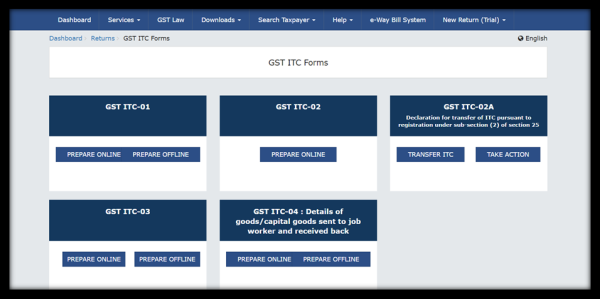
Second Step: Transferor (Business XYZ) will select Transfer ITC in the table GST ITC – 02A
You will find below screen:
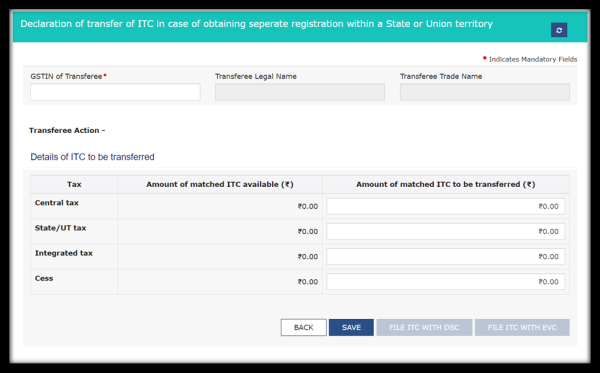
Third Step: Transferor will save and file ITC Form by With EVC / With DSC
PROCEDURE BY TRANSFEREE ( BUSINESS ABC)
First step: ITC > Returns > ITC Forms
You will find below screen:
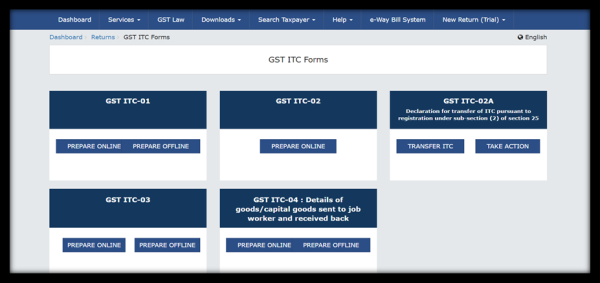
Second Step: Transferee (Business ABC) will select Take Action in the table GST ITC – 02A
Third Step: Transferor (Business XYZ) will click on ARN. Details of ITC which is to be transferred will display. Accept / Reject :
- On Acceptance, Acceptance confirmation massage will be displayed.
- On Rejection, Rejection confirmation massage will be displayed.
Fourth Step: Transferor will save and file ITC Form by With EVC / With DSC
IMPACT IN ELECTRONIC CREDIT LEDGER :
On Acceptance – ELECTRONIC CREDIT LEDGER OF TRANSFEREE WILL BE CREDITED
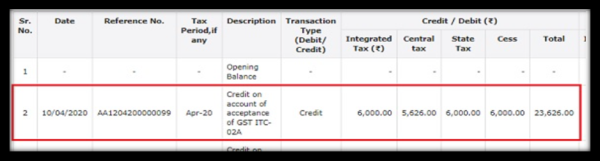
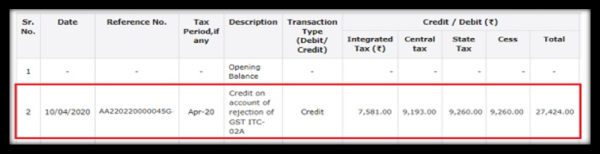
On Rejection – ELECTRONIC CREDIT LEDGER OF TRANSFEROR WILL BE RE- CREDITED











 CAclubindia
