 CA Suraj Lakhotia
#N/A…#DIV/0!.. #NAME?.. #VALUE!.. #REF!.. #NUM!
Sounds familiar?
These are the errors excel returns when the formula contains an error (#NAME?), the variables don’t meet the criterion of the formula (#VALUE!), when the reference is not valid reference (#REF!), Division not possible (…#DIV/0!) , when you enter a non numeric value where the formula requires a numeric reference (#NUM!) or the residual error (#N/A).
VLOOKUP is probably our favourite formula and “#N/A” the most disliked result. Every time we execute this formula across thousands of cells and when many of these return “#N/A”, removing these texts containing error message becomes a daunting task.
We can use few techniques to make the removal process easier:
• Copy the entire data fields > Use Paste Special Function and Paste the values > Use the find and replace option (Ctrl+H) > Type “#N/A” in “Find what” field and leave the “Replace With” field blank> Select Replace All. Excel removes all the field containing “#N/A”
This is easy to execute but the formula no longer exists in the sheet. Any update in the base sheet will not be updated.
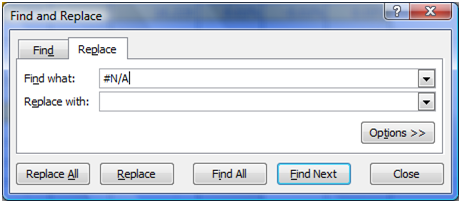
Fig.1 Using the Find and Replace Option
• Use the formula “IFERROR”: The syntax for this formula is - IFERROR (Value, Value_if_error). This is simple to use. The formula would look like:
=Iferror(Vlookup(A1,_______,__,0),”
If we don’t give any text and just use “”, then the excel will return a blank cell instead of a “#N/A”.
• Another option to delete the contents of a cell which contains an error is to use Go To option. Press “F5” and select “Special”. In the “Go To Special” window, “select formulas” and check only the “Errors” option. When you click “OK”, Excel will highlight all the Cells Containing Formulas which have returned Errors. You can delete these cells with one stroke on keyboard.
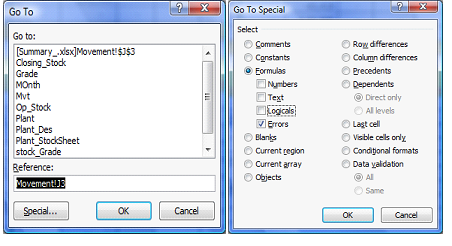
Fig.2- Using the Go To Option











 CAclubindia
