Quick Summary
Facing ITR validation errors can be a common and frustrating part of filing your Income Tax Return. This guide provides practical tips to identify and resolve these issues during the validation process. By carefully reviewing the form, correcting specific entries like exempt allowances or TDS details, and re-validating, you can streamline your ITR filing and avoid common pitfalls.

While filing ITR, many taxpayers often face validation errors which can be frustrating. To effectively solve these issues, there are specific tips to eliminate such errors during the validation process. Following these guidelines it can help to streamline your ITR filing.

Validation Errors

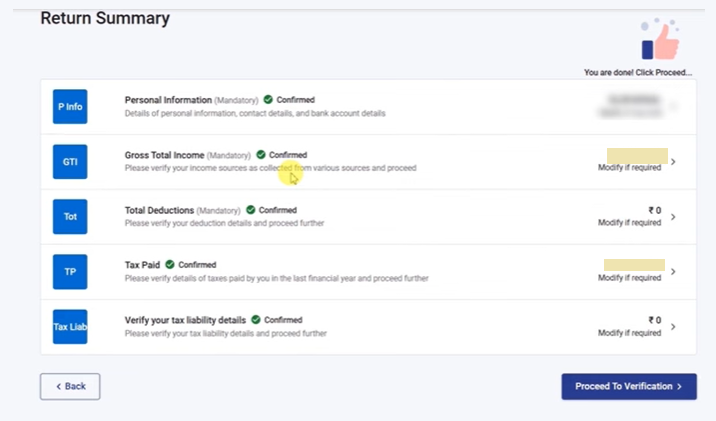
  • First, you need to click on "Proceed to Verification" after entering all the details to check the form for errors.
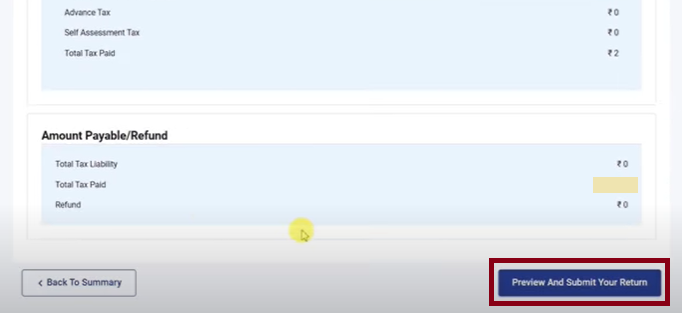
  • Scroll down and click on "Preview and Submit Your Return", then select the check box and input Place and Date. Scroll down again and click on "Proceed to Validation" to validate your return.
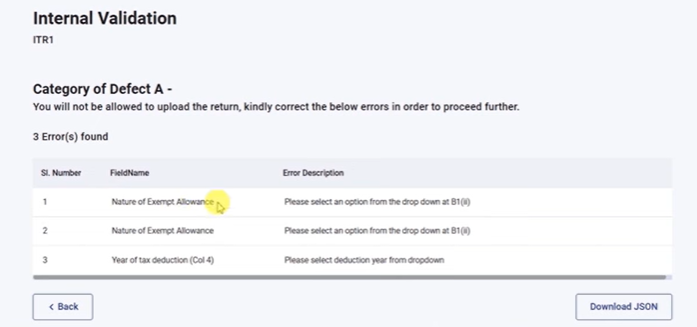
  • If errors appear, double click on errors one by one which will directly take you to the section where correction is required.
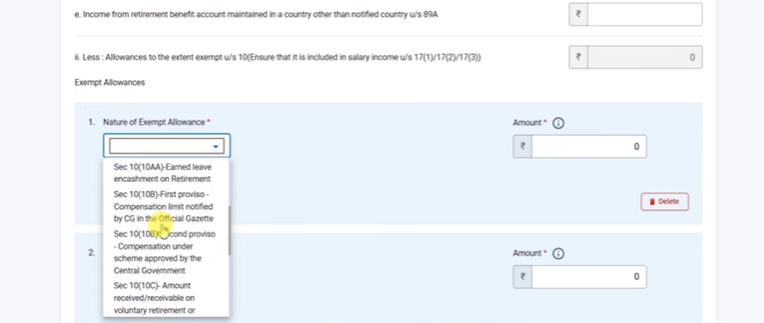
  • In the "Nature of Exempt Allowances" section, if there is any amount, you must select the correct option and fill in the exact details or if the amount is zero, you can delete that entry.
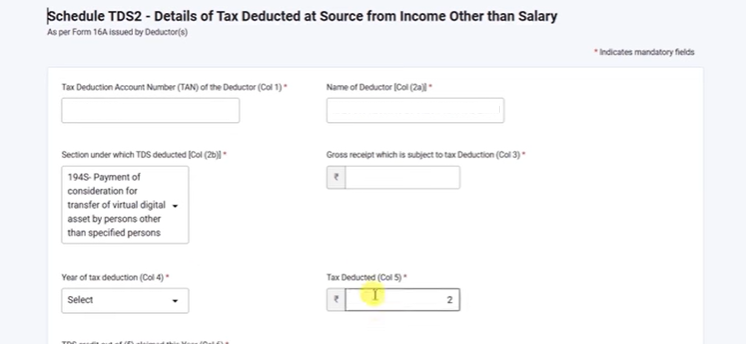
  • For TDS errors, you must report correctly financial year, gross receipt and TDS deducted.
  • After resolving each error, save the form and go back to "Proceed to Verification".
  • Once verification is successful, you will get a preview of the complete ITR, which can be downloaded before submission.
  • Then click again on "proceed to validation" which will show upload level validation.
  • Un upload level validation, if there is error they will show the same. To check the click on the error which you may ignore and e-verify.
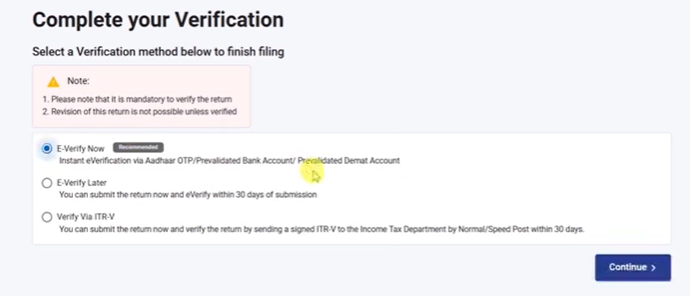
  • E-verification can be done easily using OTP sent to the Aadhaar-linked mobile number.

Finally, the ITR gets successfully submitted, a receipt can be downloaded, and if any mistake is later noticed, the ITR can be revised.

Click to know - ITR Validation Error Solved by Fixing ‘Type of Account’


To start validation, click 'Proceed to Verification', then 'Preview and Submit Your Return', select the checkbox, input Place and Date, and finally click 'Proceed to Validation'.

If errors appear, double-click on each error individually. This will take you directly to the section that requires correction.

If there's an amount in 'Nature of Exempt Allowances', select the correct option and fill in the exact details. If the amount is zero, you can delete the entry.

For TDS errors, you must correctly report the financial year, gross receipt, and TDS deducted.

Upload level validation occurs after initial verification and submission. If errors appear at this stage, they will be displayed, and you can click on them to address them before e-verifying.

E-verification can be easily done using an OTP sent to your Aadhaar-linked mobile number.


About the Author

Finance Professional

I write about Income Tax, GST, TDS, RBI updates, government schemes, and personal finance in India. My focus is on simplifying complex tax and compliance topics into easy-to-understand guides that help readers stay updated with the latest financial rules, investment options, and regulatory changes.


Comments


Related Articles


Loading


Popular Articles


CCI Pro

CCI Articles

submit article


Company
05 July 2026
Financial Controller

NovumLake Partners

Mumbai

CA

View Details
Company
ARTICLESHIP 30 June 2026
Article Assistant or Paid Assistant

VIKAS VERMA & CO

New Delhi

Others

View Details
Company
19 June 2026
Accounts Executive

Getfive Advisors Pvt. Ltd.

Ahmedabad

CA Inter

View Details
Company
14 July 2026
Senior Executive/ Manager

H S SHARMA AND CO

Pune

CA Final

View Details
Company
ARTICLESHIP 10 July 2026
Article Assistant

N S Gokhale & Co

Thane

CA Inter

View Details
Company
ARTICLESHIP 20 June 2026
Articleship

RB KESHRI & CO

Mumbai

B.Com

View Details
Company
ARTICLESHIP 07 July 2026
Articleship

Jawahar and Associates Chartered Accountants

Hyderabad

CA Inter

View Details
Company
11 July 2026
CA semi qualified

Vakilsearch.com

Chennai

CA Inter

View Details