 CA Rishabh Pugalia (ExcelNext)
Case Study:?Cleaning database ? Deleting the errors
?
Application area:?Final Documentation & Reporting
?
Solution:?Go To (Special) ? Formulas with errors
?
Example:
?
?
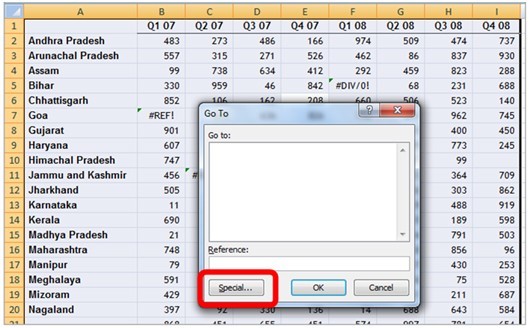
Step 1:?Select entire data set using Ctrl+A --> Press Ctrl+G together to activate ?Go To? box --> Choose ?Special? button from the ?Go To? box
?
?
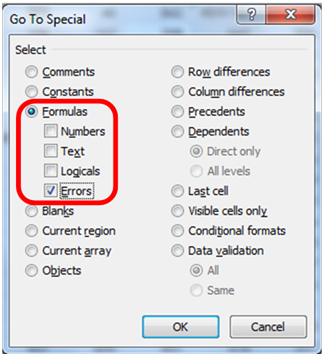
Step 2:?Choose ?Formulas? with ?Errors?
?
?
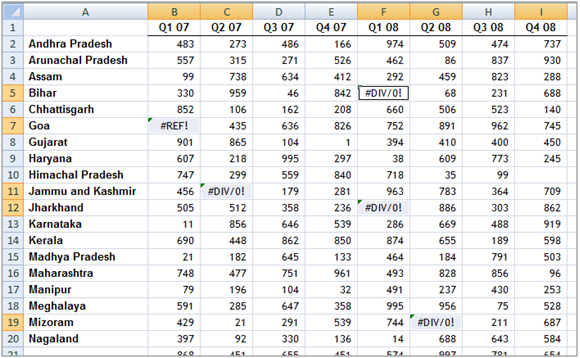
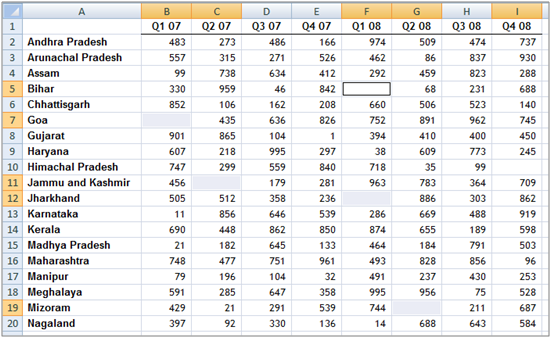
Step 3:?The above mechanism helps select all the cells with errors simultaneously. Pressing < > key will help the errors in one go.
?
?
?
Watch CA. Rishabh Pugalia?s Excel Videos ??Click Here











 CAclubindia
