
1. General scheme of Instant PAN allotment

This facility is for allotment of Instant PAN (on near-real time basis) for those applicants who possess a valid Aadhaar number. PAN is issued in PDF format to applicants, which is free of cost.
The applicant is required to type in her/his valid Aadhaar number and submit the OTP generated on the registered mobile number. Once the process is complete, a 15-digit acknowledgment number is generated. Once request is submitted, the applicant can check the status of the request at any time by providing her/his valid Aadhaar number and on successful allotment can download the PAN. The applicant will also receive a copy of the PAN in the e-mail id registered with the Aadhaar database.
2. The salient points of this facility are:
- The applicant should have a valid Aadhaar which is not linked to any other PAN.
- This facility is not for making changes in existing pan card.
- The applicant should have his mobile number registered with Aadhaar.
- This is a paper-less process and applicants are not required to submit or upload any documents.
- The applicant should not have another PAN. Possession of more than one PAN will result in penalty under section 272B(1) of Income-tax Act.
3. How to apply for instant PAN?
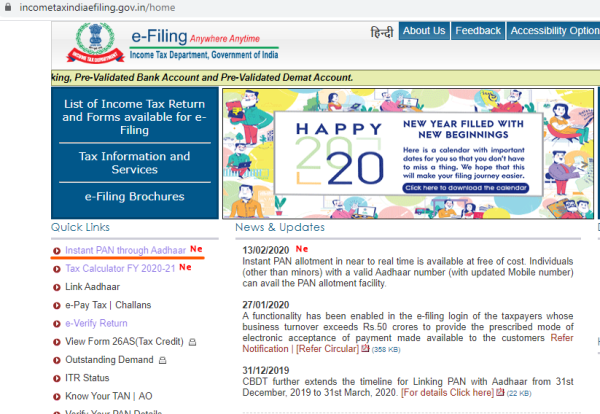
- To apply for PAN, please visit the e-Filing website of Income-tax department. (Url: www.incometaxindiaefiling.gov.in)
- Click the link- 'Instant PAN through Aadhaar'.
- Click the link- 'Get New PAN'.
- Fill in your Aadhaar in the space provided, enter captcha and confirm.
- The applicant will receive an OTP on the registered Aadhaar mobile number; submit this OTP in the text box on the webpage.
- After submission, an acknowledgement number will be generated. Please keep this acknowledgment number for future reference.
- On successful completion, a message will be sent to the applicant's registered mobile number and e-mail id (if registered in UIDAI & authenticated by OTP). This message specifies the acknowledgement number.
4. How to download PAN
- To download PAN, please go to the e-Filing website of Income-tax department. (Url: www.incometaxindiaefiling.gov.in)
- Click the link- 'Instant PAN through Aadhaar'.
- Click the link- 'Check Status of PAN'.
- Submit the Aadhaar number in the space provided, then submit the OTP sent to the Aadhaar registered mobile number.
- Check the status of application- whether PAN is allotted or not.
- If PAN is allotted, click on the download link to get a copy of the e-PAN pdf.
5. How do I get a physical PAN card?
- If a PAN has been allotted, you can get a printed physical PAN card by submitting PAN on the links below-
- https://www.onlineservices.nsdl.com/paam/ReprintEPan.html
- https://www.utiitsl.com/UTIITSL_SITE/mainform.html
6. Can we give an address different from the address on the Aadhaar card?
- No. Address as available with UIDAI in Aadhaar database will be saved in PAN database
7.. Can I make any changes in my existing PAN through this facility?
- No. Please use the Change Request Facility provided on the links below-
https://www.onlineservices.nsdl.com/paam/endUserRegisterContact.html
https://www.pan.utiitsl.com/panonline_ipg/forms/csfPan.html/csfPreForm
8. Is e-pan card valid?
Yes. please check at
https://www.incometaxindiaefiling.gov.in/eFiling/Portal/e-PAN_PDF_and_App_Links/e-PAN_and_validity_of_e-PAN.pdf?
https://www.incometaxindiaefiling.gov.in/eFiling/Portal/e-PAN_PDF_and_App_Links/notification_7_2018_pan.pdf?











 CAclubindia
