
The New Income Tax Act 2025 has been effective from 1 April 2026 by replacing the old Income Tax Act of 1961. One of the major changes made under this new law relates to TDS provisions. A new system for generating and paying TDS challans has been introduced.
How to Create a TDS Challan New Income Tax Act 2025?
To create TDS challan you need to first log in using your TAN.
- Navigate to e-File → e-pay Tax
Choosing the Correct Act
Two options will be available Income Tax Act 2025 or Income Tax Act 1961.
- If the TDS payment is for March 2026 or earlier then you need to create the challan under the old Income Tax Act 1961.
- If TDS is for April 2026 or later, the TDS deduction and challan must be made under the new Income Tax Act 2025.
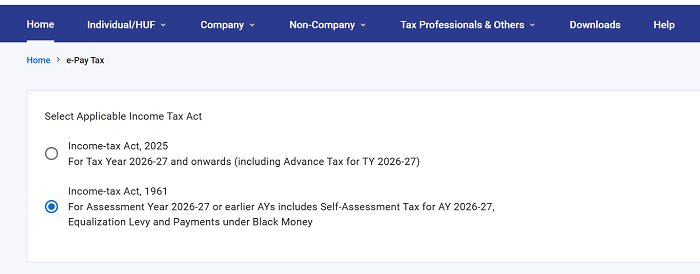
After selecting (say Income Tax Act 2025) → continue and click on New Payment .
Select the Correct Tax Year such as For April 2026 TDS transactions you need to select Tax Year 2026-27.
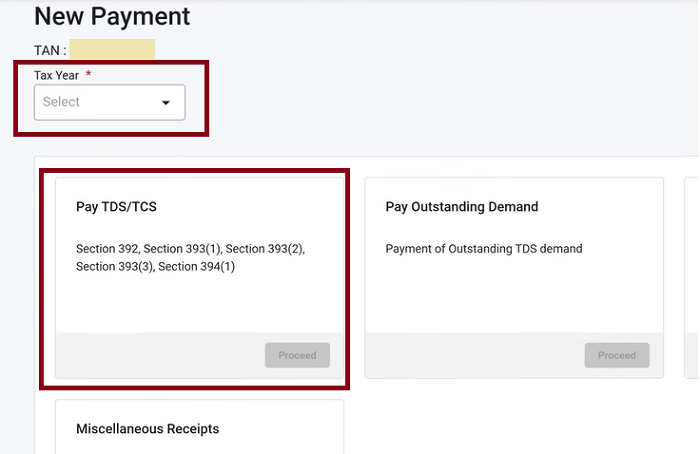
Select the Applicable TDS Section
The new portal covers TDS under the following sections: Section 392, Section 393(1), Section 393(2), Section 393(3), Section 394(1)
Click Proceed after selecting the relevant section.
Deductee Status
Select the appropriate deductee status ( Company or Other than Company )
Choose the Residential Status ( Resident or Non-Resident ) of the deductee and click on continue button.
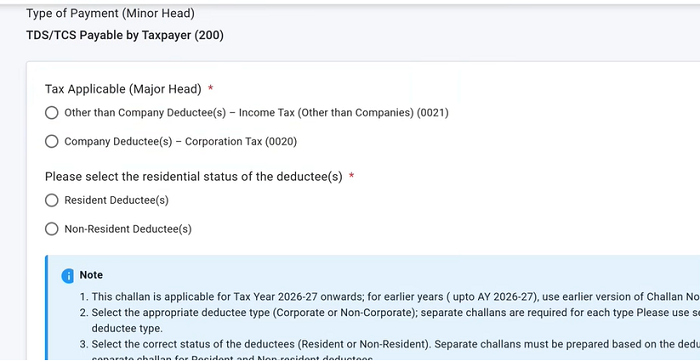
Select Correct Section Code and Description.
Say for example - you paid rent for a building property and need to deduct TDS. The applicable section is Section 393. On the portal, you will see two sub-options: Rent on Machinery and Rent other than Machinery . In this case you need to select " Rent other than Machinery " for building rent
Once you have selected the section and description:
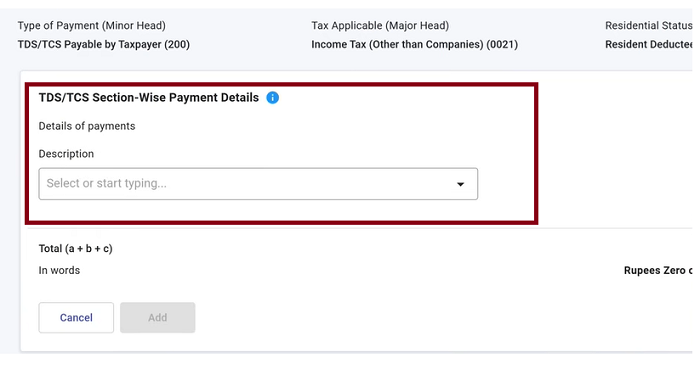
Enter the amount of TDS deducted and click add to include the entry.
Next, the portal will ask for additional components:
- Interest: calculated u/s 398 for delayed TDS payments
- Late Fee: under Section 427, charged at Rs. 200 per day for late TDS returns
- Penalty and Other Charges (if applicable).
Fill these fields based on your specific case and click Continue.
After entering all the required details, select your preferred payment method and proceed. The challan will be generated successfully once the payment is completed.











 CAclubindia
