
While filing GSTR‑3B on the GST portal, normally we click "Proceed to Payment" option once values are correctly entered.
- After Clicking "Proceed to Payment".
- The tax liability gets posted to the Tax Payable column.
- The ITC gets updated in the Electronic Credit Ledger.
- If additional cash payment is required, you click on "Create Challan".
- If cash balance is sufficient, you click "Make Payment/Post Credit to Ledger" which enables the Proceed to File option.
But recently it has been seen that after clicking "Make Payment/Post Credit to Ledger", the option "Proceed to File" still shows inactive.
Now The Question is How To File GSTR‑3B If Proceed to File Option Still Shows Inactive?
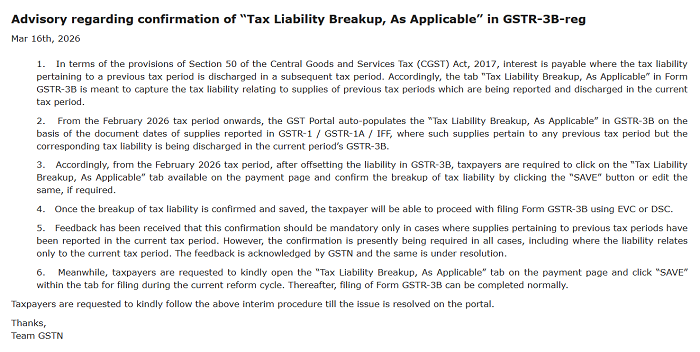
The GST portal has added an extra verification step before filing GSTR-3B return. Instead of directly seeing “Proceed to File,” the system now shows a "Tax Liability Breakup page".
Just click on the Tax Liability Breakup Page where you will be able to see the system automatically shows tax details such as CGST, SGST, IGST and Cess.
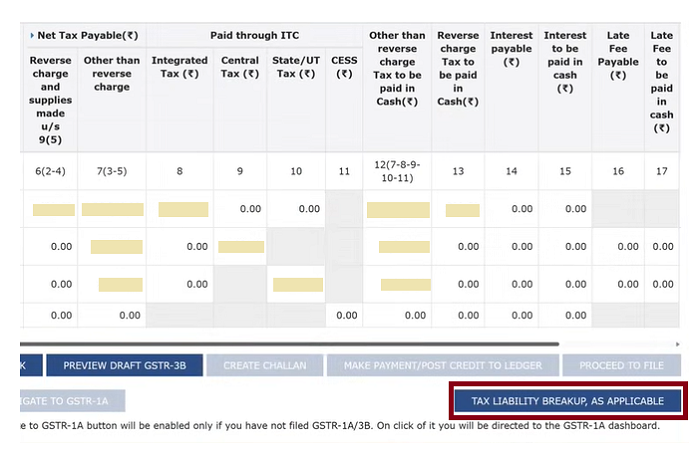
These values are generally auto-populated from GSTR-1.
- Check the Tax Liability Breakup details shown on the page.
- Click Save.
- After saving successfully, the verification section becomes active.
- Select the Authorized Signatory and file with EVC or DSC.
Once this is done, the return will be successfully filed.









 CAclubindia

