
Quick Summary
How to Export Masters from Tally?
You can export masters created in a company, in different formats. You can also choose the type of masters to export. Masters exported in XML format can be imported into Tally.ERP 9 using the Import Masters option.
- Go to Gateway of Tally > Display > List of Accounts.
- Click E: Export.
- Press backspace to configure the export options.

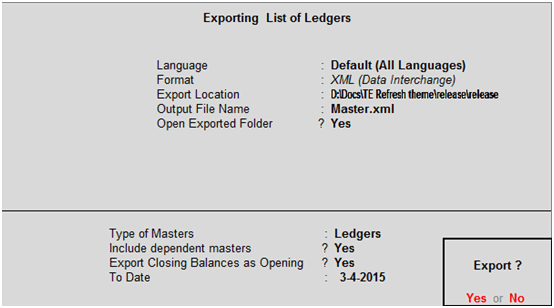
- Select the Language.
- Select the Format.
- Enter the Export Location.
- Enter the Output File Name.
- Select the Type of Masters to be exported.
- Set the option Include dependent masters? to Yes.
- Enable Export Closing Balances as Opening, if required. The Export Report screen appears as shown below:
- Press Enter to export.
The exported file is saved in the location specified.
How to Export Vouchers from Tally?
You can export vouchers recorded in a company, in different formats. You can also choose the type of vouchers to export. Vouchers exported in XML format can be imported into Tally.ERP 9 using the Import Vouchers option.
- Go to Gateway of Tally > Display > Day Book .
- Click F2: Period to change the period.
- Click E: Export.
- Press backspace to configure the export options.
- Select the Language.
- Select the Format.
- Enter the Export Location.
- Enter the Output Filename.
- Enable the option Open Exported Folder? , if required.
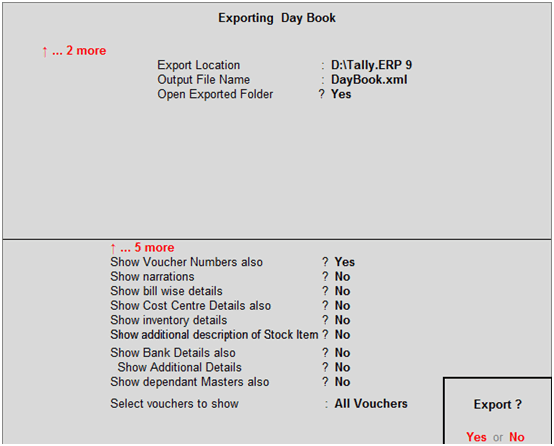
- Enable the following options, if required.
- Show Voucher Numbers also?
- Show narrations?
- Show bill-wise details?
- Show Cost Centre Details also?
- Show inventory details?
- Show additional description of Stock Item?
- Show Bank Details also?
- Show Additional Details?
- Show dependant Masters also?
- Select the required Day Book entries in the field Select vouchers to show.











 CAclubindia

