
The Income Tax Department gave an important update regarding the Validation of Bank Accounts. The Department took to X (formerly known as Twitter) to bring the taxpayers' attention to the necessity of validating bank accounts for the smooth receipt of refunds.
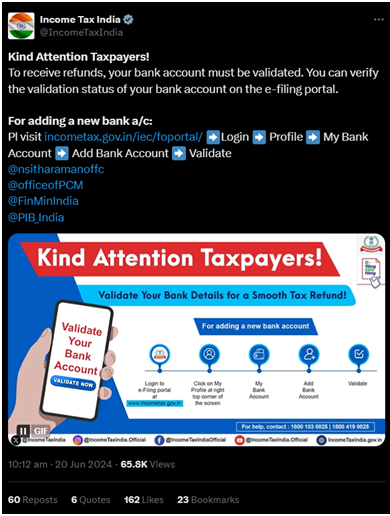
The Department has highlighted that validating your bank account on the e-filing portal is vital. Validating allows the Department to confirm the bank account details and ensure there are no discrepancies in refund receipts, like the refund being credited to an inactive account etc.
Ultimately this is for the taxpayer's benefit as it ensures a problem-free receipt of the refund amount claimed by them in their ITR. After all, the point of a refund ITR is to receive the refund, it is necessary to complete this step to ensure the refund.

Steps to Validate Bank Account
Step 1: Go to the income tax e-filing portal: https://eportal.incometax.gov.in/iec/foservices/#/login
Step 2: Log in by entering the relevant details.
Step 3: Navigate to the 'My Profile' section.
Step 4: Click on 'My Bank Accounts'.
Step 5: Add a Bank Account by entering the following details:
- ○ Bank Account Number- to be entered twice.
- ○ Account type- choose one of the following as the refund can only be received in these:
- Saving Bank Account
- Current Account
- Cash Credit Account
- Overdraft Account
- Non-Resident Ordinary (NRO) Account
- Account Holder Type- whether Primary account holder or Joint account holder.
- IFSC of the Bank.
- Select 'Yes' on the option 'Nominate Bank Account for Refund'
Step 6: Click on Validate. An OTP shall be sent to both the registered mobile number and email ID and once correctly entered the validation process from the taxpayer's side is complete.
Step 7: Once Validation is done, the portal will categorize the bank account into Failure, Success, Success with a remark or Pending for Validation accordingly.
Some important points to be kept in mind
- The Bank Account added should be linked with the PAN of the taxpayer in order to receive the refund.
- Refunds can only be received in the following bank account types: Savings, Current, Cash Credit, Overdraft and Non-Resident Ordinary.
- The Name as per PAN and the name in your Bank account must match.
- Refunds will not be issued to bank accounts that are closed, invalid or under litigation or blocked status.
- If there is a change in mobile number or email ID linked with the bank, the contact details are to be updated in the 'My Profile' section and the bank account must be revalidated to get the updated contact details from the bank.
Refund Reissue
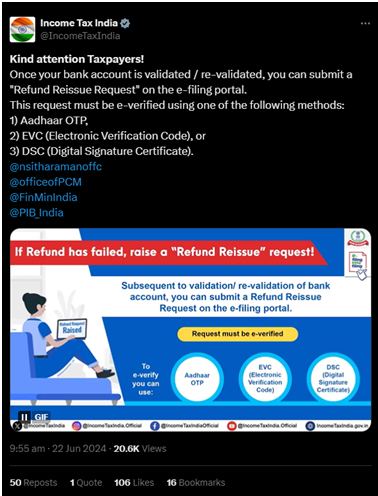
The Income Tax Department further updated on the topic of the refund issue, bringing to the taxpayers' attention that once the bank account has been verified or re-verified, a refund reissue can be submitted by them. For the refund reissue a taxpayer will have to use the e-filing portal and e-verify the same using Aadhaar OTP, Electronic Verification Code (EVC) or a Digital Signature Certificate (DSC).











 CAclubindia
