 praveen
I am pretty sure that many of the readers who clicked to view this post have some interest in investments. This article is all about shares and mutual funds and accounting for it using tally. I would like to tell all the readers that this is quite a crude method but worth trying.
Please post your feedback after going through this article.
As you know in tally we don’t have an inbuilt feature that could be used to maintain the share transactions.
Most of the traders depend upon boring spreadsheets or the statements issued by the brokers for computing capital gains.
But as I always say tally or excel is like a plain paper you can draw out anything on it. Similarly I stumbled upon this idea of using the inventory feature in tally for maintaining the stock transactions. Though it is still in the beta version I fell it is good for accounting.
Here is what you have to do.
STEP 1: CREATE A COMPANY:
Make sure that ‘accounts with inventory’ is selected.
In case you already have created a company use alter [F3] feature on gateway of tally to alter.
Once the tally accounts is setup we can pass the entries, which we will see in the next few steps.
STEP 2: CREATION OF REQUIRED MASTERS
a) Creating broker’s account: Here we will create a broker account for example, way2wealth or Karvy datashare or India Infoline so on. I am creating way2wealth account. We can create this account either as a ‘Sundry Debtor’ or as a ‘Sundry Creditor’. Here I am creating it as a sundry creditor.
a) Similarly create “Sale of shares account” under “Sales Account” & “Purchase of Shares Account” under “Purchases Account”
b) Create “Brokerage & Other Charges Account” under “Direct Expenses”
c) Create “Bank Account” for payment/receipt of money to the broker.
Once the ledgers are done we will have to create the inventory masters.
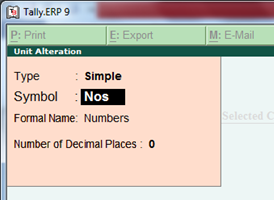
a) First step in creating inventory masters is creating unit of measure i.e. Nos.
The navigation path is as follows ‘Inventory Info.’ > ’Stock Items’ > ‘Units of Measure’ >’Create’
b) On creating Unit of Measure we can start creating Stock Items.
The navigation path is as follows ‘Inventory Info >’Stock Items’ > ’Create’
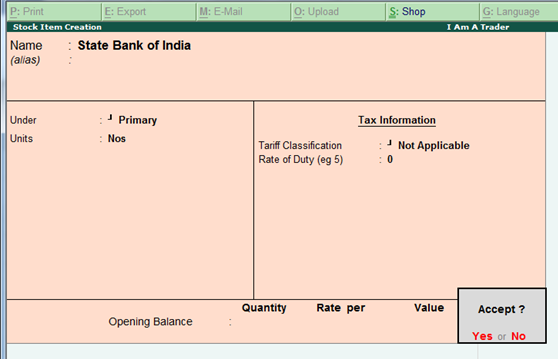
You can similarly create any number of shares. Once creation of masters is done we can start passing the transactions.
STEP 4: PASSING VOUCHERS
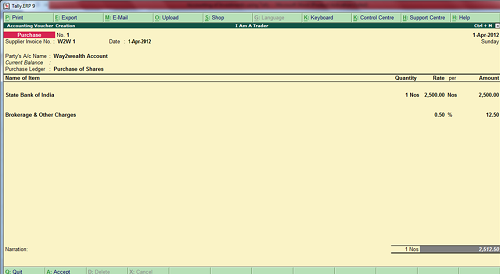
a) To start with we will pass a purchase voucher
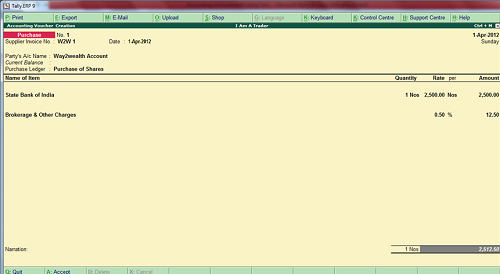
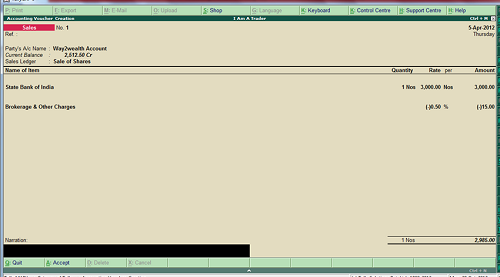
b) Next we will pass the sales voucher
c) This is how your Profit & Loss Account will look like
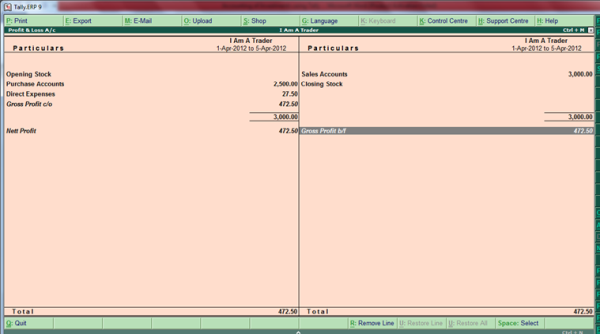
The gross profit discloses the capital gains one has earned.
This is only for the basic understanding of the readers.
Based on the feedback of this article I will pass on the advance concept of maintaining investments in tally.
Regards
CA Praveen M.R











 CAclubindia
