Identify duplicate names in data base using vlookup in excel


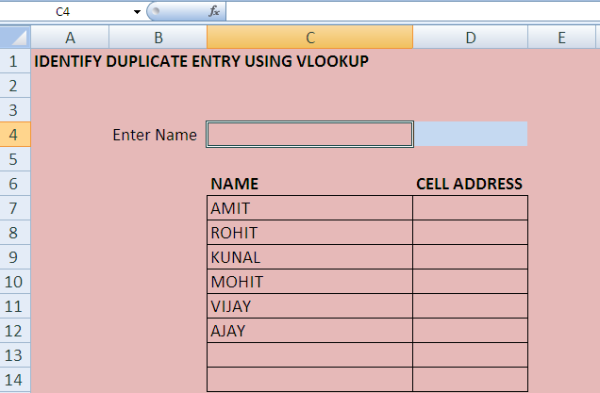
SAMPLE DATA IS GIVEN BELOW:

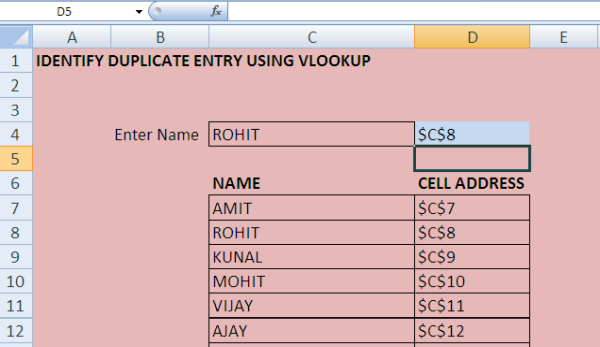
WRITE THE NAME YOU WANT TO CHECK FOR DUPLICATE ENTRY IN CELL C4 AS SHOWN BELOW:
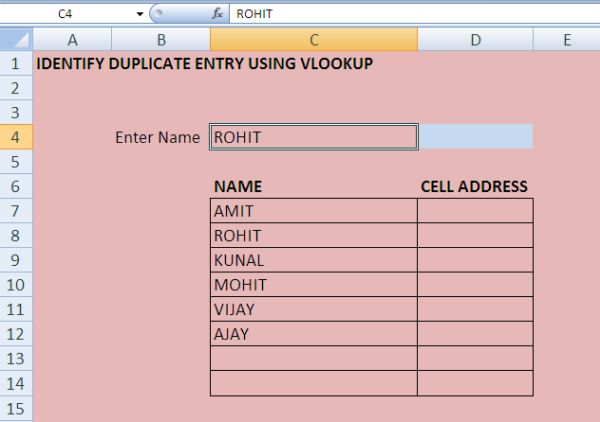
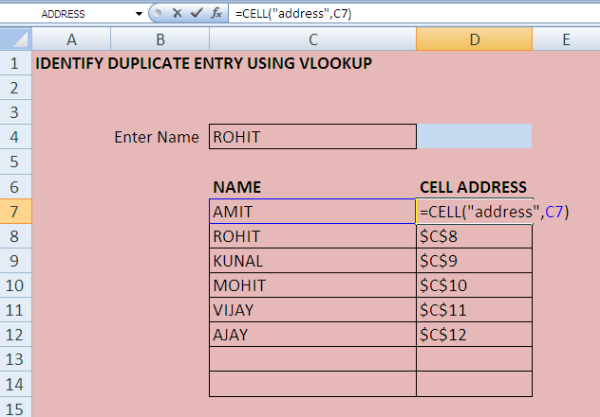
WRITE THE FORMULA IN CELL D7 & COPY IT FOR CELL ADDRESS AS SHOWN BELOW:
WRITE THE FORMULA OF VLOOKUP IN CELL D4  AS SHOWN BELOW:
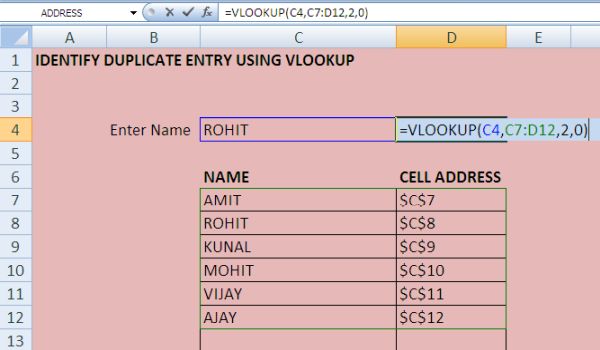
IF THE NAME IS THERE IN THE LIST YOU WILL GET THE CELL ADDRESS AS RESULT AS SHOWN BELOW:
For more details on vlookup check my video on /video/excel-basics-vlookup-2450.asp

For excel file on this example with macros check share file section: IDENTIFY DUPLICATE ENTRY.

Note: Hypothetical data has been used in the example.


37024 Views 2 Likes Comment   Share Students   Report


About the Author

salaried

CA with 13+ years of post qualification experience.. an expert in MIS, Excel..a good analyst and programmer in Excel.


Comments


Related Articles


Loading


Popular Articles


CCI Pro

CCI Articles

submit article


Company
12 June 2026
Accounts & Taxation Executive

Winshine Financial Services

Mumbai

CA Inter

View Details
Company
04 June 2026
Semi Qualified CA

Goyal Puneet & Associates

New Delhi

CA Final

View Details
Company
24 June 2026
Chartered Accountant

CA Darshita Shah & Co

Nadiad

CA

View Details
Company
20 June 2026
Assistant Accounts Manager

Fintax Professionals

Gurgaon

CA Inter

View Details
Company
25 June 2026
AUDIT MANAGER

JDAS & ASSOCIATES

New Delhi

CA

View Details
Company
ARTICLESHIP 24 June 2026
CA Article Trainee

Rahul Dang & Associates

Pune

CA Inter

View Details
Company
22 June 2026
Accountant

Global Image Technologies Private Limited

New Delhi

MBA

View Details
Company
ARTICLESHIP 27 June 2026
Article

SNCO

Mumbai

CA Inter

View Details