
How to get enrolled with GST Portal (With Screen Shots) from 8.11.2016
(Simple 5 Steps)
Existing Taxpayers of VAT, Service Tax, Central Excise.
- Enrol yourself for smooth transition to GST
- Your provisional ID will come from your tax officer
- Update profile information and upload documents
- Enrolment is being taken up in a staggered manner
Steps
(1) Visit the following official web site: https://www.gst.gov.in/
(2) The following screen will appear on the screen
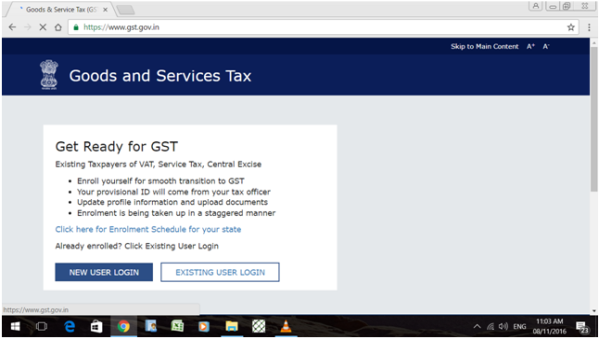
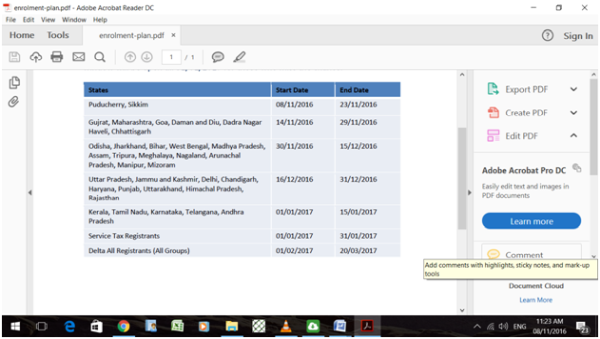
(3) Click at: Click here for Enrolment Schedule for your state.
See here the list of dates (starting & ending) for your state which is as follows:
(4) As all are new user assessee, so click on NEW USER LOGIN
Then following screen will appear on the screen.
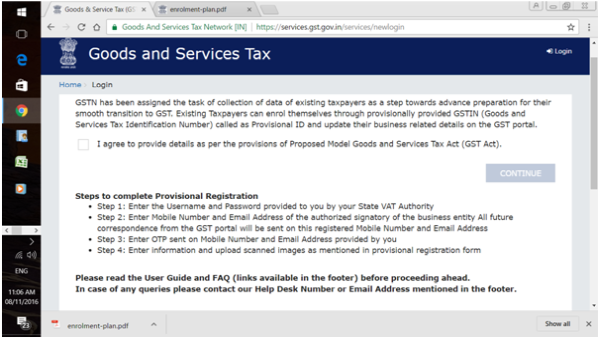
Click on ---> I Agree ----> checkbox and click on continue.
(5) Now following screen will appear on the screen.
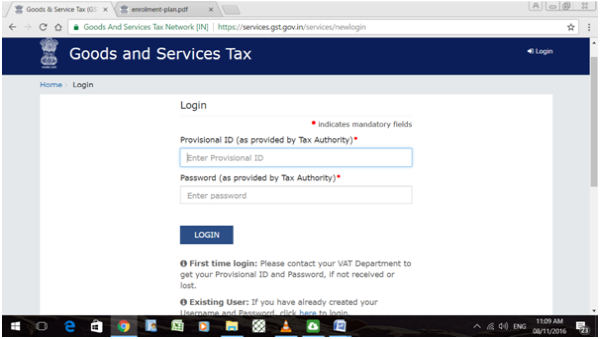
Now Enter Provisional ID as provided by Tax Authority in sealed envelope. (It has to be collected from the concerned GST offices in the areas)
Now feed your data as required and attach necessary documents.
The author can also be reached at gst.sschug@gmail.com











 CAclubindia
