 Elisa
Elisa
Time is very valuable in the content creation world, which is creative enough. Regardless of whether you are a YouTuber, marketer, or social media influencer, the need to create quality videos regularly can be too much. Scriptwriting is one of the time-consuming activities in the production of the video. The positive aspect is that there is an AI Writer tool named CapCut. AI Writer will enable you to be more productive since it will automate most of the scriptwriting process without affecting the quality of the content you produce.
The article will discuss how AI Writer will enable you to work smarter, not harder, and simplify your scriptwriting business, which will allow you to spend more time on other important parts of video production, including editing, shooting, and even marketing.
Why time efficiency matters for video creators
The process of video-making includes many steps, including thought and scriptwriting, shooting, and editing, to complete product distribution. Although all these stages are significant, scriptwriting can be considered one of the most complicated and time-consuming activities. The process of brainstorming about ideas, refining scripts, and polishing the dialogue can take hours, during which creators can present the end product as interesting and properly structured.
AI Writer saves a lot of time that could be used to write scripts, which enables creators to concentrate on other important elements of the production process by adopting the concept of automating the scriptwriting process. This also saves more time, which eventually enhances output, hence creators are able to deliver more content within less time.
Overcoming the Creative Bottleneck
Creative bottlenecks are among the major factors that hinder productivity in video production. Some producers experience writer's block, where they will find it difficult to invent new ideas for their videos. Such stasis in creative thinking may come to a halt the entire process of production, which leads to stress and low productivity.
AI Writer addresses this issue by composing new ideas and scripts of the drafts faster. AI Writer can eliminate creative blocks, as it offers advice on what should be written and logically organises the script so that the creator can continue with their endeavour. This facilitates consistency in the workflow and the continuity of the flow of content.
How to maximise your productivity with an AI writer on CapCut PC
The AI Writer tool offered by CapCut is simple to operate, and it is created to make scriptwriting easier. The following are the ways you can use AI writer to get the most out of it and boost your productivity:
Step 1: Install CapCut
You need to have CapCut on your desktop before you start. It has software on Windows and Mac when it has been installed. Open CapCut to begin writing your script.

Step 2: Select an AI writer
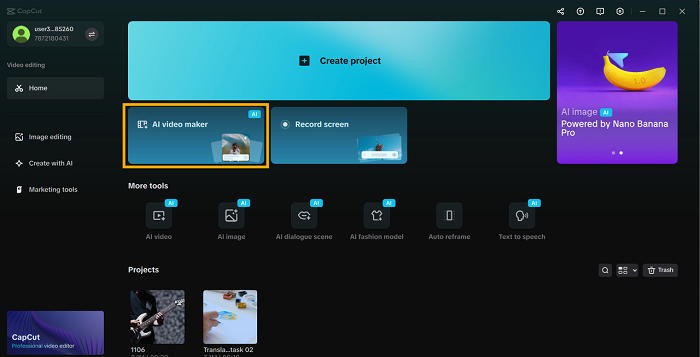
The CapCut interface has a section called the AI video maker.
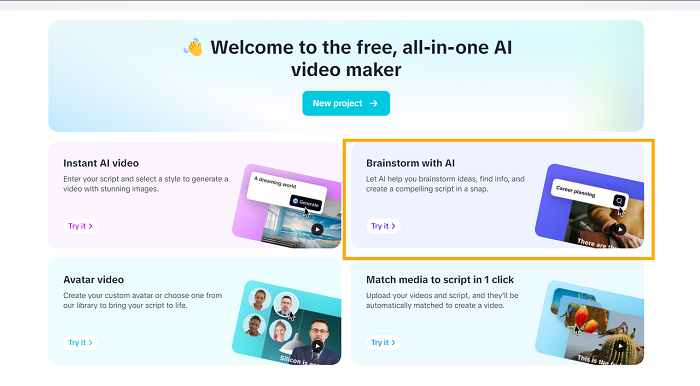
As soon as you are inside, you will have the choice of Brainstorming with AI. With this option, you can start brainstorming on your script. Enter a broad video thought or subject, and the AI immediately displays a list of helpful ideas to you. To choose your topic of interest, you can click Explore or view other options.
Step 3: Generate and customise your script
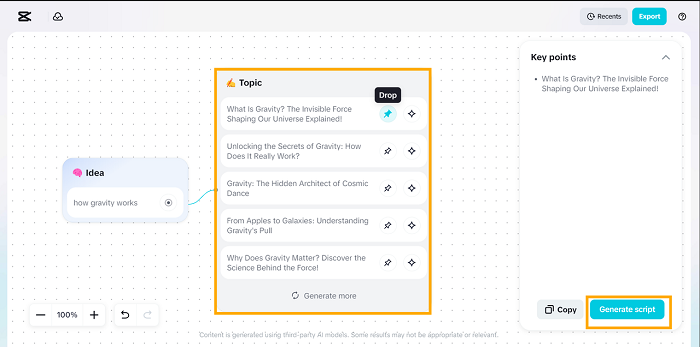
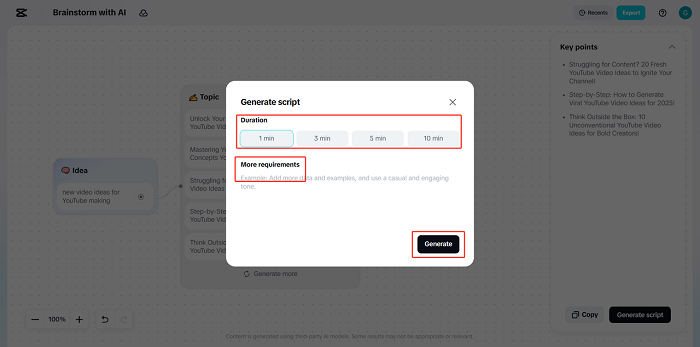
After you have picked a topic, AI Writer will write an entire script for your video. Enter your video idea into the input box, and the AI will instantly present a selection of relevant Topics based on current YouTube trends. You can Pick (pin icon) the topics that best fit your concept, or choose Explore (sparkle icon) to view more recommendations. After confirming your chosen topics, they will be automatically converted into key talking points for your script. Finish this step by clicking Generate Script.
The duration can be customised in the customisation window (e.g., 1 minute, 5 minutes), and the tone of the video can be chosen (e.g, casual, professional, humorous). You are also able to include certain requirements or themes to direct AI to create the content you require. Once you have made your customisations, press the Generate button to generate your script. Anything you are not happy with can always be re-created by clicking on Create or making additional changes to the script that was created.
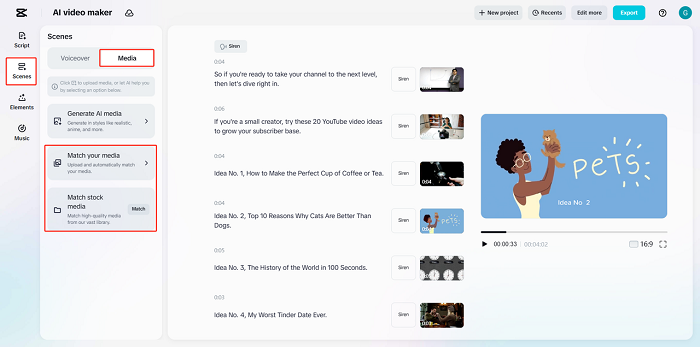
Once you have written your script, go to the next level and use an AI storyboard. Using AI Storyboard, you can see how your video is organised and create a storyboard that can help bring your script to life. An AI-generated script and storyboard will make you more productive, making the planning part an easier task.
Best practices for maximising productivity with an AI writer
To maximise your use of AI writer, there are some best practices that you should employ to maximise your productivity:
- Be Concrete and Accurate: The more information you give, the higher the chance that the video concept you enter into the AI writer will be utilised. The narrower you are, the more the script will be applicable and customised.
- Write AI as a Draft: AI Writer as a drafting tool. After the AI has created your script, revisit it and make it sound more like you to give it your unique twist and make it representative of your branded voice.
- Vary the Tones: You should not be afraid to vary your tones and styles in your scripts. With an AI writer, you can control the tone, and so you can test out scripts in various tones to find out what fits your content best.
- Use AI as Inspiration: If you are not finding new ideas, use AI writer. It can be used as a brainstorming device to produce new topics and ideas that will make your content innovative and exciting.
- Check Relevance: It is always a good idea to go over the generated script to ensure that it is relevant to your target audience and video objectives. AI Writer may produce excellent content, but human editing makes sure that it fits perfectly with your needs.
Conclusion
The AI writer by CapCut is an efficient tool that can help content creators to be as productive as possible and simplify the process of scriptwriting to the maximum. AI Writer is time-saving and assists in keeping the production timeline constant as it automates topic generation and script generation: YouTube tutorials, social media posts, and marketing videos. AI Writer will enable you to write high-quality scripts with less time to spend and make time to concentrate on other relevant matters in video creation.
The sooner you start experimenting with AI Writer, the sooner you will realise how this technology could contribute to changing the way you work, increasing your productivity, and making the process of creating appealing content more effective.










 CAclubindia

