Bank Account Validation on GST Portal means the process where the GST portal verifies the bank account details which are provided by a taxpayer during registration or updates.
For smooth tax compliance and crediting refund correct bank account details are required.
Bank account validation on the GST Portal helps to ensure genuine business registrations and helps in preventing fraudulent activities
GSTN's New Advisory on Validation Process for Bank Account Updates
GSTN has recently implemented a validation process for cases where a taxpayer attempts a non-core amendment to update bank account details. Taxpayers are requested to follow the procedure outlined below while adding bank account details on the portal.
- When the bank account details are entered, the taxpayer is required to click on “VALIDATE ACCOUNT DETAILS” button.
- After clicking the "Validate Account" button, the "Save" button at the bottom of the screen as shown remains disabled.
- The "Save" button will become active only after the "Validate Account Details" button is clicked.
Is it mandatory to provide bank account details?
Yes, it is mandatory as per the advisory issued on the GST portal - taxpayers who have not provided valid bank account details will not be able to file their GSTR-1 or Invoice Furnishing Facility (IFF) returns for outward supplies from September 1, 2024.
This is in accordance with Rule 10A, which requires taxpayers to furnish bank account details within 30 days of registration or before filing GSTR-1/IFF, whichever is earlier.
Why Rule 10A was introduced?
Rule 10A was introduced to prevent fraudulent GST registrations and fake invoice generation.
New registrants have to verify their bank account details so that only genuine businesses are registered.
It also helps in ensuring that refunds are credited to the correct bank account provided by the taxpayer on the GST portal.
How to check bank account validation status?
The bank account validation status can be check under the Dashboard → My
Profile → Bank Account Status tab.
After completing validation process, bank account number in the database would show one status out of the below mentioned four status types.
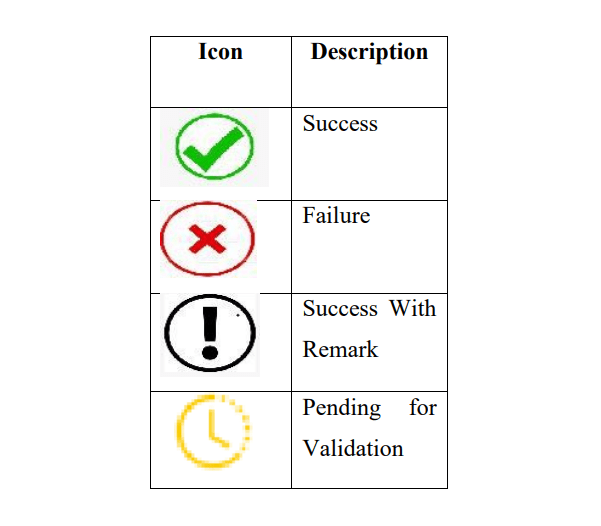
Failure
If it shows ‘Failure’ icon, then the Tax Payer must have -
- entered PAN number is invalid.
- PAN not available in the concerned bank account.
- PAN Registered under GSTIN, and the PAN maintained in the Bank Account are not same.
- IFSC code entered for the bank account details is invalid.
Success With Remark
This status means that the account cannot be validated as the bank is not integrated with NPCI for online bank account validation.
The Tax Payer have to provide alternate bank account number so that it can be revalidated to expedite further online processes.
Pending for Validation
When the Tax Payer is shown, the status “Pending for Validation” icon then please wait since the account validated by NPCI.
Note : The Tax Payer at any time can add/delete the bank account details and new account details will be validated.
FAQs
It requires to ensure genuine business registrations, prevent fraudulent activities, and ensure that refunds are credited to the correct account.
You will be not allowed to file returns such as GSTR-1 or using the IFF starting from the applicable tax period.
A copy of your bank statement, passbook, or a canceled cheque with your name, bank account number, and IFSC details are needed.
You have reached your daily limit of 2 Free Articles
Subscribe to CCI PRO for unlimited access
Why Upgrade to CCI PRO?
- No Ads
- WhatsApp Community
- Daily E-Newsletter
- Unlimited Articles Access
- Profile Visitors
- Link Social Profiles
- Featured Job Posts
- Pro Badge
- Expert GST Guidance
- Unlimited Forum Replies
- Download Content in PDF
Already a PRO member? Login here for an ad-free experience. 07941056694








 CAclubindia