
Introduction
First of all if you want to apply a loan through Google pay you must install this application which obviously most people already have Gpay app.
The question may arise in your mind how Google Pay works as a loan interface whether it is RBI-registered.
Google Pay is just an interface which means it works as a middlemen, the actual lender is an NBFC (Non-Banking Financial Company) with which Google Pay has tied up, the final lender is shown in last step when the agreement signing page appears where we can check which NBFC is offering loan and whether that company is RBI-registered or not.
Documents Required
To apply for a Google Pay personal loan you need:
- PAN Card
- Aadhaar Card
- Good CIBIL score
- Stable income
How Much Loan Can You Get Through Google Pay?
- Minimum: 30,000
- Maximum: 10 Lakh
How to Apply for a Google Pay Personal Loan?
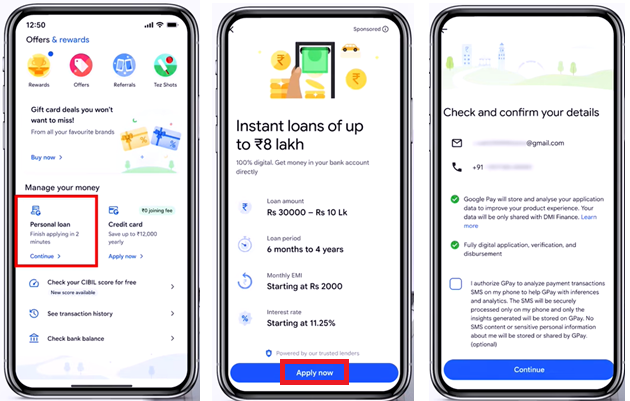
Open Google Pay
- click on "Personal Loan section" > "Apply Now".
- Check and confirm the details mentioned such as email, mobile, check the checkbox and "continue".
Enter Personal Details
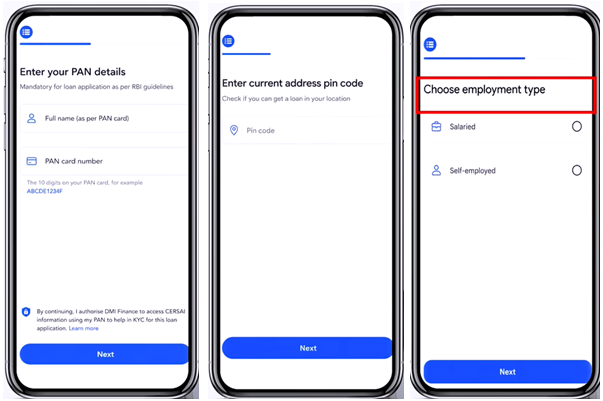
- PAN details, Address PIN code, employment type (salaried or self employed), monthly income, gender, DOB as per PAN.
- Current address - Review and edit if needed as the current home address auto-fetched from Aadhaar choose residence type ("Owned" or "Rental") and indicate duration how long have you lived at your current address.
- Enter employment details - name of company, total work experience (years) and add work address.
- Accept all the terms & conditions and continue.
Review Loan Offer
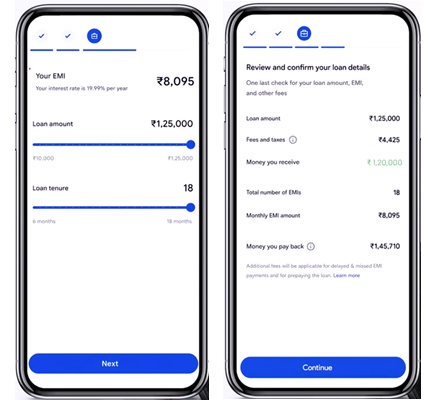
- Check the approved loan amount, interest rate, processing fee, EMI, and tenure before accepting.
- Note: loan will be provided only after checking PAN and CIBL score.
Complete KYC
- Once application is approved, start KYC, take a selfie and submit, enter Aadhaar number to continue with DigiLocker, complete DMI e-mandate registration process.
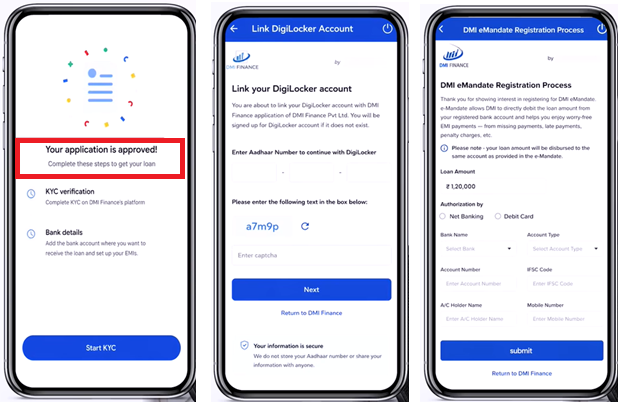
Here,
e-Mandate allows DMI to directly debit the loan amount from your registered bank account and helps you enjoy worry-free EMI payments – from missing payments, late payments, penalty charges, etc.
Note - your loan amount will be disbursed to the same account as provided in the e-Mandate.
- Once the e-mandate process is done, it shows - Your loan is approved and on the way to your bank account.
- After submission, disbursement appears in bank account. You will be able to see the final lender name, loan amount, EMI amount, Net EMI and a short note - EMI will be auto debit between 1st and 6th of the month maintain sufficient balance in your account.
Also Explore : Gpay Limit Per Day in India For The Year 2026
How To check Lender identification and RBI-registration?
Once you know which NBFC is providing your loan you can verify its RBI registration.
- Go to RBI website: www.rbi.org.in
- On the left side click on "RBI Regulated Entities" > "Non-Banking Financial Companies" > open the NBFC PDF list and search for the company name.
Tax Benefits
Loan is a liability that must be repaid.
You can claim a deduction on the interest paid if the personal loan is used for the purposes such as:
- Home renovation or improvement
- Business purposes
- Higher education
To claim these benefits, you must keep documents properly such as the loan agreement, interest certificate and proof of how the loan amount was used.
Conclusion
Google Pay personal loans can be a convenient option for quick funding, but borrowers should always compare offers, verify the lender's RBI registration, and understand all fees before accepting. If possible, consider bank loans first, as they often offer lower interest rates and better repayment terms.











 CAclubindia
