
By default, Excel accepts date input in MM/DD/YY format (US format) unless you change the control panel settings of your PC. Example 22.10.2007 or 22/10/2007 date may be considered invalid.
Important Note: Technically, every valid date is a number to Excel.
Let’s see how Text to Columns can help clean date formats. Assume you have a recordset consisting of a large number of dates like below:
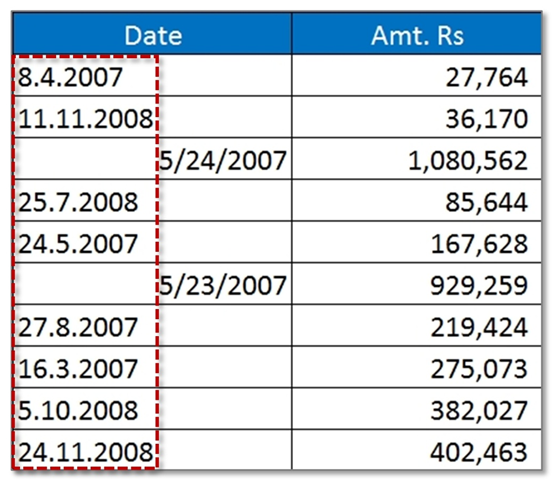
Now look at the very first date - Is it 8th April or 4th August? Confusing, right?
A lot of users select the entire range and then go to Format Cell and then change the format of the Date. But it will not change anything as it is not a valid date format in Excel since dot separators are invalid. If it is not a date, then it’s simple text to excel. Now how will you fix the issue?
Learn about Excel Date Functions
From the above table, if you look at the 4th row then you can understand that it is 25th July. To make it a valid date you need to flip the position of 25 with 7 i.e. 7 should be first and then 25. Additionally, the separator should be a slash (/). Will you re-enter dates one by one manually? Very boring task!
Here’s what you need to do.
Step 1: Add an extra column (Remarks). Then ask a question to Excel if the date given in the first column is a number. You can use ISNUMBER formula. Since every valid date is a number, TRUE indicates, a date is a number and hence, possible a valid date.
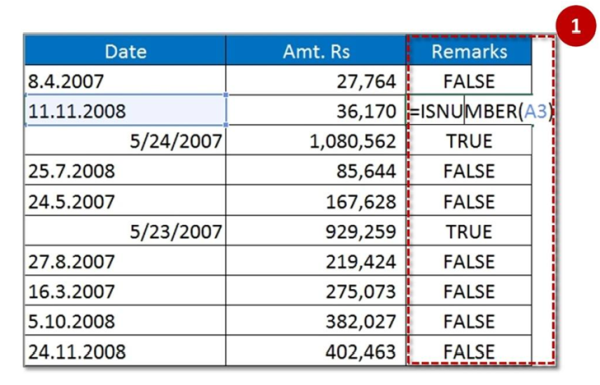
Now after applying ISNUMBER formula, you are getting result either TRUE or FALSE. You don’t need to change the date where you are getting TRUE (read: valid dates).
Step 2: Sort the data table with respect to 3rd column (Remarks), so that TRUE and FALSE are sorted in a separate block.
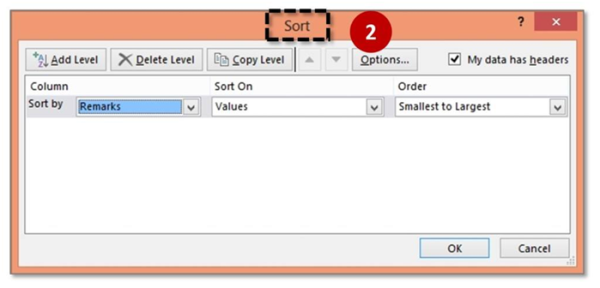
Now this give will you true records on one side and false on another side.
Step 3: Now select only the dates against which the remarks are false.
Step 4: Go To Data tab and then Text to column. Choose Delimited option. Click on Next
Step 5: Ensure that none of the checkbox is switched ON in Step 2 of 3 of Text to Columns wizard. Click on Next.
Step 6: When you are in Step 3 of 3 of Text to Columns wizard, then please stop here for a moment. You have entered the wrong date in Excel, and you need to confess it to Excel. Where is the “confession box”? In Step 3, there is an option button called Date. Choose the format of the current status/sequence of date format. It is DMY (8.4.2007) in our case. Click on Finish.
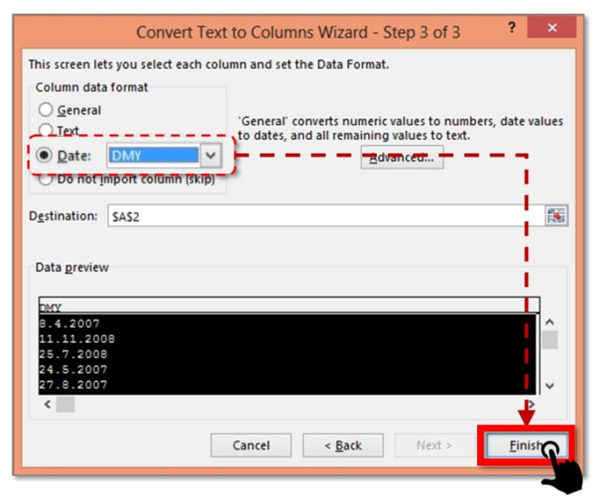
Step 7: Excel will convert the invalid dates to valid ones. Isn’t that cool! This sort of date dumps is often seen in ERP reports of SAP, Oracle, Ramco, Tally etc. The advantage of having a clean date is that you can easily use Pivot Table’s Date grouping feature. Click here to know more about it.
Recommended course to learn MS Office tools like Advanced Excel, Charts, PowerPoint Ninja, VBA Macros and Word for Finance Professionals.
Click here: /coaching/584-ms-office-bundle.asp
Canonical link: http://blog.yodalearning.com/2015/06/19/tricks-of-text-to-columns-in-ms-excel/











 CAclubindia

