
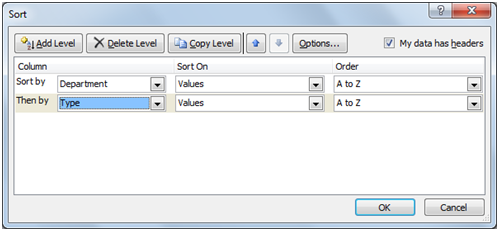
STEP-1: Sort the list on the field/s for which you want subtotals inserted using multi level sorting
Select the whole data including headers using ctrl+A ,click on Data and select Sort.
Use “Add level” option to enable multi level sorting fields.
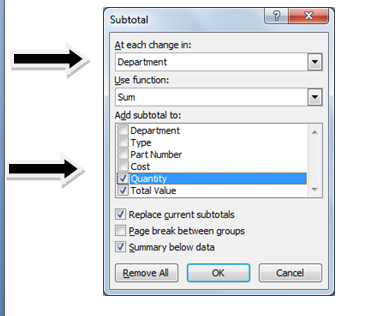
STEP-2: Click the Subtotal button in the Outline group on the Data tab. The Subtotal dialog box appears.
STEP-3: Select the field for which the subtotals are to be calculated in the “At Each Change In” drop-down list.
STEP-4: Specify the type of totals you want to insert in the “Use” Function drop-down list. Select the check boxes for the field(s) you want to total in the “Add Subtotal To” list box. Click OK.
When you use the Subtotals feature, you aren’t restricted to having the values in the designated field added together with the SUM function. You can instead use AVERAGE or COUNT function depending upon the requirement.
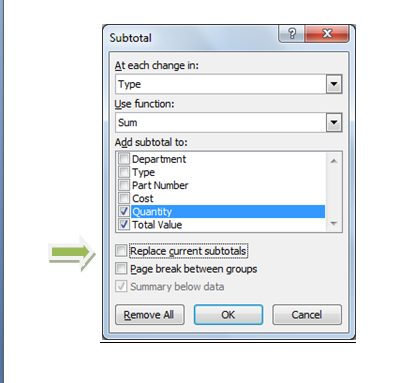
STEP-5: Repeat Step-2 to 4 again. This time In “AT each change in” field; select the next header for which you want the subtotals.
REMEMBER: Uncheck the “Replace current subtotals” check box. Otherwise previous subtotals would be replaced by this one.
Click Ok.
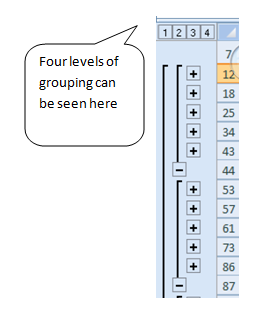
Excel adds the subtotals to the worksheet.
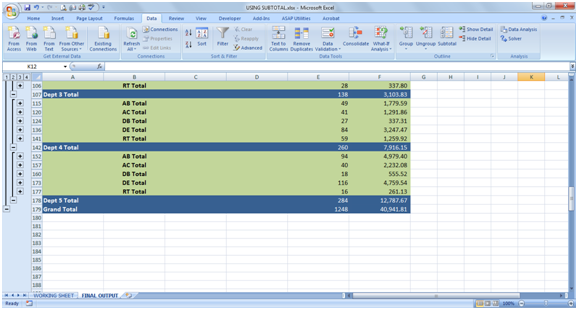
The bottom of a list showing the subtotals and a grand total.
 Click Here to download- Excel Sample File











 CAclubindia