
What is Form 26QB
Form 26QB is a statement cum challan for the online payment of TDS on property transactions.
Once a payer has deducted TDS u/s 194IA, deducted amount needs to be paid using FORM 26QB to the government.
Once it is deposited the buyer is required to furnish the TDS certificate in form 16B to the seller. This is available around 10-15 days after depositing the TDS. The buyer is required to obtain Form 16B and issues the form to the seller.

Table of Contents
When To File Form 26QB?
Form 26QB should be filed by the buyer within 30 days from the end of the month in which TDS was deducted.
For Example, if a property transaction occurred on 15 September 2023, the TDS amount must be submitted by 30 October 2023.
How Much TDS is to be deducted on the Sale of the Property?
As per section 194IA, any person being a transferee, responsible for paying (other than the person referred to in section 194LA) to a resident transferor any sum by way of consideration for transfer of any immovable property (other than agricultural land), shall, at the time of crediting the party or at the time of payment shall required to deduct TDS @1% on total sale value if the total purchase amount is exceeding Rs. 50 Lakhs
If the payment has been made in installments the TDS should be deducted on each installment
For the purpose of deducting TDS Buyer need to obtain PAN of the payee as in the absence of PAN TDS need to be deducted at higher rate i.e. 20%
How to pay TDS using form 26QB?
Taxpayer can follow below steps in order to make payment thorough 26QB
Step 1: Login to your E-Filling portal using your Income Tax credentials.
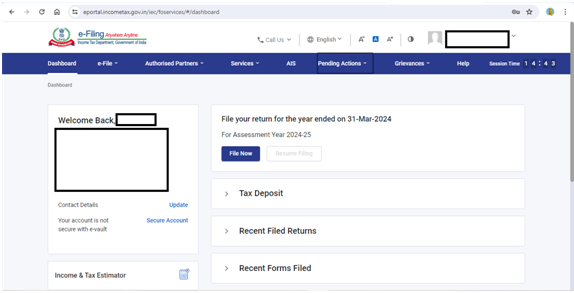
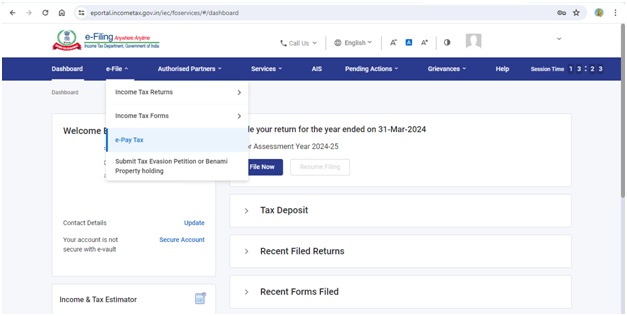
Step 2: Go to E pay tax under the tab of e-file as under.
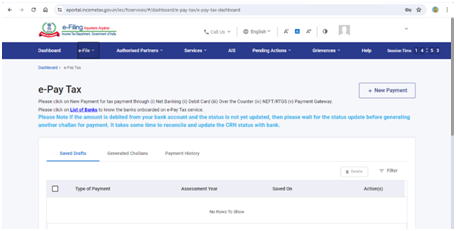
Step 3: Select New Payment on displayed screen.
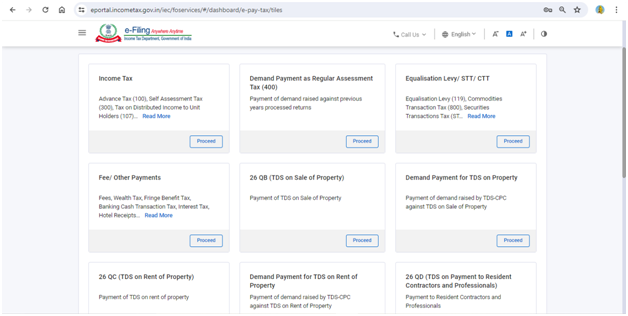
Step 4: Select 26 QB (TDS on sale of property) & click on proceed.
Step 5: Furnish all the details including Buyer details, Property details & property details on portal as asked & after getting done you can make the payment through available modes.
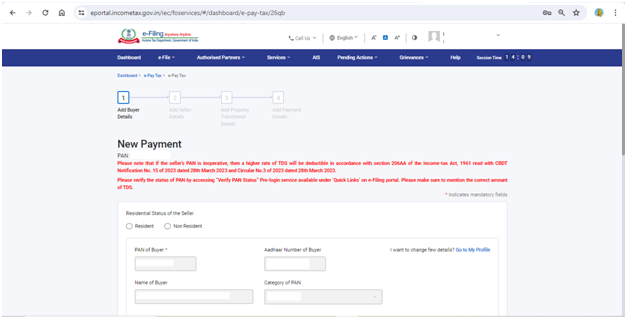
Step 6: On successful payment the Form 26QB acknowledgement will be generated and can be downloaded from TRACES Portal by logging in
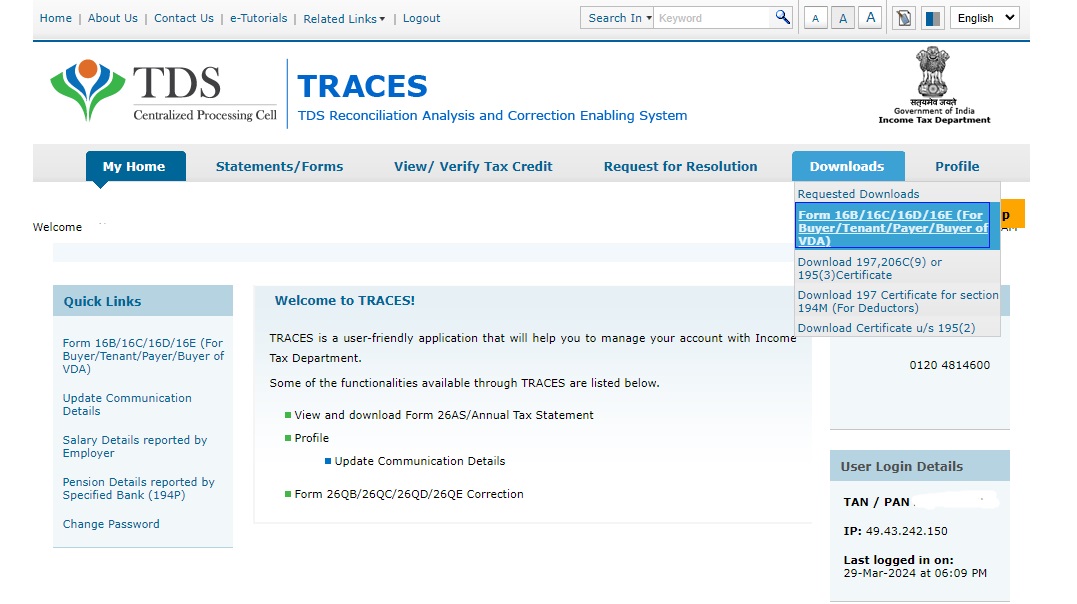
Issuance of certificate
Once the challan has been paid you need to furnish a certificate to the seller in form 16B (Available on TRACES Website) by following below procedure
- Login with your TRACES credentials
- Under the Downloads Tab select Form 16B/16C (For Buyer/tenant)
- Fill PAN of the seller and acknowledgement number details pertaining to the property transaction and click on “Proceed”.
- After a few hours, your request will be processed. Click on the Downloads tab and select Requested Downloads from the drop-down menu.
- You should be able to see that the status of your Form 16B download request is “Available”.
- Download the ‘.zip file’. The password to open the ‘.zip file’ is the date of birth of the deductor (the format is DDMMYYYY). Your form will be available inside the .zip file as a pdf. Print this out.
Non-Filling of form 26QB
The income tax department receives an Annual Information Return (AIR) from the registrar/sub-registrar office regarding the purchase and sale of property regularly. From this report, the department can figure out if you have made a property transaction exceeding Rs.50 lakh.
If the buyer has not deducted tax at source at 1% of the transaction amount or not filed TDS within the specified time, the IT department will send a notice to the buyer.
Penalties applicable for Non-Filling of Form 26QB
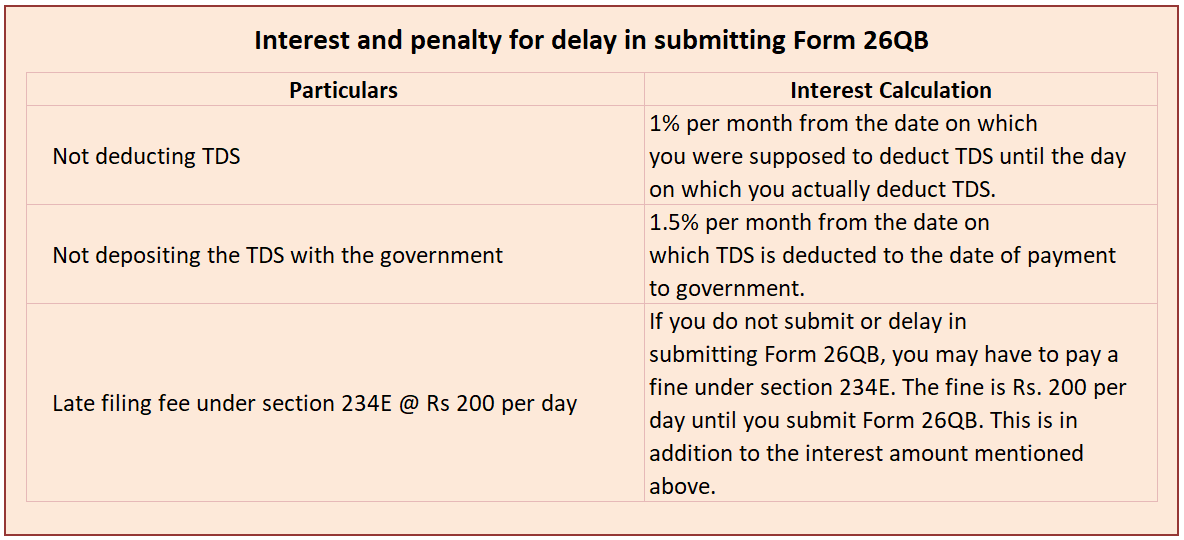
Under Section 271H of the Income Tax Act 1961, penalties from Rs. 10,000 to Rs. 1 lakh may be imposed if the TDS statement is not submitted within the specified time. However, no penalty is applicable if the TDS amount is paid along with interest, fees, and the required statement within the specified time.









 CAclubindia
