
EXCELLENCE IN EXCEL-PART II -USING SUMIF FUNCION
SUMIF function
In this function SUMIF, you add the numbers present within a criteria.
The SUMIF Function
The SUMIF function needs 3 parameters.
a. The range of criteria
b. The criteria
c. The range to add
Example
For instance, you want to count the number of pen sell in the month.
In H4, write the beginning of the formula and select the range of cell where you have your product and press F4 to freeze the reference.
=SUMIF($B$3:$B$12,
Then, you write your criteria or the reference where you have your criteria.
=SUMIF($B$3:$B$12,"Pen",
Or
=SUMIF($B$3:$B$12,G4,
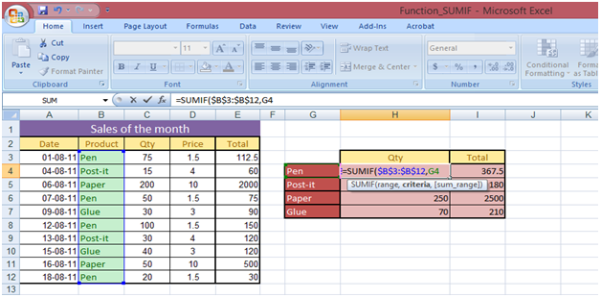
You finish with the range of cell where you have your data to add. So, if you want to return the number of pen sold, you will select the range C3:C12 and press F4 to lock the sum range reference.
The result is 245; 75 (row 3) + 50 (row 6) + 100 (row 8) + 20 (row 12)
=SUMIF($B$3:$B$12,G4,$C$3:$C$12)
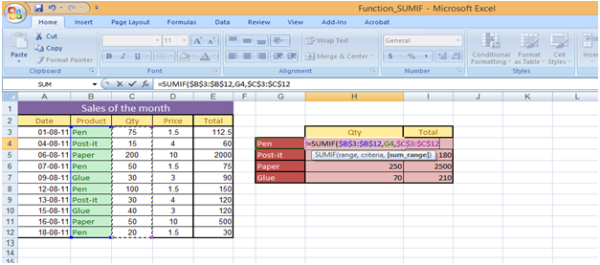
If you want to return the amount of sales for the pen, you select the range. In this case the column E is used as 3rd parameters, the result is 367.5.
=SUMIF($B$3:$B$12,G4,$E$3:$E$12)
Fill the remaining excel sheet with the function SUMIF by dragging the formula vertically.
Example with Greater Than
Now, you can have, as a criteria, a condition (greater than or less than).
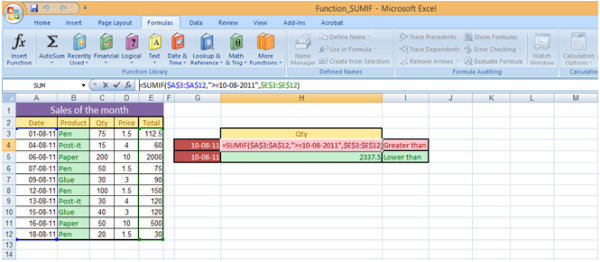
For instance, you want to know the amount of sales before or after the 10/08/2011. For the first criteria, you will select the range of cell with the dates because our criteria is a date.
The second criteria can be written in two ways
i. first: "> = 10/08/2011"
ii. or if you want to use the value in cell ">"&G4
The symbol & is compulsory to link the operator, between quotes, and the cell reference.
For the last parameter, you select the range of cell 'Total' because that's what you want to add.
Your formula is:
=SUMIF($A$3:$A$12,">=10-08-2011”,$E$3:$E$12)
In the attached workbook, you also have an example with the operator "less than"
Simlarly, Excel 2007 has introduced another formula-SUMIFS which is used when more than one criteria is to be used.
In auditing life, this formula is used to derived the total of amount of debtors/creditors having amount more than or less than a specified criteria.
I hope you all like the article and found it useful.
All comments/suggestions are welcome. Kindly press “Thank User” Button.











 CAclubindia
