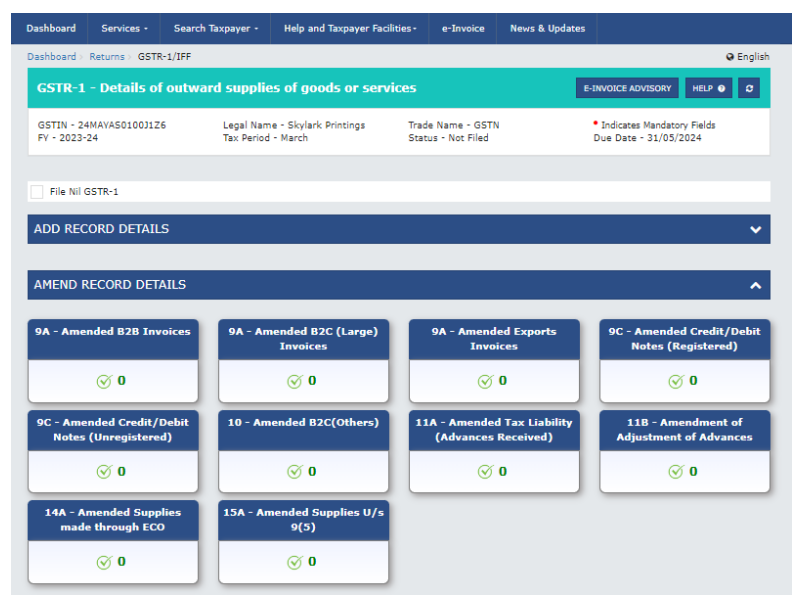
It is informed to all taxpayers that as per Notification No. 26/2022 - Central Tax dated 26th December 2022 two new Table 14A and Table 15A have been introduced in GSTR-1 to capture the amendment details of the supplies made through e-commerce operators (ECO) on which e-commerce operators are liable to collect tax under section 52 or liable to pay tax u/s 9(5) of the CGST Act, 2017. These tables have now been made live on the GST common portal and will be available in GSTR-1/IFF from February 2024 tax period onwards. These amendment tables are relevant for those taxpayers who have reported the supplies in Table 14 or Table 15 in earlier tax periods.
Complete advisory on the captioned subject has been mentioned below:

Advisory on GSTR-1/IFF: Introduction of New 14A and 15A tables
It is informed to all taxpayers that as per Notification No. 26/2022 - Central Tax dated 26th December 2022 two new Table 14A and Table 15A have been introduced in GSTR-1 to capture the amendment details of the supplies made through e-commerce operators (ECO) on which e-commerce operators are liable to collect tax under section 52 or liable to pay tax u/s 9(5) of the CGST Act, 2017. These tables have now been made live on the GST common portal and will be available in GSTR-1/IFF from February 2024 tax period onwards. These amendment tables are relevant for those taxpayers who have reported the supplies in Table 14 or Table 15 in earlier tax periods.
Table 14A - Amended Supplies made through e-commerce operator (ECO) in GSTR-1
In this table, the supplier can amend the detail of original supplies that he has already reported in original table 14 under below two sections in earlier return periods.
1. 14(a) Liable to collect tax u/s 52(TCS)
2. 14(b) Liable to pay tax u/s 9(5)
Table 15A - Amended Supplies u/s 9(5) in GSTR-1/IFF
In this table, the e-commerce operator can amend the detail of original supplies that he has already reported in table 15 originally under following four sections in earlier return periods.
1. Registered Supplier and Registered Recipient (B2B)
2. Registered Supplier and Unregistered Recipient (B2C)
3. Unregistered Supplier and Registered Recipient (URP2B)
4. Unregistered Supplier and Unregistered Recipient (URP2C)
To view the table 14A/15A, taxpayer can navigate to Returns Dashboard > Selection of Period > Details ofoutward supplies of goods or services GSTR-1 > Prepare Online
Other Salient features
1. Amended taxable values will be auto-populated from table 14A(b) to Table 3.1.1(ii) of GSTR-3B.
2. Amended taxable value along with tax liabilities from all the four sections of table 15A i.e., B2B, B2C, URP2B and URP2C will be auto-populated to table 3.1.1(i) of GSTR-3B.
3. There will be no auto-population of e-invoice in Table -15A. E-invoices reported for 9(5) supplies will be populated in FORM GSTR-1 as per existing functionality. E-commerce operators are advised to examine and add such records in table 15A related to 9(5) supplies.
4. E-commerce operator shall report amendment of debit or credit notes related to such services notified u/s 9(5) in existing table 9C of GSTR-1/IFF.
Impact of new tables of ECO-Documents in GSTR-2B
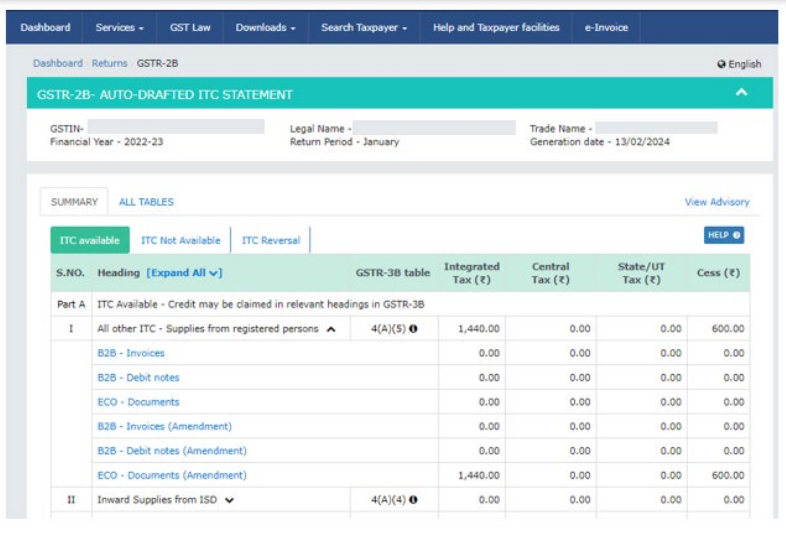
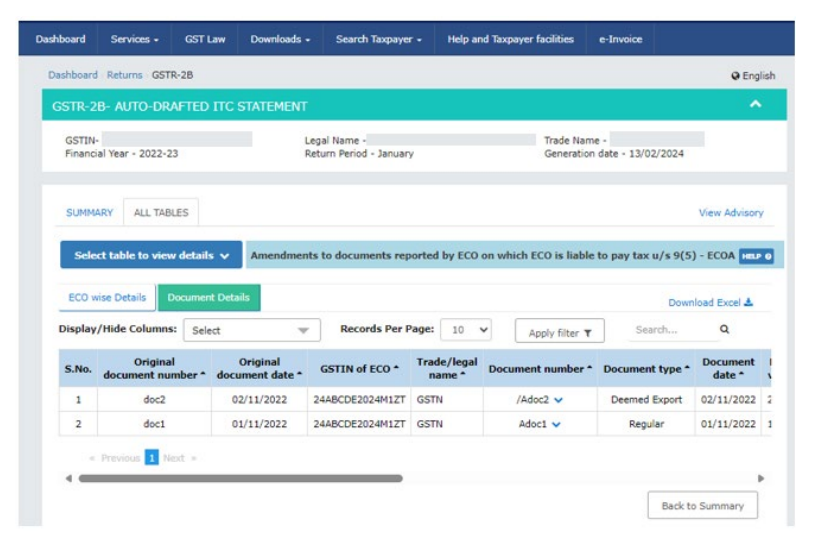
For the ease of registered recipient who are making supplies through e-commerce operator, a new table "ECO - Documents (Amendment)" is being added in GSTR-2B. In this table, the registered recipient can view the amended document details of the supplies made through e-commerce operator on which ecommerce operator is liable to pay tax under section 9(5) of the Act.
The values will be auto populated from Registered Supplier and Registered Recipient (B2B) and Unregistered Supplier and Registered Recipient (URP2B) section of table 15A to this new ECO -
Documents table of GSTR-2B.
To view the ECO-Documents (Amendment) table, taxpayer can navigate to Returns Dashboard > Selection of Period > Auto- drafted ITC Statement for the month GSTR 2B > View.
To view the records in ECO-Documents (Amendment) table, taxpayer can navigate to Returns Dashboard > Selection of Period > Auto- drafted ITC Statement for the month GSTR 2B > View > ECO Documents (Amendment)











 CAclubindia
