Dear Valued Tax Payers,
1. GSTN is pleased to inform you that the functionality for bank account validation is now integrated with the GST System. This feature is introduced to ensure that the bank accounts provided by the Tax Payer is correct.
2. The bank account validation status can be seen under the Dashboard ----> My Profile -------> Bank Account Status tab in the FO portal. Tax Payers will also receive the bank account status detail on registered email and mobile number immediately after the validation is performed for his declared bank account.

3. Post validation, any bank account number in the database would have one status out of the below mentioned four status types. The exact details of the accounts can be seen by hovering mouse over these icons in the Tax Payers' dashboard in FO Portal.
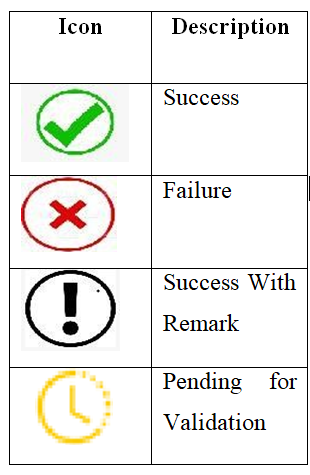
4. Whenever, the Tax Payer is shown 'Failure' icon with further details such as
- The entered PAN number is invalid.
- PAN not available in the concerned bank account.
- PAN Registered under GSTIN, and the PAN maintained in the Bank Account are not same.
- IFSC code entered for the bank account details is invalid.
In these cases, the Tax Payer is expected to ensure that he has entered correct bank details and the KYC is completed by bank for his bank account.
5. Whenever, the Tax Payer is shown, the status of his bank account as 'Success With Remark' icon with details "The account cannot be validated since the bank is not integrated with NPCI for online bank account validation", the Tax Payer should provide alternate bank account number so that it can be revalidated to expedite further online processes.
6. If the account status is shown as "Pending for Validation" then please wait since the account will be validated by NPCI.
7. The Tax Payer at any time can add/delete the bank account details and new account details will be validated.
Thank you for your cooperation.
Team GSTN












 CAclubindia

