Itr 2(excel)-schedule bfla

Efiling 1982 views 5 replies

In Schedule "CYLA-BFLA" of ITR 2(Excel Version) of AY 2015-16, I am not able to enter the B/f loss for adjustment against current year capital gains since all the cells are white in colour(meaning they are derived figures and entries cannot be made by the assessee).If one checks the home page of ITR 2,again Schedule "CYLA-BFLA" is shown in white which means entries in this schedule are derived figures.If so,how does one adjust the B/f losses against current year gains?Which Schedule has to be filled up for the same?

Would be grateful for an early response.Many thanks.

Replies (5)

Please fill the details in the schedule CYL.

Sorry,did not follow what you meant-Both CYL and BFL are part of the same Schedule,viz,"CYLA-BFLA" and all the cells in the Schedule are "white",meaning no entries can be made by the assessee in those cells.Am I missing something?Could you please specify the name of the schedule in ITR-2(Excel Version) where this B/f loss can be adjusted against current year's capital gains?

Right next to CYLA-BFLA there is another schedule CFL ( sorry i mistyped ) which needed to be filled

No problem,dear Kuldip.Thanks for your help.

Hello Balaji,

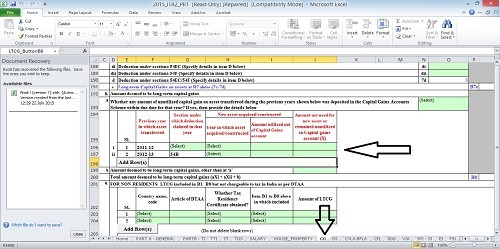
You have to enter details in respective income sheets and it will take automatically from that particular sheet, for eg in case of capital gains, you have to enter details in "CG" schedule as shown below , also for current year losses enter purchase sale value directly it will automaticaly calculate the loss amount, hope i am clear about it and it will help you


CCI Pro

Leave a Reply

Your are not logged in . Please login to post replies

Click here to Login / Register