Menu
Forum Search
Error while uploading the form 61a

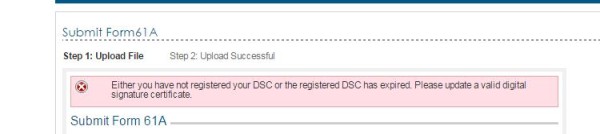


Me too getting the same error. DSC registered updated. I tried our 5 computers same error in all computers

Make Sure you Register Digital Signature for the Authorised Person on the E-Filing Website. First Login into Authorised Person's account ( PERSONAL ACCOUNT ) on Income Tax Website then Register his Digital Signature by going to Profile Settings.
Once you register Authorised Persons Digital Signature, You Login with your Company's ITDREIN credentials & upload the Form. It will get uploaded.
Only registering DSC of Authorised Person in Company's Login will not suffice. You should also register the Dsc of Authorised Person for the Authroised Person Login on e-filing website Also.
| Originally posted by : Suresh Iyer | ||
 |
Only registering DSC of Authorised Person in Company's Login will not suffice. You should also register the Dsc of Authorised Person for the Authroised Person Login on e-filing website Also. |  |
I have done everything, I did register the AP for the AP login on e-filing website. Still same error.
| Originally posted by : Suriya Kumar | ||
|
|
|
Suriya, is your problem solved ?

Only registering DSC of Authorised Person in Company's Login will not suffice. You should also register the Dsc of Authorised Person for the Authroised Person Login on e-filing website Also. We have done everything, I did register the AP for the AP login on e-filing website. Still same error.
We are also facing the same problem.
Got the Query resolved by Help Desk. They asked me to register the DSC of Person (whom you are making Autho. Person in 61A) as individual in income tax website. Means you need to register the dsc of AP in individual capacity. Then file the form 61A in Bulk filing (zip). Problem solved.
Leave a Reply
Your are not logged in . Please login to post replies
Click here to Login / Register
Recent Topics :
- Last day for ITR-U for AY 2023-2024 (FY 2022-2023)
- Sale of shares in indian company by a non resident
- Difference in TIS
- GSTR-9C Upload Status Error Occured
- “Income Tax Implications of Company-Related
- Advice needed: Hypothetical case of non-filing of
- Demand Raised for Cess Amount Despite Section 89 R
- WRONG BILL NO FILED IN GST R1
- Addtional trade name for my another firm
- Commission / Agency Business without books: REAL E
Related Topics :



 CAclubindia
