
Asking mandatory inputs while filling return

3308 views 5 replies
Hello. While trying to fill my return on the portal, I'm getting two strange errors:
 
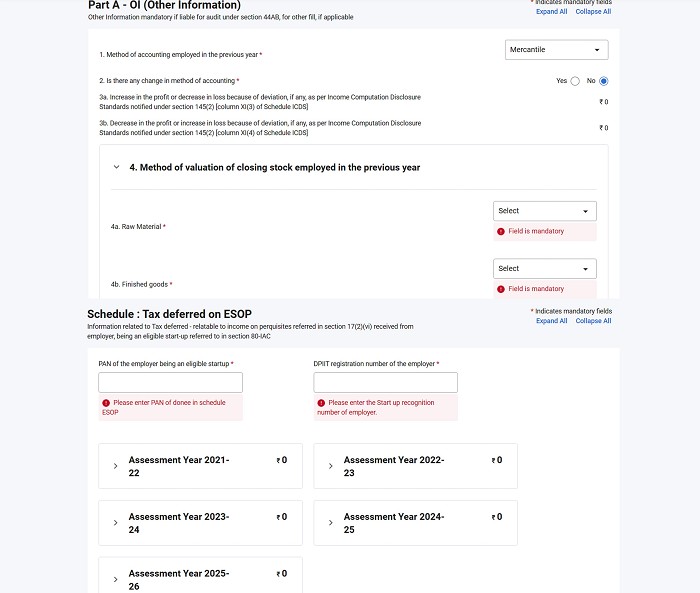
a) Firstly, for 'Method of valuation of closing stock employed in the previous year' under 'Part A- OI (other information)', it's asking me to choose an option for 'Raw Material' & 'Finished Goods'. Both these items aren't applicable for me.
 
b) Secondly, for 'Schedule : Tax deferred on ESOP', it's asking for 'PAN of the employer being an eligible startup' & 'DPIIT registration number of the employer'. Again, this is not applicable for me.
 
I am filling under 44 AD using ITR 3 & hadn't filled these things last year as well, so if anyone has some idea about this error, please let me know. Attaching screenshot for reference. Thanks. 

Replies (5)
Quick Summary
This discussion addresses an issue encountered when filling out ITR 3, specifically regarding mandatory fields for 'Method of valuation of closing stock' and 'Tax deferred on ESOP' that are not applicable to service-based businesses. The solution involves entering '0' for all stock value fields and selecting 'Cost' as the method of valuation, which bypasses the validation error. For the ESOP schedule, users are advised to delete the schedule if it's not applicable, or if deletion isn't an option, to ensure all required fields are correctly addressed or bypassed according to the portal's logic for non-applicable sections.

Delete both the schedules "OI' & 'ESOP' from the 'General' Schedule.

I am also facing the same issue and I dodn't see any delete option for ESOP. I am unable to submit my returns because of this issue.

@ Sridhar Yamsani

There is something in Computer Parlance called right click.

Did you try that?

Select the whole row, right click and Delete.

@ Elowen

Use the guidance already provided by me 

Part A-OI (Other Information) has fields for closing stock valuation that appear mandatory in the portal ,  but they only apply to businesses that have physical inventory (raw material, work-in-progress, finished goods).

If you are a service provider, consultant, or professional with no stock-in-trade, the fix is:
- Enter 0 in all stock value fields
- For the Method of Valuation dropdown, select Cost (it is the default and works even when the value is zero)
- The portal will accept zero-value entries and the validation clears

The underlying reason is that ITR forms are built for all business types, so inventory fields show up even when not applicable. Selecting Cost with zero amount is the correct treatment for a nil-stock business.

The Part A-BS (Balance Sheet) section has similar fields ,  same approach applies.

This [ITR filing guide for freelancers and consultants for AY 2026-27](https://taxgarden.in/blog/freelancer-consultant-income-tax-filing-guide-india-ay-2026-27) covers how to handle these business income schedules correctly.

Leave a Reply

Your are not logged in . Please login to post replies

Click here to Login / Register  

Company
29 June 2026
Accountant (Finance & Compliance)

TRIEYEZ

Kolkata

CA

View Details
Company
ARTICLESHIP 08 July 2026
Article internship

AJAY SINGH AND CO LLP

Thane

CA Final

View Details
Company
Featured 16 July 2026
Semi Qualified Company Secretary

Vakilsearch.com

Chennai

CS

View Details
Company
06 July 2026
Chartered Accountant (Indirect Taxation)

Gowra Ventures Pvt Ltd

Hyderabad

CA

View Details
Company
24 June 2026
Chartered Accountant

CA Darshita Shah & Co

Nadiad

CA

View Details
Company
20 June 2026
Chartered Accountant

ANV & Company

New Delhi

CA

View Details
Company
19 June 2026
Accounts Executive

Getfive Advisors Pvt. Ltd.

Ahmedabad

CA Inter

View Details
Company
ARTICLESHIP 10 July 2026
Article Assistant

N S Gokhale & Co

Thane

CA Inter

View Details


