TDS Q4 RETURN - DEFAULTS DUE TO WRONG DEDUCTIONS DATES

TDS 470 views 2 replies

Respected Experts,

I had filed 27Q returns for Q4 of 2024-25, however I submitted the return with wrong deduction dates.

For Q4 months of JAN-FEB-MAR, I had (mistakenly) entered the same deduction date of 09/01/2025 while actually paying (depositing) the TDS on time for each month.

Month - Deduction Date

JAN - 09/01/2025 (Correct)

FEB - 09/01/2025 (Wrong. Should have been 09/02/2025)

MAR - 09/01/2025 (Wrong. Should have been 09/03/2025)

Now I see the 'DEFAULTS' status for 27Q Q4 regular return statement with XXX amount payable for 3(b) INTEREST ON LATE PAYMENT as type of default.

I downloaded the JUSTIFICATION REPORT and this is when I realized I had entered wrong deduction dates for the months of FEB and MAR. Same deduction date of 09/01/2025 for both the months.
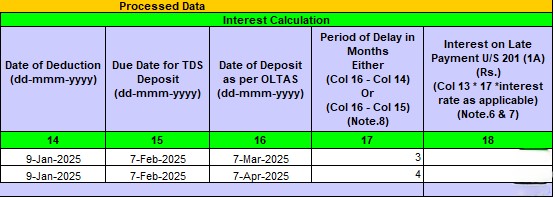
I also see one Unconsumed Challans (Date of Deposit 07-May-2025) inside Traces dashboard. 

When I try to proceed with REQUEST FOR CORRECTION (online/offline), I get the following error.

No data available for the specified search criteria.
Reasons can be:
1) There is no statement filed for the searched criteria. Please verify FY, Q, FT are entered correctly.
2) The statement is filed and is being processed in CPC TDS. Please try after some time.
3) The original statement filed is a paper return.

Please help me fix this.

Your knowledgable guidance would really help.

Best Regards.

Replies (2)

Rectifying the Error in 27Q Return -

*Error in Deduction Dates*: You filed 27Q returns with incorrect deduction dates for February and March, resulting in interest liability. - 

*Interest Calculation*: The interest is calculated based on the difference between the actual deduction date and the deposit date. Steps to Rectify the Error 

1. *Request for Correction*: Try to file a correction statement (online or offline) with the correct deduction dates. 

2. *Re-calculate Interest*: Ensure the interest is calculated correctly based on the actual deduction dates. 

3. *Utilize Unconsumed Challan*: Use the unconsumed challan (dated 07-May-2025) to pay the interest amount. Troubleshooting the Error - 

*Error Message*: The error message "No data available for the specified search criteria" may be due to processing delays or incorrect search criteria. - *Possible Solutions*: 

1. Verify the search criteria (FY, Q, FT) and try again.

 2. Wait for some time and try again, as the statement might be processing.

3. Contact the CPC TDS helpline or a tax professional for assistance. Recommendations -

 *File Correction Statement*: File a correction statement with the correct deduction dates to rectify the error. -

*Consult a Tax Professional*: If you're unsure about the process, consult a tax professional to ensure compliance and avoid further issues. Hope this helps! Let me know if you need further guidance .

Go for Online correction with Proper DSC of the responsible person registered. 

Correct only the Date of deduction. Then submit using DSC mode


CCI Pro

Leave a Reply

Your are not logged in . Please login to post replies

Click here to Login / Register