How to insert a video in MS Word

others 733 views 11 replies

How to insert a video in MS Word 2010?

Replies (11)

here's the solution

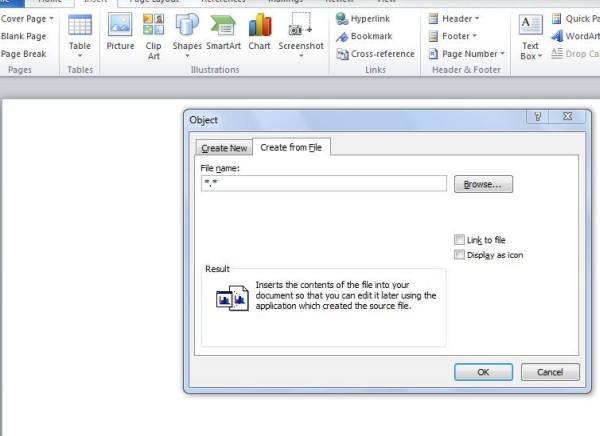
go to insert ---> object --->create from file

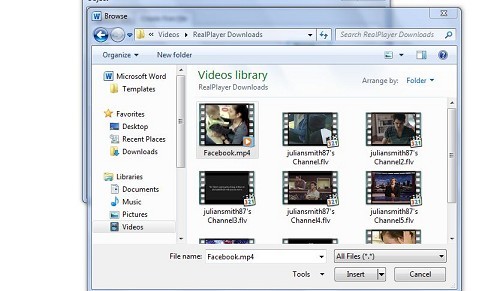
browse to the video you want to insert

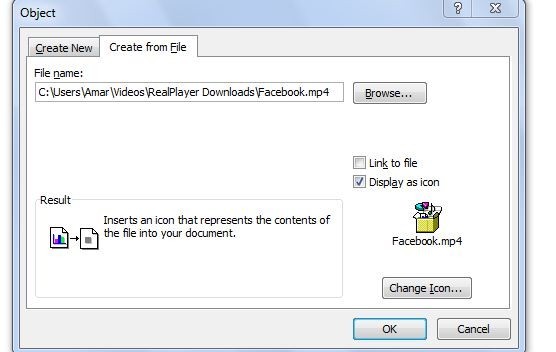
choose link to file or display as icon ,anyway you want

double click on that icon will play the video

:)hope it would help

Great Job dear Keep it up

Originally posted by : SAN...
Great Job dear Keep it up
Originally posted by : SAN...

Great Job dear Keep it up

Originally posted by : SAN...Great Job dear Keep it up


thank you :)

gd jobb

But in this case it will open it another programme i want to open it in MS Word itself..

You want to embed the video in MSword...........hmmmmmm

i tried to embed but nothing worked out:(sorry

https://www.addictivetips.com/microsoft-office/how-to-embed-youtube-videos-in-word-2010/

Pls visit this link . I think it will help you...

Originally posted by : Lakshmi

https://www.addictivetips.com/microsoft-office/how-to-embed-youtube-videos-in-word-2010/


Pls visit this link . I think it will help you...

this is same link i found while searching for it.....i tried it myself...but video didn't come up in powerpoint.

https://office.microsoft.com/en-us/word-help/create-visually-compelling-documents-in-word-2010-RZ101888976.aspx

thanx a lot  Amar


CCI Pro

Leave a Reply

Your are not logged in . Please login to post replies

Click here to Login / Register