
SEO Sai Gr. Hosp.
121382 Points
Posted on 06 September 2017
All supplies that are B2C and the amount is less than Rs 2.5 lakh, the details of those invoices have to be entered here.
Step 1 – Click on the 7- B2C Others tile.
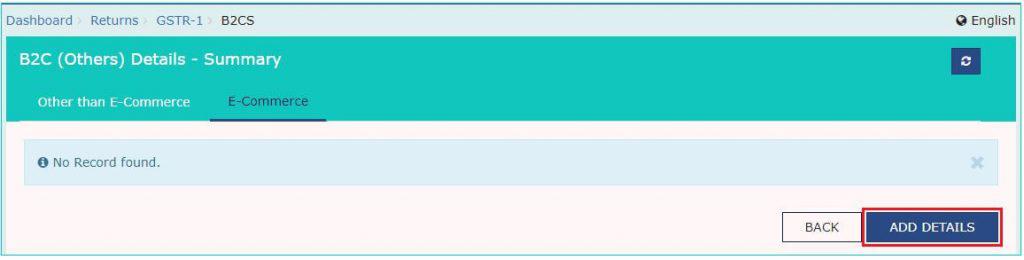
Step 2 -Select E-commerce tab to add details for a transaction through E-commerce or else select Other than E-commerce tab in case transaction is through non E-commerce. Click on Add Details button on the bottom right.
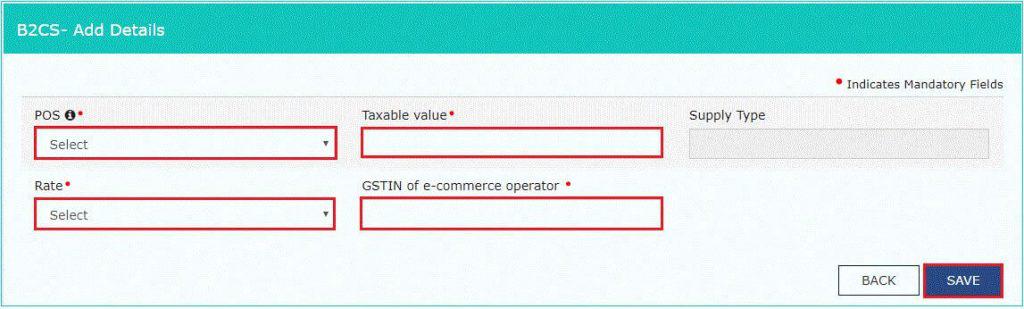
Step 3 – The following details have to be entered here –
- Select Place of Supply (State Code) where supply was delivered. The Supply Type field gets auto populated
- Enter the Value of Taxable supplies made
- Select Rate of GST applicable
- Enter GSTIN of e-commerce operator(if any)
- Click on Save
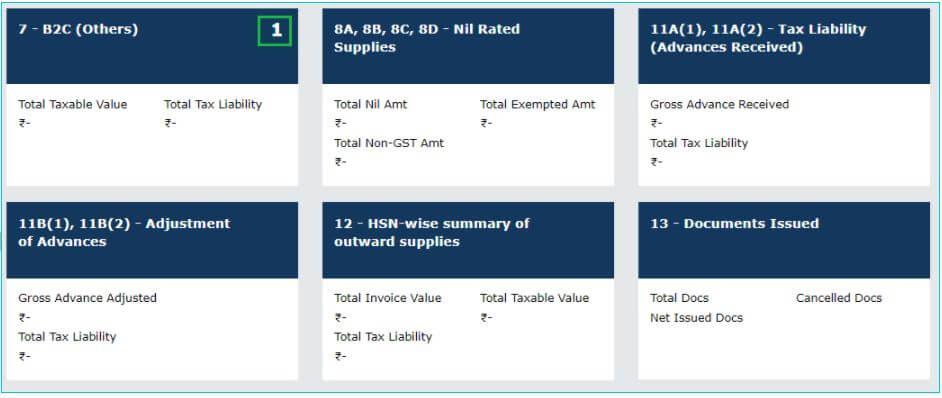
Step 4 -Click on back button to go back to GSTR 1 page. You can see the summary of B2C others invoices here.
Refer: guide-to-gstr1-filing








 CAclubindia
