Introducing Single Click Nil Filing of GSTR-1
Single click Nil filing of GSTR-1 has been introduced on the GSTN portal to improve the user experience and performance of GSTR-1/IFF filing. Taxpayers can now file NIL GSTR-1 return by simply ticking the checkbox File NIL GSTR-1 available at GSTR-1 dashboard.

Detailed advisory has been mentioned below
It has been constant endeavor to improve the user experience and performance of GSTR-1/IFF filing and hence significant improvements in Summary Generation process, quicker response time and enhanced user-experience for the taxpayers have been achieved. In order to further simplify the return filing experience a single click NIL filing of GSTR-1 has been introduced on GST Portal. Taxpayers can now file NIL GSTR-1 return by simply ticking the check box File NIL GSTR-1 available at GSTR-1 dashboard.
Eligibility to file NIL GSTR-1: Taxpayers may file NIL GSTR-1 if they have:
- No Outward Supplies (including supplies on which tax is to be charged on reverse charge basis, zero rated supplies and deemed exports) during the month or quarter for which the form is being filed for, or
- No Amendments to be made to any of the supplies declared in an earlier form,
- No Credit or Debit Notes to be declared / amended,
- No details of advances received for services is to be declared or adjusted
Steps to file NIL GSTR-1
Taxpayers shall login to GST portal and navigate to online form GSTR-1 by selecting relevant GSTR-1 period in Returns dashboard (Services > Returns > Returns Dashboard > Form GSTR-1 > Prepare Online).
1. Select File NIL GSTR-1 checkbox: In the GSTR-1 dashboard, a File NIL GSTR-1 checkbox shall be available at the top. If the taxpayer is eligible to file NIL GSTR-1, they can select the File NIL GSTR-1 On click of the checkbox, system will show a note related to NIL filing and all the tiles/tables shall be hidden.
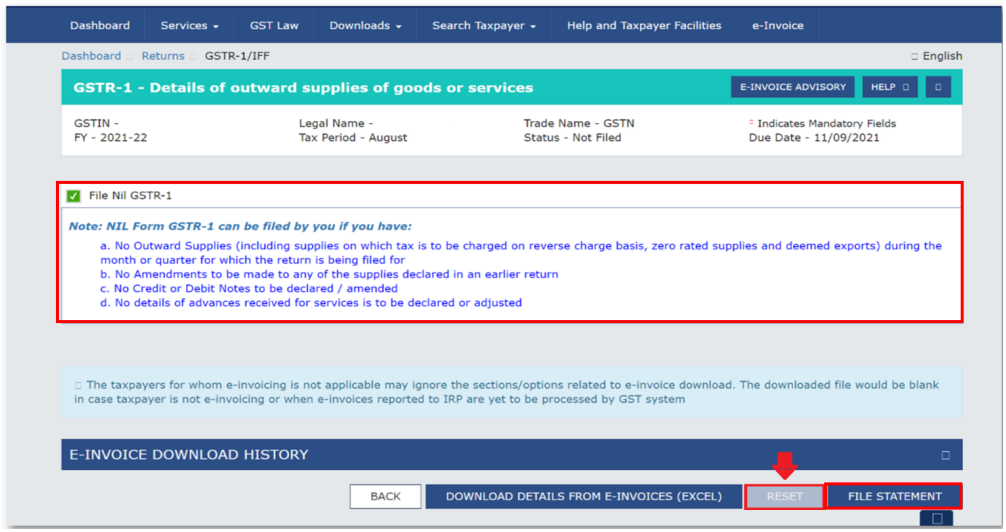
Nil filing of GSTR-1 will not be allowed in case there is already saved records in GSTR-1. The taxpayers are advised to delete already saved records or reset GSTR-1 data by clicking RESET button available on GSTR-1 dashboard before filing NIL GSTR-1. (Above image)
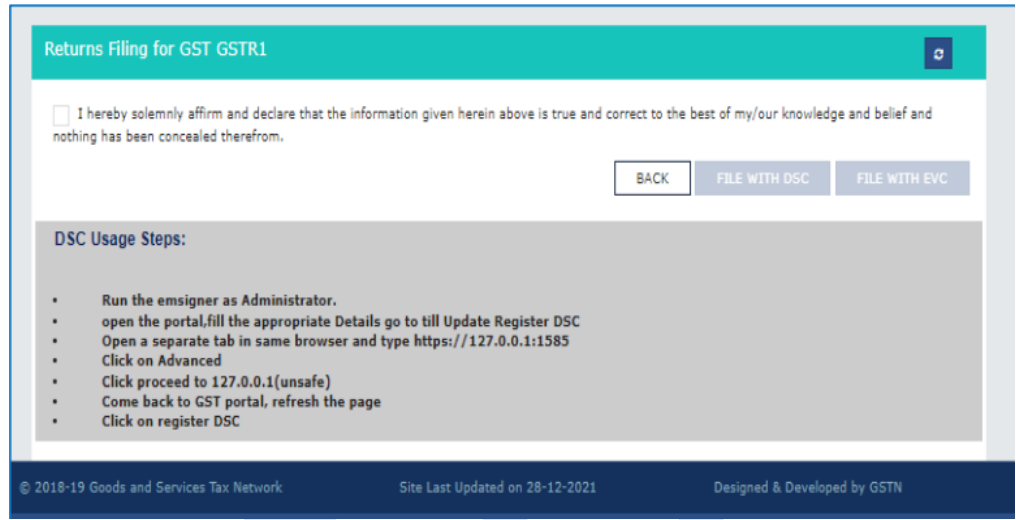
2. File Statement: To file Nil GSTR-1, taxpayer need to click File Statement button, which shall be available at the bottom of the GSTR-1 dashboard page. On clicking of ‘File Statement’ button, taxpayers will be navigated to the filing page to file GSTR-1/IFF using DSC/EVC.
Thanking You,
Team GSTN









 CAclubindia
