Tds on sale of property (online payment) - peculiar porblem

TDS 4765 views 6 replies

Dear All,

I have purchased a new property 4 months ago and deducted 1% tax and deposited it using online Tax payment at time of purchase.

My bank account stands deducted for the TDS amount, and my Form 26AS shows the property purchase transaction. However, the column  "TDS Deposited" in form 26AS (both in my and seller's form 26AS) shows "zero" amount. As a result the seller is not able to get credit for the amount deducted.  

My analysis so far has revealed the following -

  1. I had made house purchase payments in 5 installments and hence paid online TDS by 5 separate transactions. 
  2. After filling online Form 26QB, there is an instruction that states "that on getting redirected to the Bank's website, I should be selecting "Income Tax" or "Basic" Tax option for the payment to correcty reflect in Form 26AS.
  3. However, I realized this instruction only after I paid the first 3 transaction using "Other Taxes" option on the Bank's website. I correctly paid the last 2 transactions using the "Income Tax" option on the Bank's website.
  4. For the first 3 transactions, the "TDS Deposited" amount is shown as "Zero", while the last 2 transactions are being correctly reflected in Form 26AS.
  5. All major and minor heads and PAN numbers are correctly filled up. The only mistake made was that while on Bank's website, for 3 transactions, I selected the "Other Taxes" option instead of "Income Tax".
  6. I approached my Bank for correction, and they could not understand nor appreciate the problem.
  7. I met my Assessing Officer, and he seemed to care little or nothing about my problem. After being directed from one desk to another in the income tax office, I came to a dead end. No one seemed to understand the problem or care to spend a minute to explain the procedure to resolve this issue.
  8. Please advise on the following -
    1. If there is any known solution to this kind of an issue.
    2. If none, what is the escalation matrix to resolve this issue.
    3. Any other means to resovle the issue.

I am in a situation where my bank account is deducted, seller is putting pressure for getting credit and the Income Tax authorities are not responding and not bothered. Any and all help would be of greate help.

Regards



Replies (6)

it should have reflected in 26as by now, and have you obtained Form16B from TRACES after filing 26QB?

if no, please try this and see in 26AS after 7days

Hi,

I had faced a similar problem where the amount had been deducted from my bank account and was not appearing in the Form 26AS. I then called up the helpline number who directed me to send the details of the payment like the date of payment, amount, your PAN number and the Deductee's PAN number along with the Form 26 QB to their email - contactus @ tdscpc.gov.in

Suggest you to also send the email with all the details and await for their response.

In my case, before i could send the email, the amount got reflected in 26AS, hence didnt actually require to send it eventually.

Thanks Sateesh for your help. Based on your suggestion I called up the TDS CPC. On the brighter side they understood my problem and acknowledged that it is an issue.

On the down side, they said they do not have a correction system in place as of now nor are they aware when the correction mechanism would be in place. They said I will simply have to wait indefinitely for now for the solution.

Planning to write to the CPC email and at least get this in writing so that I am not hassled later by the seller.

@ Tarun Kumar - The Property purchase transaction is reflected in the Form 26AS. But in the transaction record in Form 26 AS there is a colum called " TDS Amount Deposited". That column shows the amount deposited as "Zero". Also attaching a screenshot of Form16B for your reference. You would notice in the form 16B that the first entry states TDS amount deposited as Zero however the second entry notes the amount received in the government account!!

Regards

Did this get resolved. I have run into a similar issue. Kindly post a reply if you it is resolved.

Thanks a lot.

Chitra

This has been resolved.  I had called the TDS Centralized Processing Center (CPC) and they had solved this problem by creating a new link on the TRACES Website.

I have listed the procedure below. If that does not work then you can  alternatively you can call up the TDS CPC at 1800 103 0344 or 0120 4814600

Here is what you need to do -

1. Login to Traces website ( If you have not registered on TRACES, then that is a separate procedure you can find on the internet)

url: https://www.tdscpc.gov.in/app/login.xH T M L

2. On the home page click on Downloads -> Form 16 B

3. Assessment Year of transaction and Enter Acknowledgement Number and PAN of Seller

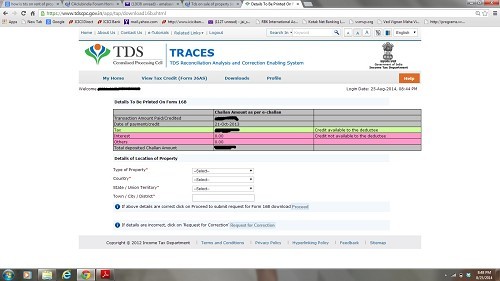
This is the screen you will see-

4Once you see this screen, edit the values as you require -

Keep in mind -

1. Only the amount that you specify in the green row would be refelcted in the "Tax Deducted" column in Form26AS for you and the property seller.

2. You only have one attempt at editing this and submitting. So ensure that all details are correctly filled.

3.  Once you are done with filling in the details, click on the "Request for Correction" button at the bottom of the screen.

4. There might be a couple of confirmation screens, once you confirm, your request would be accepted and processed in a few hours.

5. Check your Form 26AS on TRACES again the next day - if all things are ok - you can feel relieved !!

Hope this helps!!


CCI Pro

Leave a Reply

Your are not logged in . Please login to post replies

Click here to Login / Register