banner_ad

Tally

Others 965 views 2 replies

Dear Sir/ Ma'am,

I'm new to this fourm and new to tally as well. i have been assinged for tally work recently. i need your valuble support.

My question: if i want to book oustanding expenses in tally for example: the invoice is made in Jan month and payment will be done in Feb in this regards what entry i should pass.

please assist on the same.

Many thanks.

Best Regards,

Anitha

Replies (2)


Step - 1

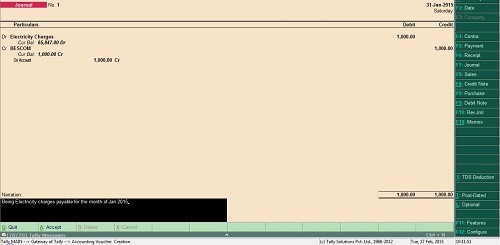
Accrual Entry to be passed in the month of Jan 2015 for expenses

Gateway of Tally -> Accounting Vouchers -> F7 and pass below entry

Step - 2

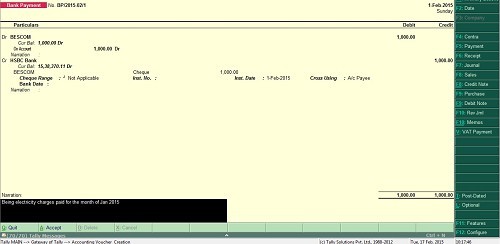
Payment Entry to be passed in the month of Feb 2015 for payment

Gateway of Tally -> Accounting Vouchers -> F5 and pass below entry

Hope this will help out.

If you have to pass outstanding expense entry at the month end entry would be like :

Press "F7" - Journal entry

i) If salary is payable

on 31/01/2015

Salary A/c will be debit           20,000

            To Salary Payable                      20,000

(Being salary payable for the month of Jan'15 to XXX)

Like this you can pass other outstanding entry.


CCI Pro

Leave a Reply

Your are not logged in . Please login to post replies

Click here to Login / Register  

Company
24 May 2026
Accounts & Tax Executive

PARAS KHURANA AND CO

New Delhi

B.Com

View Details
Company
11 May 2026
Post office

Post office

Anakapalle

Others

View Details
Company
11 May 2026
AUDIT INTERN

M/S K.K.KHANNA AND COMPANY

Noida

CA Foundation

View Details
Company
26 May 2026
Senior Accountant cum purchase Manager

Vardhaman Group of India

Pimpri Chinchwad

CA Inter

View Details
Company
01 June 2026
Audit, Taxation & Compliance Executive

R P S K & Associates

Nashik

CA Inter

View Details
Company
26 May 2026
Audit executive

vdsr & co LLP

Chennai

CA Inter

View Details
Company
22 May 2026
U.S. Financial Reporting & Consolidation Manager

Karia Overseas

Ahmedabad

CA

View Details
Company
ARTICLESHIP 14 May 2026
CA ARTICLE

PRAVEEN GARG & CO

Faridabad

CA Foundation

View Details