if we want to transfer goods from baroda to surat and party is registered in indore mp .
in that case do we need to generate eway bill or not?
if yes than how
Menu
Forum Search
Regarding eway bill
Replies (6)

Guest
Posted on 19 June 2018
How to Generate E-Way Bill
An eway Bill is an ‘electronic way’ bill for movement of goods which can be generated on the eWay Bill Portal. Transport of goods of more than Rs. 50,000 (Single Invoice/bill/delivery challan) in value in a vehicle cannot be made by a registered person without an eWay bill from 1st April 2018. E-way bill can be generated or cancelled through the e-way bill website, LEDGERS GST Software, SMS, Android App and by Site-to-Site Integration (through API). When an eWay bill is generated a unique eWay bill number (EBN) is allocated and is available to the supplier, recipient, and the transporter. In this article, we look at the steps to generate a e-way bill on the Government website.
Know more about e-way bill.
Steps to Generate E-Way Bill
E-way bill can be generated on the GST eWay Portal. To use the portal, you will need a GST registration and transporter registration.
Login to E-Way Bill Portal
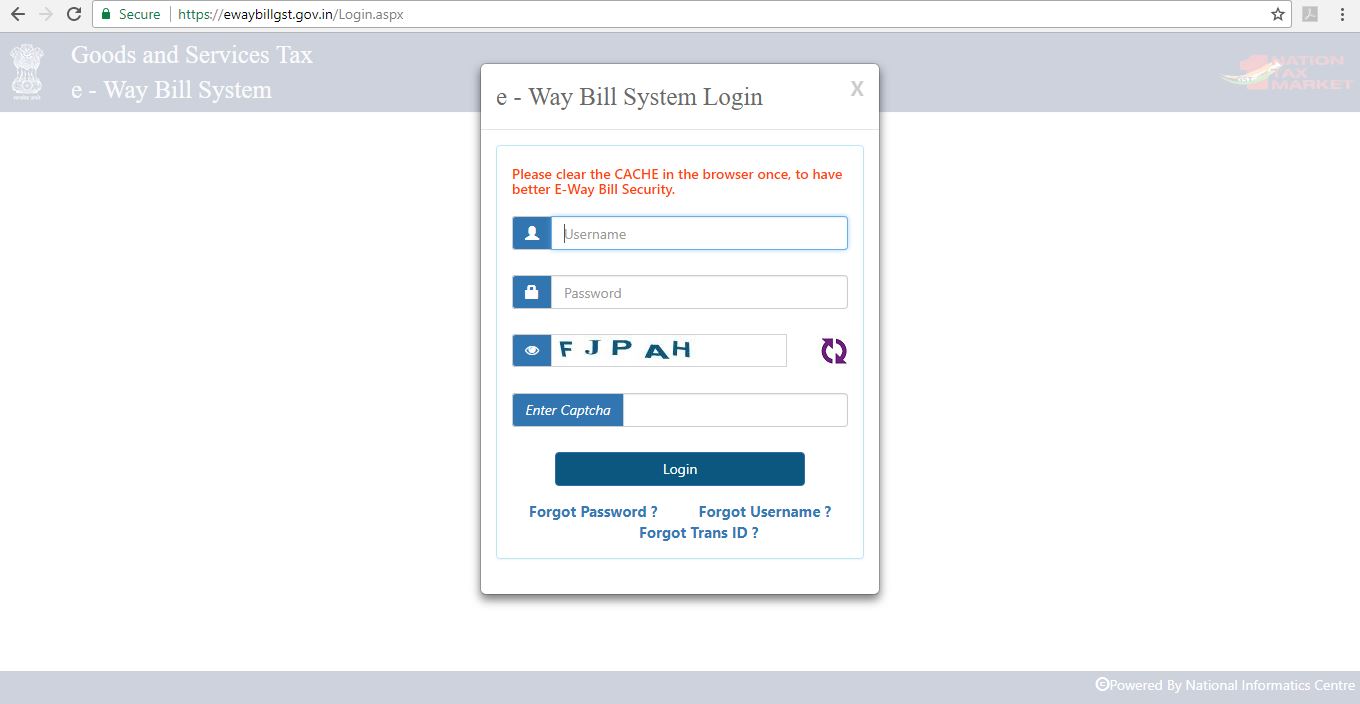
Step 1: Access the eway bill generation portal at https://ewaybill.nic.in/ and enter the login detail to enter the platform.
Step 2: Click on the “Generate New” option from the eWay bill- Main menu page to generate a new eWay bill.
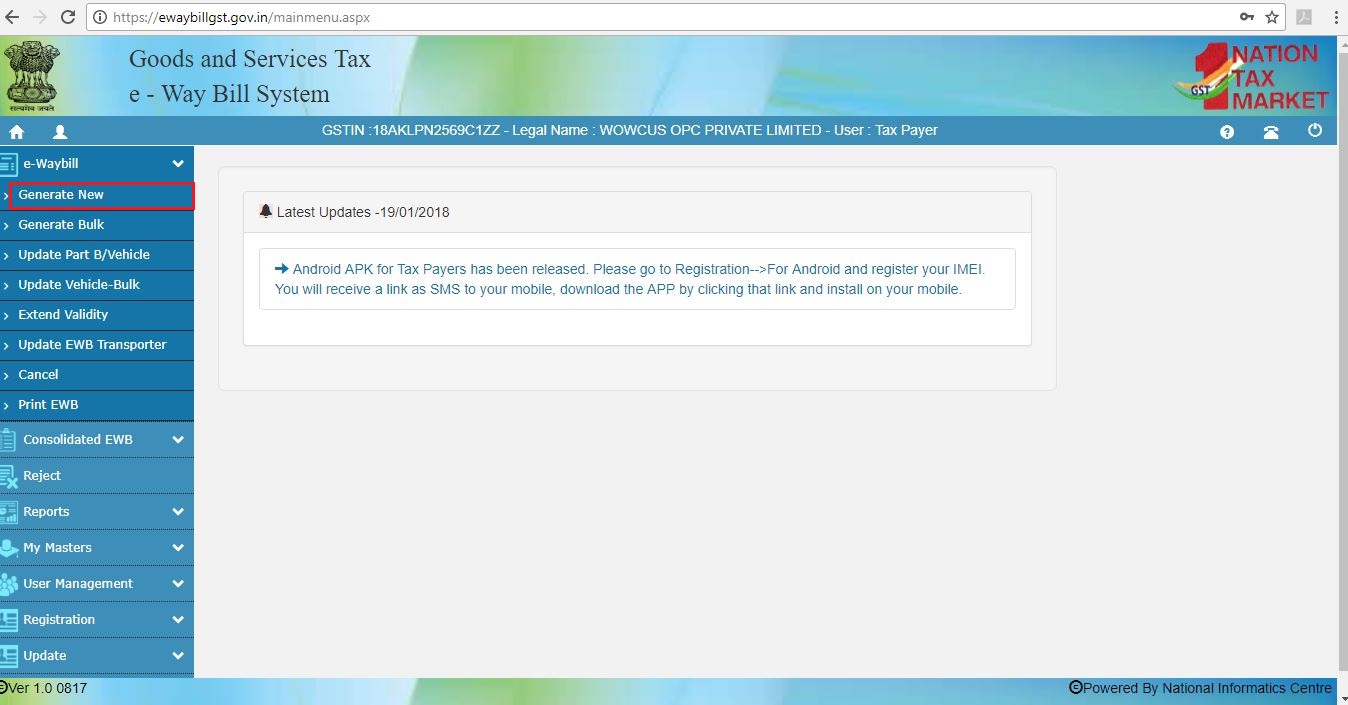
Generate eWay Bill
Step 3: A new eway bill generation form appears. Fill in the details required similar to creating a GST invoice.
Select outward, if you are the supplier and inward, if you are the recipient. Enter details of the supplier and recipient along with GSTIN, wherever applicable.
When a registered GSTIN is entered in the field provided in the form, other details gets pulled into the empty fields. Before proceeding to the next step kindly check the details.
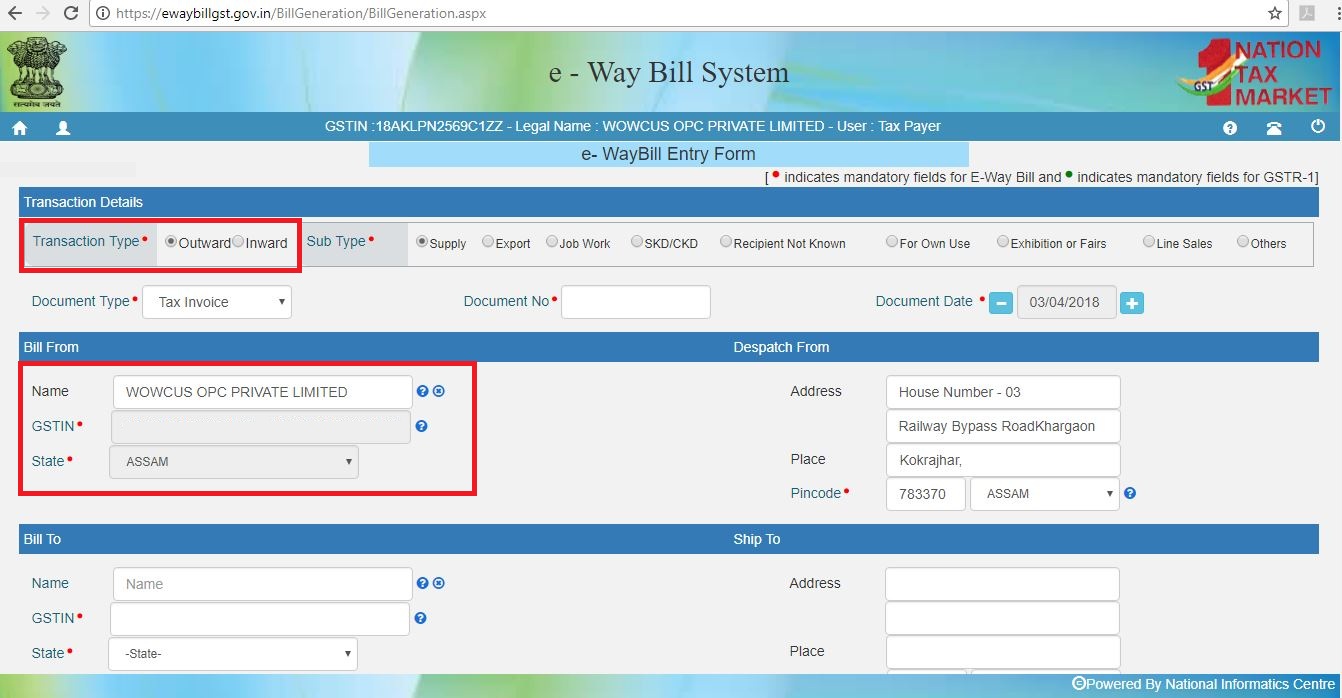
Enter Goods Descripttion
STEP 4: The second half of the page will contain information to be filled as follows:
- Product Name and Descripttion must be completed similar to a tax invoice.
- HSN Code for the Product must be entered. Click here to find HSN code.
- IGST or CGST Rates applicable. IGST would be applicable for inter-state transport and SGST / CGST for intra-state transport.
- Approximate distance of transport. This would determine the validity of the eway bill.
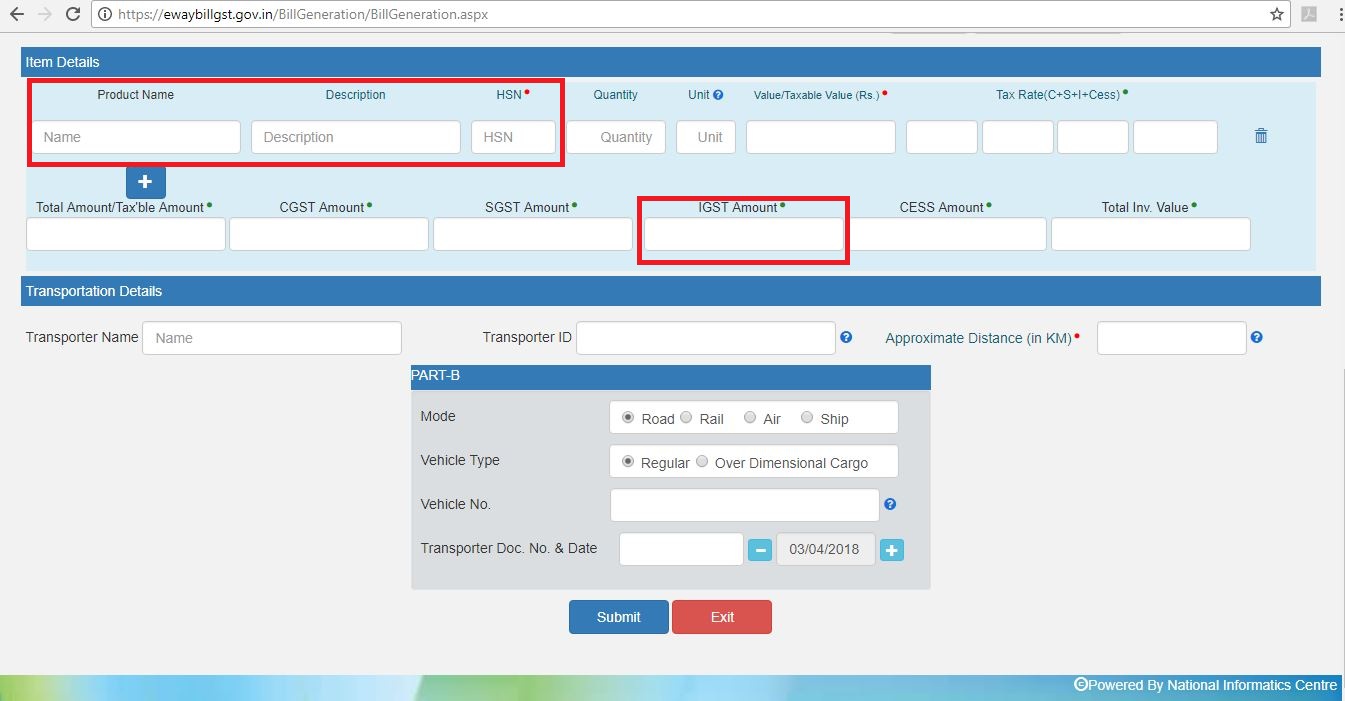
Step 5: Generate E-way bill
Click on the “SUBMIT” button to generate the eWay Bill. The eWay bill gets displayed which contains the eWay Bill number and the QR Code that contains all the details in the digital format. The printed copy of the bill should be provided to the transporter who will carry it throughout the trip till it is being handed over to the consignee.
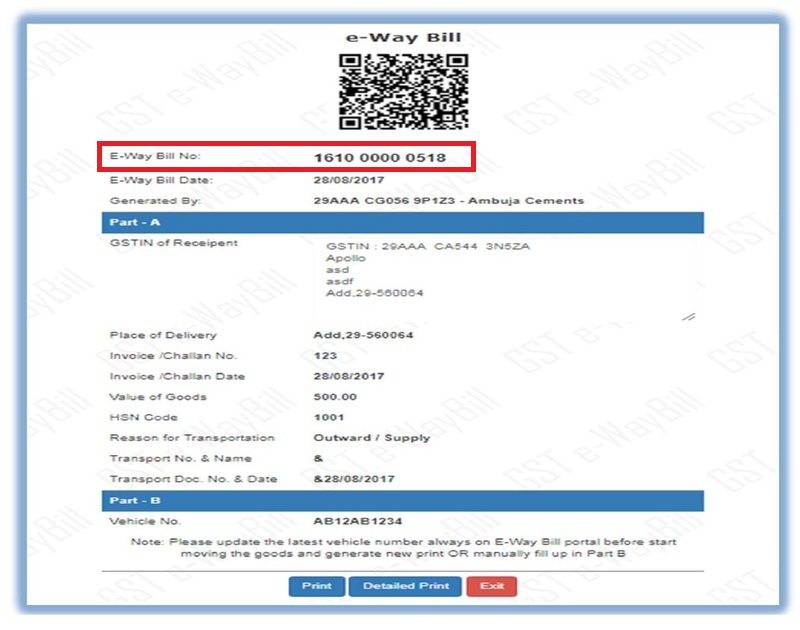
Step 6: Consolidate E-way Bill Generation
A consolidated eWay bill can also be created which contains all the details on the transaction and is also easy to generate it by providing just the ‘eWay bill number’ in the required field. Click on “SUBMIT” to generate the consolidated eWay Bill.
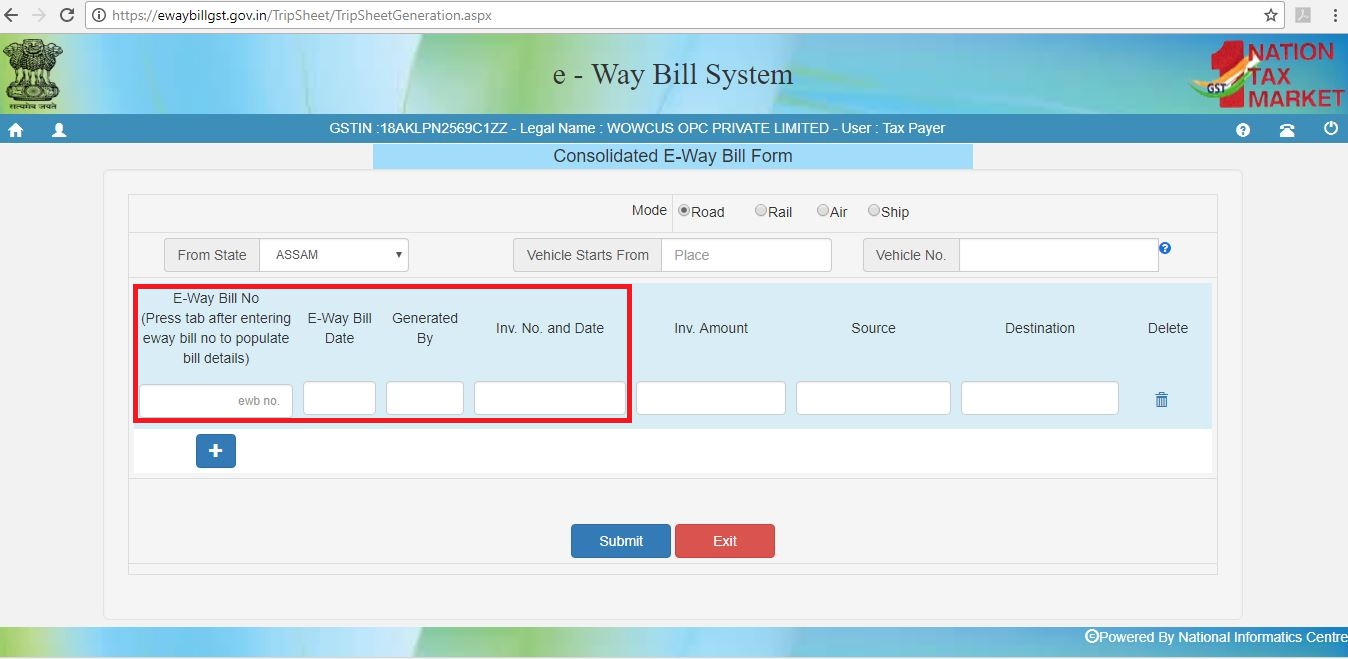
An eWay bill can be updated once it is created. Details on the transporter, consignment, consigner and also the GSTIN of both the parties can be updated in the existing eWay bill provided the bill is not due on its validity.
On 19 June 2018 at 12:21

| Originally posted by : shraddha atal | ||
 |
if we want to transfer goods from baroda to surat and party is registered in indore mp . in that case do we need to generate eway bill or not?if yes than how |  |
Sometimes, the tax payer raises the bill to somebody and sends the consignment to somebody else as per the business requirements. There is a provision in the e-way bill system to handle this situation, called as ‘Bill to’ and ‘Ship to’.
In the e-way bill form, there are two portions under ‘TO’ section. In the left hand side - ‘Billing To’ GSTIN and trade name is entered and in the right hand side - ‘Ship to’ address of the destination of the movement is entered. The other details are entered as per the invoice.
In case ship to state is different from Bill to State, the tax components are entered as per the billing state party. That is, if the Bill to location is inter-state for the supplier, IGST is entered and if the Bill to Party location is intra-state for the supplier, the SGST and CGST are entered irrespective of movement of goods whether movement happened within state or outside the state
On 19 June 2018 at 12:27

MURALI NADIMINTI
20 Points
Posted on 19 June 2018
e way bill is compulsory where consignment value more than 50000,/-. e way bill can be generated by seller or buyer or transporter those who are registered under GST.
On 19 June 2018 at 12:50

Vinod Babu
20 Points
Posted on 19 June 2018
If Invoice Value* exceeds Rs. 50,000 OR
If a vehicle carries goods against multiple Invoices, then where the aggregate Invoice value* exceed Rs. 50,000 and move by Motorised conveyance.
So, if either of above points is satisfied, the user should generate e-Way Bill.
There is no Distance Relaxation In eway bill , it was earlier that upto 10 km u can send your material to Transporter place by Generating A part for further delivery but it increased to 50 km by noti.12/2018.
Distance clause is 50 kms now for intra state only but not applicable in inter state.
So There is no such rexlation of distance in Eway bill , if consignment value exceed to 50k, move by Motorised conveyance , eway is mandatory.
If a vehicle carries goods against multiple Invoices, then where the aggregate Invoice value* exceed Rs. 50,000 and move by Motorised conveyance.
So, if either of above points is satisfied, the user should generate e-Way Bill.
There is no Distance Relaxation In eway bill , it was earlier that upto 10 km u can send your material to Transporter place by Generating A part for further delivery but it increased to 50 km by noti.12/2018.
Distance clause is 50 kms now for intra state only but not applicable in inter state.
So There is no such rexlation of distance in Eway bill , if consignment value exceed to 50k, move by Motorised conveyance , eway is mandatory.
On 19 June 2018 at 13:25

I think above explanation is enough
On 19 June 2018 at 20:56

yes thank you so much
On 19 June 2018 at 21:29
Leave a Reply
Your are not logged in . Please login to post replies
Click here to Login / Register
Recent Topics :
- Gifting money to my father-in-law (my husband's da
- GSTR-1 JSON from marketplace exports (Myntra / Ama
- Question on buy back of shares
- Saving corporate tax completely on profit from rea
- Hi experts need some helps
- A query regarding GST and Place of Supply:
- ADT-3 not filed by previous Auditor
- Revising salary on 24Q Q4 FY 25-26
- LTCG: Home Loan Principal Repayment?
- Ims action relationship query
Related Topics :



 CAclubindia
