banner_ad

New procedure for viewing form 26as

6842 views 1 replies

If the size of your Form 26AS is large, this request can only be processed on-demand. Please login to TRACES and submit download request for Form 26AS which would be made available to you in text format. If you have not yet registered on TRACES, please register by clicking on 'Register as New User' on TRACES home page and selecting type of user as 'Tax Payer'

Replies (1)

1. Register to Traces as Tax Payer (Help for register)

2. Now go login and login with details entered while registering

3. Now Click on "View Tax Credit (Form 26AS)" on above tab

4. Choose Assessment Year and View as HTML

5. Click on "VIew/Download"

6. This msg will popup "Due to large size of Form 26AS, this request can only be processed on-demand. Please submit download request for Form 26AS which would be made available to you in text format. Click on 'Proceed' to submit download request for Form 26AS for the selected Assessment Year." then click on "Proceed"

7. Again another msg while popup alongwith request id like " Request for Form 26AS text file has been submitted for the selected Assessment Year. Request Number is XXXXXXXX. The file will be made available in the 'Downloads' section." then click on "OK"

8. Now go to "Downloads" ---> "Requested Download"

9. Click on "View All"

10. If it's says "Submitted" then it is process it will take another 1 or 2 mintus till then wait.

11. Now you can see your above request id is appear if it say "available" then you can download clicking on "request id" and on "HTTP Download"

12. Downloaded file is in txt format you cant read 26AS so first extract from zip format (Password will be Assessee DOB in DDMMYYYY) format.

13. Now open open text file and Select all text in file (Short cut:- Ctrl + A) and copy it (Short cut:- Ctrl + C)

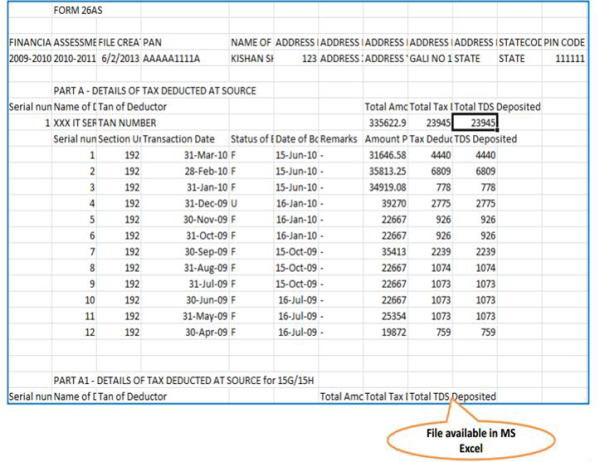
14. open excel and past it.

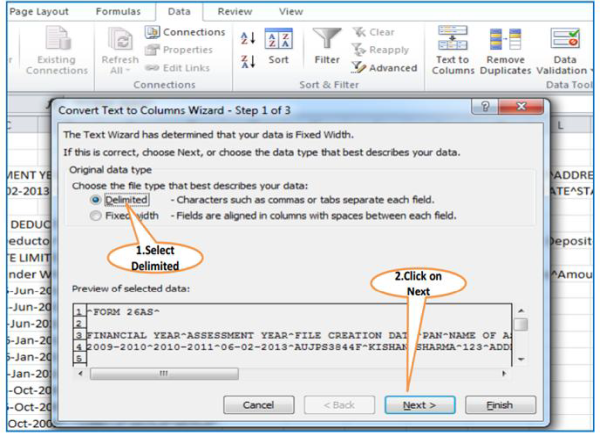
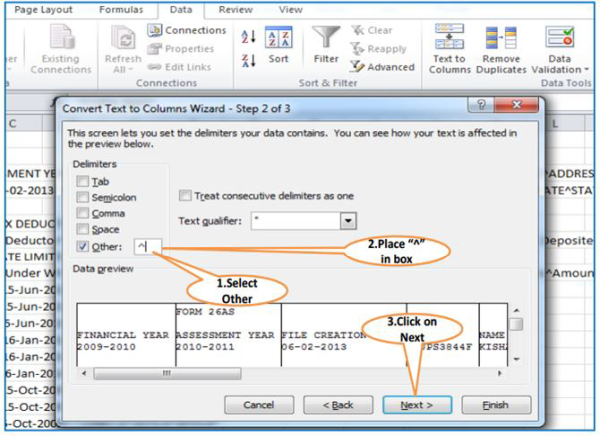
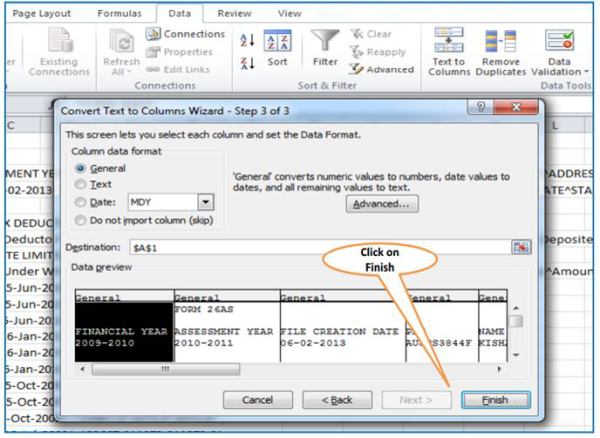
Now follow procedure as shown in following image:-

Thats it, it is not like PDF but it is better than text


CCI Pro

Leave a Reply

Your are not logged in . Please login to post replies

Click here to Login / Register  

Company
19 May 2026
Accountant

ca kunjan

Mumbai

CA Inter

View Details
Company
04 May 2026
Content Writer Intern

Interactive Media Pvt Ltd.

New Delhi

CA Inter

View Details
Company
29 May 2026
Company Secretary - Part time

Shaswat initial support private limited

Ahmedabad

CS

View Details
Company
08 May 2026
CHARTERED ACCOUNTANT

SHAH LADHA AND ASSOCIATE

Ahmedabad

CA

View Details
Company
16 May 2026
Audit clerk

mgirt & co

Bengaluru

CA Inter

View Details
Company
27 May 2026
Audit Assitant

Virender K Gupta and Co

New Delhi

B.Com

View Details
Company
03 May 2026
Senior Chartered Accountant

Nirmal Jain & Co

New Delhi

CA

View Details
Company
07 May 2026
CA Assistant

amit desai and co

Mumbai

CA Final

View Details