How to unblock any website which is blocked by IT ?

858 views 7 replies

How to unblock any website which is blocked by IT ?

Replies (7)

elaborate the problem.

If the Website is in function and blocked by Info. Tech. Dept. in India, you can browse the website from a proxy server. https://www.hidemyass.com/


Go to the above mentioned link, type the url of the website which you want to go to in the box given and click on Hide My Ass Icon given beside it.

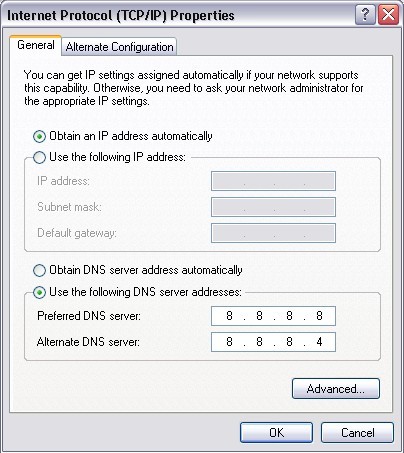
change ur dns to 8.8.8.8 (primary) and 8.8.8.4(secondary), there are much more Proxy sites to browse the net anonymously.

What is dns and how do i change it ?

Originally posted by : Deep @ k Gupt/\
If the Website is in function and blocked by Info. Tech. Dept. in India, you can browse the website from a proxy server. https://www.hidemyass.com/


Go to the above mentioned link, type the url of the website which you want to go to in the box given and click on Hide My Ass Icon given beside it.

What to do if the site https://www.hidemyass.com/ is also blocked by IT

To set your DNS, you need to find the Internet Protocol window.

For Users on a Dial-up Connection:
Go to My Computer>Dialup Networking.
Right-click your internet connection and select Properties.
A window will open - click the Server Types tab. Click TCP/IP Settings.
For All Other Users:
Go to Control Panel>Network Connections and select your local network.
Click Properties, then select Internet Protocol (TCP/IP).
Click Properties.
the following window will appear


CCI Pro

Leave a Reply

Your are not logged in . Please login to post replies

Click here to Login / Register