
Excel formula

Excel formula req for Pan number in cell which contains 4th letter P =person and if it contains C = company
Replies (2)

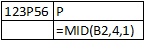
Use formula MID(text,start_num,num_chars)

e.g.


B2 is the cell, 4 is the starting position, 1 is the no. of character to return from fourth position.

The 4th character of a PAN identifies the holder type. A formula covering all types (PAN in A2):

=IFERROR(INDEX({"Individual","Company","HUF","Firm/LLP","AOP","Trust","BOI","Local Authority","Artificial Juridical Person","Government"},MATCH(MID(UPPER(A2),4,1),{"P","C","H","F","A","T","B","L","J","G"},0)),"Invalid PAN")

For only the two types asked:

=IF(MID(A2,4,1)="P","Person",IF(MID(A2,4,1)="C","Company","Other"))

To validate the PAN format (5 letters, 4 digits, 1 letter) as well, in Excel 365:

=AND(LEN(A2)=10,ISNUMBER(--MID(A2,6,4)),SUMPRODUCT(--ISNUMBER(--MID(A2,{1,2,3,4,5,10},1)))=0)

Practical use: the type drives TDS rates (194C 1% for P/H, 2% for others) and the Sec 206AB/206AA checks.

Leave a Reply

Your are not logged in . Please login to post replies

Click here to Login / Register  

Company
Featured 27 October 2026
semi-qualified CA

Saini Pati Shah & Co LLP, Chartered Accountants

Mumbai

CA Final

View Details
Company
15 October 2026
Senior Accountant

Continental Belting Pvt Ltd

Mumbai

B.Com

View Details
Company
16 October 2026
CA article trainee

Zerdi & Co. Chartered Accountants

Pune

CA Inter

View Details
Company
21 October 2026
CA INTER/ BCOM WITH EXPERIENCE

CA S KUMAR GUPTA & CO

Amritsar

CA Inter

View Details
Company
Featured ARTICLESHIP 31 October 2026
CA Articleship

apricus india

Navi Mumbai

CA Inter

View Details
Company
Featured 07 November 2026
Paid Assisstant

DPV & Associates

Chennai

CA Inter

View Details
Company
02 November 2026
Audit Executive

SRJP & Co LLP

Kochi

CA Inter

View Details
Company
10 November 2026
FP&A Executive

Gujarat Guardian

Ankleshwar

CA Final

View Details