E-TDS Correction Statement 24 Q4

TDS 4720 views 8 replies

If i need to correct form 24 q4 FY 2007-08  pertaining to interest for default u/s 201 (1) /206 c(7), what should i do? i.e. how should i go about ? 

How to make this entry in the correction statement  as their are no aother entries to be made

please let me know at the ealiest.

Regards

.

Replies (8)

Deductors are required to file eTDS statement every quarter. Any error/ omission in original statement filed has to be rectified by filing a correction statement. It was possible to file multiple correction statement in respect of one original return, however this was not happening because of the following reasons
·         Non availability of original statement FVU file
·         Non availability of updated FVU file after incorporating corrections
NSDL has now started this facility of downloading latest TDS/TCS consolidated statement, incorporating all updates done via correction statements
Pre-requisite for requesting TDS/TCS statement online.
·         Online request for TDS/TCS statement can be made only on successful registration of TAN (creating TAN registration account) at TIN website.
·         Register TAN online at TIN website. For registering TAN click link ‘Online TAN Registration’
Steps to be followed for placing the request of consolidated TDS/TCS statement
·         Login to TAN Registration Account with user id, password and TAN.
·         On successful login, under option TDS/TCS, select option “Request- Consolidated TDS/TCS statement”.
·         Request for consolidated TDS / TCS statement can be made for your TAN only.
·         On clicking the aforementioned option, provide details of statement as below for which consolidated file is required:
1.    Provisional Receipt Number of regular
2.    statement
3.    Form no.
4.    Quarter
5.    Financial Year
·         On successful validation of the above details, two questions related to the TDS/TCS statement requested will be asked as a part of verification.
·         On successful verification of answers to the aforementioned two questions, request number will be generated and the consolidated TDS/TCS statement will be e-mailed to the user on the email ID provided on TAN registration within 24 hours.
·         Consolidated TDS/TCS statement will be available only if correct answers are provided to the questions for verification.
·         Two attempts within a day will be provided to correctly answer the verification questions.
·         In case of two unsuccessful attempts within a day for the same statement, request for such statement can be placed on next day.
·         In case of large number of records in the TDS/TCS statement requested, the statement will be split in multiple files owing to restriction of mail size.
·         In case TDS/TCS statement is split in multiple files then each file will be sent by separate e-mail.
Using Consolidated TDS/TCS statement for preparing correction statement
Consolidated TDS/TCS statement provided will be in compressed form.
·         Extension of the consolidated TDS/TCS statement will be .tds
·         In case of single file, extract the content of the file by providing password to the file.
·         In case of multiple files, merge the files using FMU and then extract the contents of the merged file by providing password.
·         After extracting the consolidated TDS/TCS statement, import the same in the return preparation utility for making any correction
Conclusion
The facility provided by NSDL will go a long way in helping deductors file correction statements in organized and better manner. 


The process of registration is simple but considering security every mail attachment from NSDL comes with password protection. This will require deductor to keep track of TAN registration number till it is activated.


The process of placing request for consolidated statement, again is little complex for the sake of security. We placed one request and we were asked two questions. One was to fill up PAN and deductee amount in respect of 5 deductees. Second question was to fill up Challan Sr No , date and amount.


The statement arrived via email within 24 hours as promised.

I Agree with Fathema

Interest u/s 201(1)are charged because of either 1. delay in deducting tax or 2. delay in remitting deducted tax. As you know TDS should be deducted at the time of credit of salary to payee's account or payment there of which ever is earlier and should be remitted on or before 7th day of the subsequent month. Check your tds return for the deviation from the above two

Dear,

you need not file any correction statement for the payment of interest. After filing the return you may receive notice form the department asking you to pay interest, and you may send reply with copy of the challan. That's all.

regards

Dear Venkat, 

There is three reasons for Notice served to your TAN for interest. No 1 You might have remitted the deducted amount in to government account by late.  No 2  The  challans  which you remitted in the bank might not be remitted in right TAN or  the challan which you remitted it would have not mentioned with  correct details like Date, CIn, Bsr and Amount so that the challan would have not matched with the right details. But you might have matched that  challan with  the deductees in the deductee details in anx 1 it means you have remitted but the amount not credited with any so you have not paid to any . For the delay the interest  might be rised against your Tan. No 3 actually you might have deducted in short so that you have to pay the balance with interest. check the reasons first then go for rectification. For,  number 1 we should pay the interest for delayed payment , number 2 we have to revise the return with right details compared with NSDL informations about the particular challan or challans, number 3 we have to pay or write the right reason to the department for short deduction. 

what if the original return is filied in paper form and if i want to revise one quarter what i should do?

please advice

Dear Ajay Sut

Check with the tin fc where you have filed your paper return whether the same has been digitised and uploaded to tin central server by quoting your provisional receipt no for the paper return. In the event of paper returns having not been digitised and uploaded you can file a original etds return to credit the pan of the deductees

Originally posted by : FATEMA

Deductors are required to file eTDS statement every quarter. Any error/ omission in original statement filed has to be rectified by filing a correction statement. It was possible to file multiple correction statement in respect of one original return, however this was not happening because of the following reasons
·         Non availability of original statement FVU file
·         Non availability of updated FVU file after incorporating corrections
NSDL has now started this facility of downloading latest TDS/TCS consolidated statement, incorporating all updates done via correction statements
Pre-requisite for requesting TDS/TCS statement online.
·         Online request for TDS/TCS statement can be made only on successful registration of TAN (creating TAN registration account) at TIN website.
·         Register TAN online at TIN website. For registering TAN click link ‘Online TAN Registration’
Steps to be followed for placing the request of consolidated TDS/TCS statement
·         Login to TAN Registration Account with user id, password and TAN.
·         On successful login, under option TDS/TCS, select option “Request- Consolidated TDS/TCS statement”.
·         Request for consolidated TDS / TCS statement can be made for your TAN only.
·         On clicking the aforementioned option, provide details of statement as below for which consolidated file is required:
1.    Provisional Receipt Number of regular
2.    statement
3.    Form no.
4.    Quarter
5.    Financial Year
·         On successful validation of the above details, two questions related to the TDS/TCS statement requested will be asked as a part of verification.
·         On successful verification of answers to the aforementioned two questions, request number will be generated and the consolidated TDS/TCS statement will be e-mailed to the user on the email ID provided on TAN registration within 24 hours.
·         Consolidated TDS/TCS statement will be available only if correct answers are provided to the questions for verification.
·         Two attempts within a day will be provided to correctly answer the verification questions.
·         In case of two unsuccessful attempts within a day for the same statement, request for such statement can be placed on next day.
·         In case of large number of records in the TDS/TCS statement requested, the statement will be split in multiple files owing to restriction of mail size.
·         In case TDS/TCS statement is split in multiple files then each file will be sent by separate e-mail.
Using Consolidated TDS/TCS statement for preparing correction statement
Consolidated TDS/TCS statement provided will be in compressed form.
·         Extension of the consolidated TDS/TCS statement will be .tds
·         In case of single file, extract the content of the file by providing password to the file.
·         In case of multiple files, merge the files using FMU and then extract the contents of the merged file by providing password.
·         After extracting the consolidated TDS/TCS statement, import the same in the return preparation utility for making any correction
Conclusion
The facility provided by NSDL will go a long way in helping deductors file correction statements in organized and better manner. 


The process of registration is simple but considering security every mail attachment from NSDL comes with password protection. This will require deductor to keep track of TAN registration number till it is activated.


The process of placing request for consolidated statement, again is little complex for the sake of security. We placed one request and we were asked two questions. One was to fill up PAN and deductee amount in respect of 5 deductees. Second question was to fill up Challan Sr No , date and amount.


The statement arrived via email within 24 hours as promised.

 

AFTer that you have to follow this


               I want to share with you that NSDL has prepared a very good utility regarding submission of e-tds/e-tcs statement more than one time.  Earlier only one time correction can be done through NSDL Return Preparation Utility (RPU).  Now RPU version 2.2 has been prepared by them which can prepare FVU for correction more than one time.    Still this utility is available in the following name. 

e-TDS_RPU_2.2.ex

          To know regarding it's installation,  first of all it's name will be changed such as  e-TDS_RPU_2.2.exe instead of e-TDS_RPU_2.2.ex. 

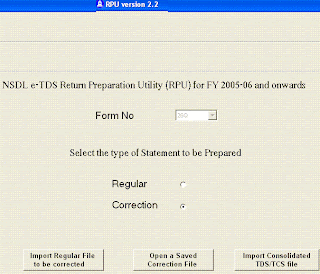
           Now view  below picture,  there are three option for import data in NSDL RPU 2.2. 
 
  1. Import Regular file to be corrected.
  2. Open a saved Correction file
  3. Import consolidated TDS/TCS file. 


                     In this way, it is final that re-correction statement can be done with the help of consolidated TDS/TCS file. 
Now, complete installation procedure is given as under:-

  • Copy the set up file in your system and rename the file as e-TDS_RPU_2.2.exe
  • Install the NSDL RPU
  • Open the RPU
  • Select the form no. from the drop down for which correction statement is to be prepared.
  • Select option “Correction”
  • On selecting the option “correction”, an option to import the consolidated file (“ Import consolidated TDS/TCS file”) will be provided.
  • Click on the option “Import Consolidated TDS/TCS file”
  • On clicking the option you will be prompted to browse the consolidated file.
  • On selecting the path and file to be imported, click on the button “Open”.
  • On successful import of file carry out the required correction
  • Click on the “Create” provided at the bottom of the RPU screen to create correction file at desired location.
                                  (YOU NEED TO RENAME THE FILE AS {.EXE} BEFORE DOWNLOADING IT)


On viewing above detail, the following questions arise:-

  1. What Provisional  Receipt Number will be entered on pressing button "Import Consolidated TDS/TCS button. It may be Receipt Number of Original , First Correction, Rejected Statement or Last correction etc. 
  2. What is consolidated TDS/TCS file  and How it can be collected. 
  3. How consolidated file can be collected. 
  4. Where is link to download the RPU version 2.2.


Step by Step answer of above questions are given as under :

  1. There is no need to enter manually any Provisional Receipt Number of 15 digits.  RPU version 2.2 has in built feature to capture them.  It is excellent feature of NSDL.
  2. What is Consolidated TDS/TCS File,  to know regarding this file click here
  3. Only after successful registration of TAN at www.tin-nsdl, consolidated file can be collected.  To know more regarding Tan Registration click here
  4. Before getting RPU, it is mandatory to know more regarding correction statement.


CCI Pro

Leave a Reply

Your are not logged in . Please login to post replies

Click here to Login / Register