banner_ad

Workbook navigation excel addins - must for all office users

Excel 1398 views 2 replies

Friends,

Download attached one Free Workbook Navigation Excel Addins for Excel-97,2003,2007,2010,2013.

Simple interface to work with large numbers of open Workbooks & Sheets.

Install as Add-ins is Optional.

Some features:

     1. Index of all Sheet Names in separate worksheet with hyperlink.
     2. Sort sheets ascending or descending, Create\remove multiple windows.
     3. Synchronies all the sheets to view same area in the worksheet.
     4. Copy activesheet without truncated of cells having more then 255 characters.
     5. Reduce file Size, may open some type of Corrupt files.
     6. List Directory & filenames, External link, comments, define names, Shapes with hyperlink.
     7. Delete Empty rows, All Empty Worksheets, remove all page breaks, hide sheets.
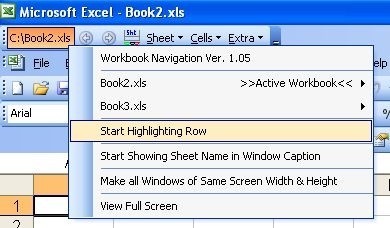
     8. Display fullpath of Active Workbook in its Toolbar Button.
     9. Find string or External Link.
    10. e-mail\close loaded Add-ins.
    11. Right click on any controls & see options to select.
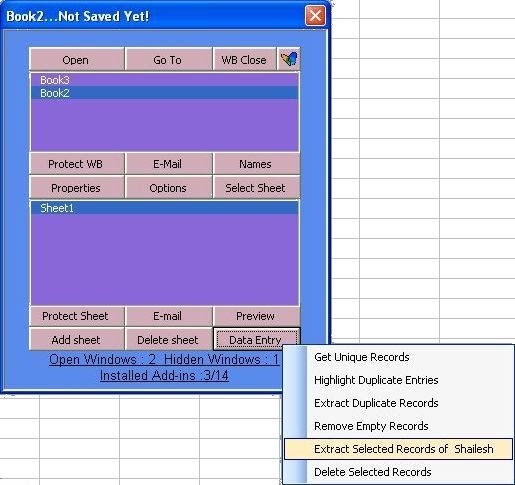
        e.g. RIGHT CLICK on Data Entry button & see option like Get Unique Records,highlight duplicate entries, Extract Duplicate Records etc.
   12. Full Screen View.
   13. Can Highlights Entire Row.
   14. Can Shows Sheet name in window caption.
   15. Sent email from email id from cells.
   16. List Filname from Desktop.
   17. Remove leading Apostophe i.e. '

etc.

In Excel-2003, When you load this addins you can see one toolbar installed at top left.

In Excel-2007+ you can see toolbar installed in Addins Tab.

HAPPY INDEPENDCE DAY!


Replies (2)

You can download from attached zip file.


Also download other exshail software from below link:

https://https://download.cnet.com/windows/exshail-software/3260-20_4-10279896.html?


Tips :

A quick way to cycle through your external links is to use the find feature built into Excel by searching for “[“, left bracket, which can help identity those external workbook references (i.e. External Links).

Hit Ctrl+F on your keyboard to open your find wizard.

Click the “Options” button to open additional criteria.

Select: within “Workbook”.

Select: look in “Formulas”.

Enter a left bracket “[” in the Find What field (without double quotes)

Excel will now go through and show you all the instances where the left bracket has been used in your worksheet

Do you know with Exshail Workbook Navigation Excel Addins you can also find External Reference & list them. Expert users may post about how they achieve this features through this Addins.


CCI Pro

Leave a Reply

Your are not logged in . Please login to post replies

Click here to Login / Register  

Company
26 May 2026
Audit executive

vdsr & co LLP

Chennai

CA Inter

View Details
Company
12 May 2026
Accounts Executive

Nafa Group

Mumbai

B.Com

View Details
Company
04 May 2026
Content Writer Intern

Interactive Media Pvt Ltd.

New Delhi

CA Inter

View Details
Company
29 May 2026
Accounts assistant

Shubh Consultancy

Mumbai

Graduate (Any)

View Details
Company
26 May 2026
Senior Accountant cum purchase Manager

Vardhaman Group of India

Pimpri Chinchwad

CA Inter

View Details
Company
ARTICLESHIP 05 May 2026
ARTICLED ASSISTANT

JS ADVISORS

New Delhi

CA Inter

View Details
Company
14 May 2026
Senior Accounts Executive

Karan Gupta & Co.

New Delhi

Graduate (Any)

View Details
Company
Featured 27 May 2026
Lead Conversion Executive / Sales Closing Executive

SMJ global advisors pvt ltd

New Delhi

B.Com

View Details