
Merge Two account ledger in tally
Features of the Utility:Allows you to merge vouchers of two Ledgers. Here's an illustration of a situation wherein this feature can be useful.
Mr X had been posting his routine expenses into various ledgers a/c as show below:-
a) Newspaper Expenses
b) Tea Expenses
c) Office Expenses.
However, when his Chartered Accountant saw the entries in Tally Software, he advised that only one ledger must be kept for all these expenses as they of are of small amounts. He advised that the entries of "Newspaper Expenses" and "Tea Expenses" to be merged into "Office Expenses" ledger. In brief, only one ledger viz "Office Expenses" was required.
To do this manual we have to open all the entries one by one and have to change name in each entries .but with the help of this TDL/small software you can merge ledgers in one go.
Delete complete Ledger along with entries in one Go :In few cases there is need to delete complete ledger account .but in tally we can not delete complete account in one go ,we have to first delete the entries in the ledger one by one ,only after that we can delete ledger .but with the help of this free file you can delete tally complete ledger in one go.
How to install
1) Download ,unzip,and Install UDIMagic Free Edition
On successful installation, you will get a shortcut for UDIMagic FREE Edition on your DESKTOP.
2) Make changes in the Tally.ini (Tally configuration file is located in Tally folder) as shown below :-Location given below is example.location of file depend upon where you have installed the software and location of udimagicfree edition folder
Remarks:-
You can use any text-editor like NOTEPAD to edit the Tally.ini file.
;;Set this as YES
User TDL = Yes
;;------------------------------------------------------------
;;Specify / uncomment the relevant line for your Tally version
;;------------------------------------------------------------
;;For Tally 9 Release 3 [Beta] users - Uncomment the next line by removing the two semi-colons
;;tdl = c:\UDIMagicFreeEdition\udimagic9-r3.tcp
;;For Tally 9 users - Uncomment the next line by removing the two semi-colons
;;tdl = c:\UDIMagicFreeEdition\udimagic9.tcp
;;For Tally 7.2 users - Uncomment the next line by removing the two semi-colons
;;tdl = c:\UDIMagicFreeEdition\udimagic72.tcp
;;For other Tally Version/Release- Uncomment the next line by removing the two semi-colons
;;tdl = c:\UDIMagicFreeEdition\udimagic.txt
3) Next, save the Tally.ini file.
4) Start Tally Software and open any dummy company.
Remarks:-
When you start Tally Software, you will be able to see UDIMagic TCP 2.x in the Gateway of Tally menu. Here's how it appears in the Gateway of Tally screen..


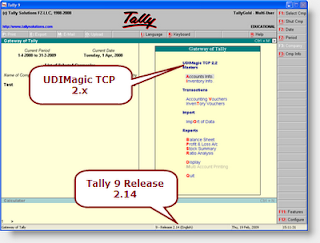
UDIMagic Free Edition v1.0 Release 2.0 is a FREE Tally add-on utility that provides Tally-add-on features.
PS:
UDIMagic FREE Edition is a free software and NO support services are provided for it (whether free or on chargeable basis).
How To use the software.
How to Merge ledgers
- First open compny in tally for which you want to merge the ledger accounts.
- Open UDI magic software from desktop or where ever you placed the shortcut.
- Select the option of Merge ledger click populate button.
- Screen as shown in right side will appear ,select the source ledger(want to merge) and destination ledger(want to retain after merging)
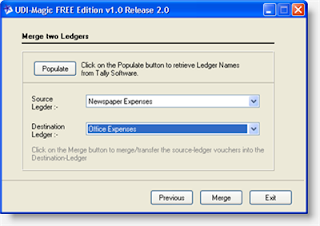
Mr X used UDIMagic Free Edition to Merge two ledgers. Here's a screen-snapshot of UDIMagic Free Edition.
Step 1
Source Ledger : Newspaper Expenses
Destination Ledger : Office Expenses
Remarks:
Merge Ledger "Newspaper Expenses" into "Office Expenses"
Step 2
Source Ledger : Tea Expenses
Destination Ledger : Office Expenses
Remarks:
Merge Ledger "Tea Expenses" into "Office Expenses"
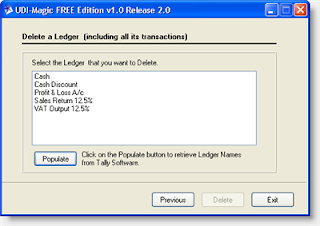
How to delete Ledger
- Open company in which you want changes in tally .
- Now open UDI magic software
- select option "delete ledger"and click populate.
- Select the ledger account given in the List which you want to delete.
- That all ,all entries will be delete from a ledger account .
Once a ledger is deleted (including all its entries), the same cannot be retrieved back. Hence, be careful before you use this feature.






 CAclubindia
