banner_ad

Macro

others 606 views 3 replies
Ca someone tell me how to enable Macro in Windows 7. I am unable to file ITR due to this.
Replies (3)

No One????

if you are using MS office 7, then

1. check the macro settings, follow below mentioned steps.

main ribbon(office button) > excel options > trust centers > trust center settings > macro settings > select option number 2. Disable all macros with notification.

then

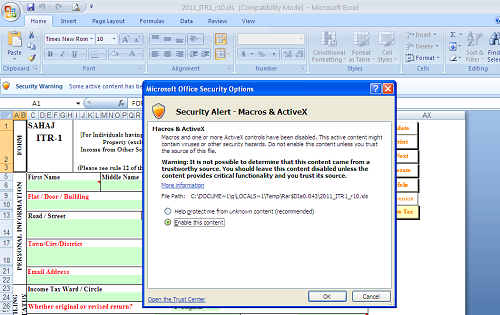
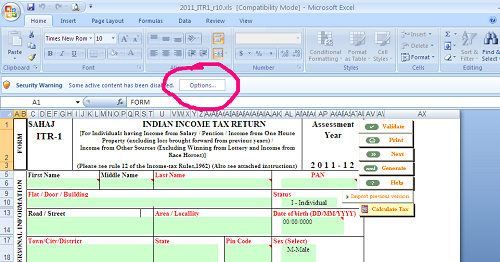
2. check the screen of excel after opening ITR(Excel utility) and find a ribbon and click on enable,  

3.in the next screen select "enable this content" and click "ok".


now u can prepare ITR.

Tnaks a lot Mahendra.


CCI Pro

Leave a Reply

Your are not logged in . Please login to post replies

Click here to Login / Register  

Company
Featured 02 May 2026
Senior execiutive

hitesh chandwani & co

Pune

B.Com

View Details
Company
Featured 28 March 2026
CA Final

Ashok Amol & Associates

New Delhi

CA Final

View Details
Company
Featured 13 April 2026
GST CONSULTANCY

Abhishek G Agrawal & Co.

Korba

CA Final

View Details
Company
Featured 14 April 2026
GST CONSULTANT

Abhishek G Agrawal & Co.

Korba

CA Final

View Details
Company
Featured 29 April 2026
Manager- Finance and Compliance

Naveen Fintech Pvt Ltd

Kolkata

CA Inter

View Details
Company
Featured 28 March 2026
Accountant

Ashok Amol & Associates

New Delhi

B.Com

View Details
Company
Featured ARTICLESHIP 19 March 2026
Article Assistant

Gupta Sachdeva & Co. Chartered Accountants

New Delhi

CA Final

View Details