How to remove Schedule S(Salaries) Block2 in salary schedule in ITR-U

While filing ITR-U, in Schedule S(Salaries), by default two Block of Salaries are scheduled?

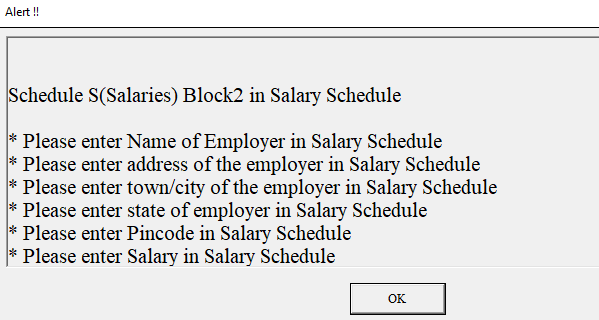
While validating the ITR-U, it prompts Alert -to update  it as second employer, which if not applicable, how to remove Schedule Block2 le S(Salaries) Block2 in salary schedule in ITR-U.

Replies (1)

When filing ITR-U, the Schedule S (Salaries) section sometimes defaults to two blocks of salaries, even if you don't have a second employer. Here's how to remove the unnecessary block: Removing Unnecessary Salary Block in Schedule S *Step-by-Step Instructions* 1. *Open the ITR-U form*: Go to the Schedule S (Salaries) section. 2. *Delete the second block*: Click on the 'Delete' button next to the second block (Block 2). 3. *Confirm deletion*: A confirmation prompt will appear. Click 'Yes' to confirm the deletion. 4. *Save changes*: Save the changes made to the Schedule S section. 5. *Re-validate the ITR-U*: Re-validate the ITR-U form to ensure there are no errors. *Alternative Method* If the above steps don't work, try the following: 1. *Go to the 'Schedule S' section*: Click on the 'Schedule S' tab. 2. *Click on 'Add/ Delete'*: Click on the 'Add/Delete' button. 3. *Select 'Delete'*: Select the 'Delete' option for the second block (Block 2). 4. *Confirm deletion*: Confirm the deletion when prompted. By following these steps, you should be able to remove the unnecessary salary block in Schedule S. If you're still facing issues, consider consulting the Income Tax Department's guidance or seeking assistance from a tax professional.

Leave a Reply

Your are not logged in . Please login to post replies

Click here to Login / Register

