Excel sheets are not moving

Excel 2382 views 4 replies

Dear all, 

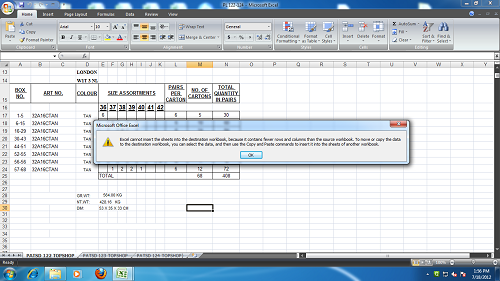
 I am trying to copy a excel worksheet from one workbook to another unable to move sheet... 
 

Replies (4)

can you copy the error message? I am not able to see what error you are getting!


Excel cannot insert the sheets into the destination workbook, because it contains fewer rows and columns than the source workbook  to move or copy the data to the destination workbook, you can select the data and then use the copy and paste commands to insert it into the sheets of another workbook.

It seems that You are copying a sheet from excel 2007 or higher to a workbook of excel 2003.


PK

Sorry.. Not sure why this error comes. I first create a new workbook (Ctrl+N); then I just rightclick on the pane and select move or copy. In the pop-up window, I check "Copy" and in the dropdown I select the new workbook (Book1).


CCI Pro

Leave a Reply

Your are not logged in . Please login to post replies

Click here to Login / Register  

Company
Featured 28 March 2026
CA Final

Ashok Amol & Associates

New Delhi

CA Final

View Details
Company
Featured 28 March 2026
Accountant

Ashok Amol & Associates

New Delhi

B.Com

View Details
Company
Featured 13 April 2026
GST CONSULTANCY

Abhishek G Agrawal & Co.

Korba

CA Final

View Details
Company
Featured 19 March 2026
Article Assistant

Gupta Sachdeva & Co. Chartered Accountants

New Delhi

CA Final

View Details
Company
Featured 14 March 2026
Associate CA

N N V Satish&co

Hyderabad

CA

View Details
Company
Featured 14 March 2026
Article Trainee

N N V Satish&co

Hyderabad

CA Inter

View Details
Company
Featured 14 April 2026
GST CONSULTANT

Abhishek G Agrawal & Co.

Korba

CA Final

View Details
Company
Featured 12 March 2026
Customer Relationship Executive

TAXLET

Calicut

B.Com

View Details