Error while installing e-tds rpu in windows 8

Efiling 7615 views 14 replies

Hi Everyone,


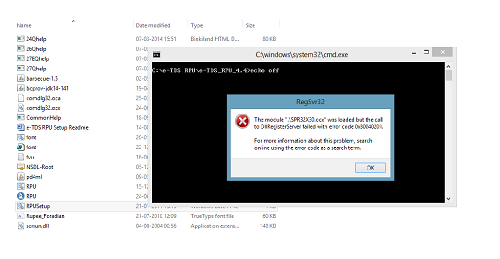
I am facing problem while installing the e-TDS RPU in my new WINDOWS 8 Laptop. I have changed the user account setting to "Never Notify" through the control panel however the same problem is still persisting.

Error says "The module ".\SPR32X30.ocx" was loaded but the call to DIIRegisterServer failed with error code 0x80040200."


Can someone please help me out here.


Regards,

CA. Nitu Agarwal



Replies (14)

Hi


You have to run that exe file under Administrative Rights.

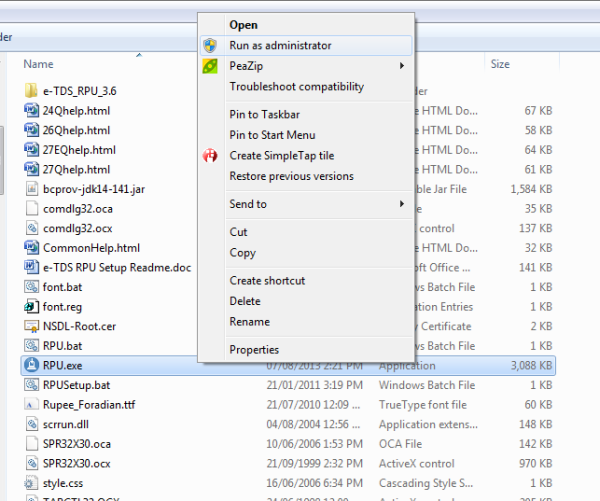
Right click on RPU.exe file and select run as Administrator.


Thanks//VaibhavJ

Originally posted by : @ VaibhavJ

Thanks Vaibhav for a quick reply and fantastic solution. Appreciate the same.


Regards,

CA. Nitu


Hi


You have to run that exe file under Administrative Rights.

Right click on RPU.exe file and select run as Administrator.


Thanks//VaibhavJ


Thanks Nitu for acknowledgement!

stay on screen you want to capture and press - scrn prn - button then open mspaint program and go to edit and paste or ctrl+v you will find your screen shot there...then save that file as .jpg type which you can send or attach as you require.. k... just try..

Hi


You have to press PrintScreen (PrtSc) buttonon your keyboard.


This will capture your scrren.


Now go to MS Paint application.


Press Ctr + V button. Your copied screen will be pasted.


Save file in format you need.


Thanks//VaibhavJ

Ohk, You got other way out!!


Cheers

thanks thanks thanks very very very much vaivhab for help keep it up keep helping others

Hey Vaibhav, I had clicked on "run as Administrator', but 3 errors are cuming relationg to "ocx" file, now what to do?? reply asap

Anshul

Originally posted by : Anshul Gopalia
Hey Vaibhav, I had clicked on "run as Administrator', but 3 errors are cuming relationg to "ocx" file, now what to do?? reply asap

Anshul

what is it about?

Hello,


I have same problem i have solved like this:


copy following file and past the same in C:\Windows\System32 from RPU setup saved folder


SPR32X30.ocx
TABCTL32.OCX
comdlg32.ocx
scrrun.dll


now right click RPUSetup.bat and click on run as administrator


Thats All


Now open RPU.exe it will work

HOW TO OPEN CONSO FILE IN COMPUTER


error while installing e-tds rpu in windows 8 

how do solve?


C:\e-TDS RPU\e-TDS_RPU_4.4>echo off


CCI Pro

Leave a Reply

Your are not logged in . Please login to post replies

Click here to Login / Register