Ask any queries related to excel.
Menu
Forum Search
Ask any queries related to excel
Replies (28)

How to select alternate cells ??
On 05 August 2011 at 14:36

Alternate cells can be selected by Presing Ctrl key & Click on the cell which you want to select by mouse
On 05 August 2011 at 14:43
But how to select without using mouse? I learnt abt it sumwer but forgot now..
On 05 August 2011 at 14:49
i. Press Shift-F8 key to anchor the cursor. Sentence "Add to selection" will appear in status bar.
ii. Select desired ranges.
iii. and when you're done, press Esc to toggle off the option of non-contiguous selection.
On 05 August 2011 at 15:10

There is an option in excel 2007 that when we type in numericals it automaticaly converts the numbers in bath language, can it also be done in english language?
On 05 August 2011 at 15:22
| Originally posted by : Pankaj Arora | ||
 |
There is an option in excel 2007 that when we type in numericals it automaticaly converts the numbers in bath language, can it also be done in english language? |
 |
With VBA code or with formula it is possible.
Paste below vba code to VBA module.
Function Ntow (amt As Variant) As Variant
Dim FIGURE As Variant
Dim LENFIG As Integer
Dim i As Integer
Dim WORDs(19) As String
Dim tens(9) As String
WORDs(1)= "One"
WORDs(2)= "Two"
WORDs(3)= "Three"
WORDs(4)= "Four"
WORDs(5)= "Five"
WORDs(6)= "Six"
WORDs(7)= "Seven"
WORDs(8)= "Eight"
WORDs(9)= "Nine"
WORDs(10)= "Ten"
WORDs(11)= "Eleven"
WORDs(12)= "Twelve"
WORDs(13)= "Thirteen"
WORDs(14)= "Fourteen"
WORDs(15)= "Fifteen"
WORDs(16)= "Sixteen"
WORDs(17)= "Seventeen"
WORDs(18)= "Eighteen"
WORDs(19)= "Nineteen"
tens(2) = "Twenty"
tens(3) = "Thirty"
tens(4) = "Fourty"
tens(5) = "Fifty"
tens(6) = "Sixty"
tens(7) = "Seventy"
tens(8) = "Eighty"
tens(9) = "Ninety"
FIGURE = amt
FIGURE = Format(FIGURE,"FIXED")
FIGLEN = Len(FIGURE)
If figlen < 12 Then
FIGURE = Space(12-FIGLEN) & FIGURE
End If
If Val(Left(figure,9)) > 1 Then
Ntow= "Rupees "
Elseif Val(Left(figure,9)) = 1 Then
Ntow = "Rupee "
End If
For i = 1 To 3
If Val(Left(figure,2)) < 20 And Val(Left(figure,2)) > 0 Then
Ntow = Ntow & words(Val(Left(figure,2)))
Elseif Val(Left(figure,2)) > 19 Then
Ntow = Ntow & tens(Val(Left(figure,1)))
Ntow = Ntow & words(Val( Right(Left(figure,2),1) ))
End If
If i = 1 And Val(Left(figure,2)) > 0 Then
Ntow = Ntow & " Crore "
Elseif i = 2 And Val(Left(figure,2)) > 0 Then
Ntow = Ntow & " Lakh "
Elseif i = 3 And Val(Left(figure,2)) > 0 Then
Ntow = Ntow & " Thousand "
End If
figure = Mid(figure,3)
Next i
If Val(Left(figure,1)) > 0 Then
Ntow = Ntow & words(Val(Left(figure,1))) + " Hundred "
End If
figure = Mid(figure,2)
If Val(Left(figure,2)) < 20 And Val(Left(figure,2)) > 0 Then
Ntow = Ntow & words(Val(Left(figure,2)))
Elseif Val(Left(figure,2)) > 19 Then
Ntow = Ntow & tens(Val(Left(figure,1)))
Ntow = Ntow & words(Val( Right(Left(figure,2),1) ))
End If
figure = Mid(figure,4)
If Val(figure) > 0 Then
Ntow = Ntow & " Paise "
If Val(Left(figure,2)) < 20 And Val(Left(figure,2)) > 0 Then
Ntow = Ntow & words(Val(Left(figure,2)))
Elseif Val(Left(figure,2)) > 19 Then
Ntow = Ntow & tens(Val(Left(figure,1)))
Ntow = Ntow & words(Val( Right(Left(figure,2),1) ))
End If
End If
FIGURE = amt
FIGURE = Format(FIGURE,"FIXED")
If Val(figure) > 0 Then
Ntow = Ntow & " Only "
End If
End Function
or you can us\download addins from google search.
see more details for user defined functions & getting started with macros from below page.
https://dmcritchie.mvps.org/excel/getstarted.htm
Below are some usefule pages for converting number to words.
https://exshail.web.officelive.com/Addins.aspx
(for Indian Ruppees Excel Addins.)
https://exshail.web.officelive.com/ComAddins.aspx
(for com-addins (also in hindi words) for excel office application.)
https://exshail.web.officelive.com/Misc.aspx
(for spellnoformula workbook ( no vba code requried)
IndianSpellNoFormulaHindi (for hindi)
On 05 August 2011 at 19:04
Thanks for the info but the fact is that I m not a computer professional so if can explain this in a layman language I'll be vvery thankful.
Also, are these option available in 2003 also.
On 06 August 2011 at 10:39

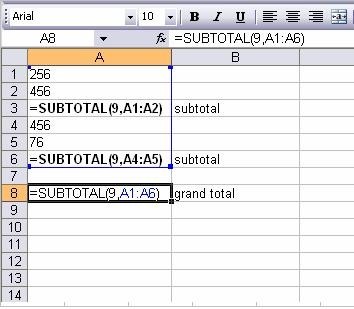
Pls tell me by which formula i can totals of some SUM FORMULAS ONLY. Means using sum, i'll have to the path of each cell required to add. but if there is any formula which i can apply to a rnge of cells, and the return must be only total of totals, where a sum formula has been already inserted.
On 06 August 2011 at 12:04
Hi Pankaj Arora I couldn't understand your question. Plz Mail me at helpinghand786 @ in.com . I have an utility which can convert numbers into Text (In English).
On 06 August 2011 at 13:01
Hi JMD . I don't think there is any formula for this. But an excel Add in Can be made for your query. iF you require this add in mail me at helpinghand786 @ in.com
On 06 August 2011 at 13:04

| Originally posted by : JMD | ||
|
|
Pls tell me by which formula i can totals of some SUM FORMULAS ONLY. Means using sum, i'll have to the path of each cell required to add. but if there is any formula which i can apply to a rnge of cells, and the return must be only total of totals, where a sum formula has been already inserted. |
|
Instead of sum formula always use subtotal function. see more details in Excel Help. Also see below image.
Exshail Software
Free Exshail Classic Menu for Excl-2007.
https://exshail.web.officelive.com/Exshail_Classic_Menu.aspx
On 06 August 2011 at 19:37
| Originally posted by : Pankaj Arora | ||
|
|
Thanks for the info but the fact is that I m not a computer professional so if can explain this in a layman language I'll be vvery thankful. Also, are these option available in 2003 also. |
|
This options (using excel addins) are also available in 2003.
Don't waorry, try again to read the stuff in web site suggested again & google search Excel Addins to download & installed in excel. Read inbuilt Excel Help first. Previously I was also like you, but learn through internet.
"Koshish Karne walo Ki Har Nahi Hoti"
On 06 August 2011 at 21:49

Dear Singh Sir,
We want formula for this querry, charactor to be pick up basing on numeric field match,
in sheet1 column "A" having Numeric fields, "B" is Charactors, in sheet 2 column no "a" having numeric field only, in "B" we want to extract with matching of sheet2 col."A" = sheet1 col. "A" to be pick up Col."B" from Sheet1 to sheet2.
Thanks in advance.
On 09 August 2011 at 18:51

Hello Sir,
I want to learn excel formula for cacluclating income tax, i knows ot before but forgot now,
it is smthing like, if,(A1<=160000,'NIL', if (A1>=160000,'a1-160000*10%.................................... etc etc.
but now forgot the same, it will be very grateful to you if you tell me the formula.
Please
Thanx in Advance
On 10 August 2011 at 16:09
Leave a Reply
Your are not logged in . Please login to post replies
Click here to Login / Register
Recent Topics :
- FAST DS 2026 query
- Consultation
- E-way notices for FY 22-23
- Gst file not created
- Regarding 3CEB query
- Omitted E-Commerce Sales Reported in Table 14 but
- Omitted sales shown in GSTR-1 Table 14 but not in
- EWAY BILL TAKE OUT OF OTHER COMPAMY
- Penalty & late fee for late ITR filing
- Business discontinued as Government took possessio
Related Topics :



 CAclubindia
