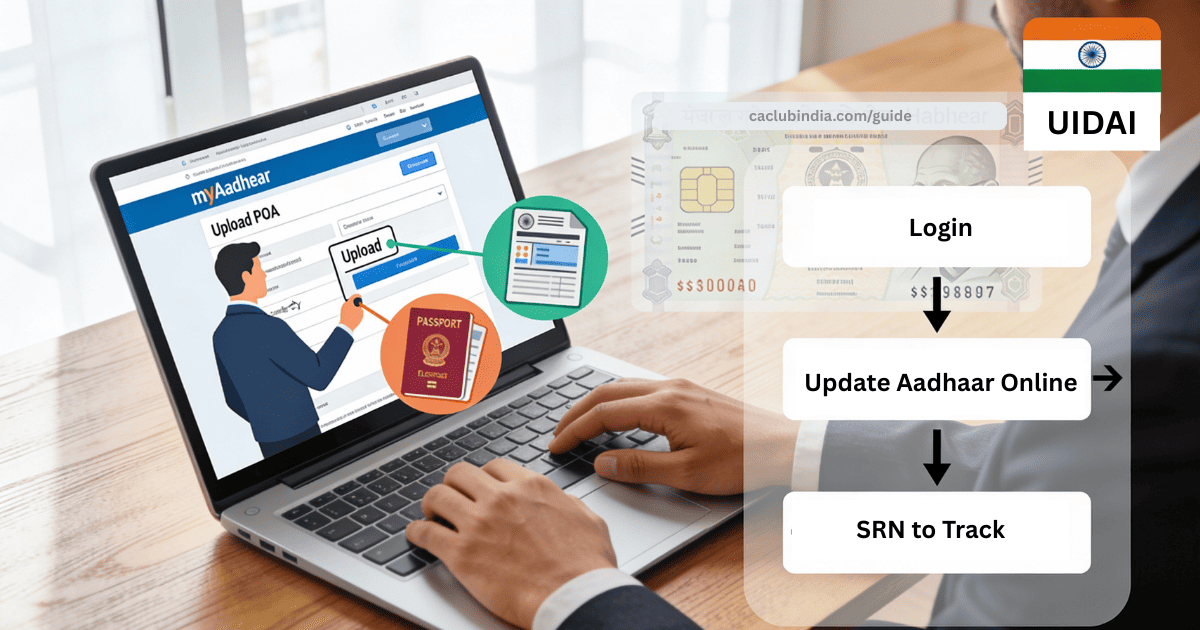
To update Aadhaar address, you can use the online myAadhaar portal or through offline by visiting an Aadhaar Seva Kendra/Enrolment Centre.
How to Change Address in Aadhaar Card Online?
- Go to the UIDAI website and log in using your Aadhaar number and OTP sent to your registered mobile number.
- After logging in, click on the option ‘Address Update’ tab and choose ‘Update Aadhaar Online’ tab.
- Select ‘Address’ and click Proceed.
- Fill in your new address exactly as it should appear and select a valid Proof of Address (POA) document from the list (e.g., Passport, Ration Card).
- Upload a clear, colored scan of the original POA document.
- After entering the above details, click ‘Next’.
- Preview the form carefully, ensure details match the document, and pay the non-refundable fee of ₹50.
- A Service Request Number (SRN) will be generated. Save it to check the status.
How to Change Address in Aadhaar Card Offline?
If you are unable upload POA document for address update, you may prefer offline update by visiting nearest Aadhaar Seva Kendra or authorised update centre.
- Visit the nearest Enrolment Centre (Find using the UIDAI website).
- Ask for Aadhaar Update/Correction Form and fill it with your new address.
- Provide a photocopy of your valid POA document with self‑attested.
- Pay the prescribed fee.
- Receive an acknowledgement slip with URN (Update Request Number) to track status online on UIDAI website.
How to Check Aadhaar Card Address Update Status?
- Visit the UIDAI website.
- Click on ‘Check Aadhaar Update Status’ option under ‘My Aadhaar’.
- Use your URN/SRN to see progress.
- Once status shows “updated,” download your new e‑Aadhaar and cross‑check every line of the address; if any error persists, you can raise another update request.
How to Download the Updated Aadhaar Card After Address Change?
- Visit the UIDAI website and click on ‘Download Aadhaar’ option under the ‘Get Aadhaar’ tab.
- Then enter your 12-digit Aadhaar number, captcha code and click on ‘Send OTP’.
- Input the OTP that you received on your mobile number, choose masked/unmasked version and click the ‘Verify & Download’ button to download a PDF of your e-Aadhaar card.
FAQs
Can I change my Aadhaar address without proof of address?
No. You cannot change Aadhaar address without a valid Proof of Address (POA).
What is the cost for Aadhaar card address change?
Only address change: ₹50
Address change along with biometric update: Free
How long does it take to update the Aadhaar address online?
UIDAI states that it may take up to 30 days. However, in most cases, updates are approved or rejected within 7-10 working days.