
----------
8197 Points
Posted on 05 May 2012

The Indian Govt has Announced the Symbol for Rupee currency few months back and It will take more time to implement the same in all over the world as there are many regulatory requirement involved in implementation .Further the Font type button has not been incorporated in Keyboards yet .However I have found a trick from the net by which you can start using the Rupee symbol from now .It is very easy to use the trick .Trick is developed by Foradian Technologies .
steps To Install the Rupee symbol.
How to use ?
1. Download the above attached font Rupee.ttf or the new version Rupee_Foradian.ttf
2. Install the font. (It is easy. Just copy the font and paste it in "Fonts" folder in control panel)
3. Start using it. :)
download the Rupee Firadian.ttf
How to type the Rupee symbol ?
Hi, thanks, its working fine..
do the follwing steps..if you still confuesed..
-
Download the Rupee Firadian.ttf which given in the above.
-
copy and paste that in the Fonts folder (general location is C:\WINDOWS\Fonts).if you still not found..search for fonts in the windows search..you will defintely find.
-
Open MS Office->Word or MS EXCEL
-
Select and Change the font to Rupee (Genreally Arial or Times New Roman will be there)
-
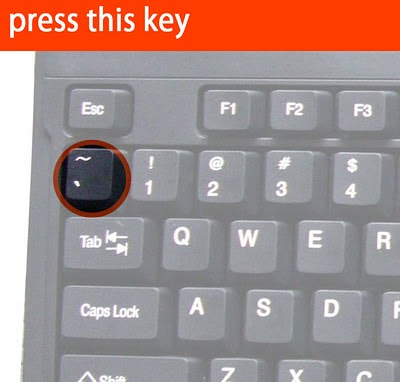
Press the button '`~' which is above the TAB and left to the '1' keay and below the 'Esc' also.
-
Optional step :6. Select the symbol and change the size to bugger (48 or 76 which ever you like)
Hurryyyyyyyyyyy...you got it...
Rupee symbol mapped the grave acent symbol - ` (the key just above "tab" button in your keyboard) with the new Rupee symbol. Just select "Rupee" font from the drop down list of your fonts in your application and press the key just above your tab button. It will display our new rupee symbol. Try it.
Limitations
The "Rupee.ttf" font is necessary to view the currency symbol. So as long as the new symbol is not encoded in to unicode font by default, we cant use the symbol universally.means if you type the symbol in your letter and send to other person but the receiver has not installed the font then he can not see the rupee symbol












 CAclubindia
