
Weary, sore eyes after a couple of hours, not to mention a workday on the computer, are a common reality for many. Add to that the leisure hours spent online, engaging social media, or looking at a smart phone screen, and it’s no mystery why this is a growing condition, according to the American Optometric Association. This condition even has a medical name: Computer Vision Syndrome (CVS). In addition to eye strain, people who suffer from CVS often also suffer from headaches, dry and irritated eyes, and fatigue.With so many professions being computer dependent, it’s nearly impossible for most folks to decrease the time they spend staring at a screen. So, what can you do to protect your vision?
1. Proper lighting: Whether reading a book or an illuminated digital screen, a desk lamp aimed at your workspace helps minimize eye strain.
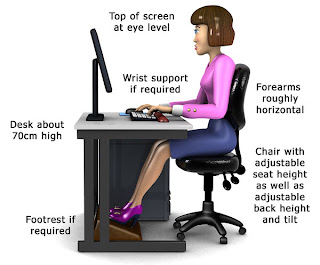
3. Blink: It’s easy to get so caught up in what’s on our monitors that we stare excessively and forget to blink normally. Yet, the tears that wash over our eyes when blinking help prevent irritation and drying. So, try to be aware of whether or not you’re blinking and blink frequently.
4. Take regular breaks: If possible take a break from the screen every 20-30 minutes, looking at something more distant for half a minute or so. This shift in focus engages other eye muscles and gives the ones focusing on your monitor some time to relax.
5. Eye exercises: There are a number of exercises you can do to strengthen your eye muscles, including making figure eights with your eyes while keeping your head straight. Another exercise that requires you to alternate the focus of your eyes (thus engaging different muscles) is a little trickier: Point your index fingers toward each other, about an inch apart. Hold them about eight inches away from your eyes at eye level. Look over your fingers at a distant object while still visually being aware of your fingers. If you’re doing it right, you will see a little “hot dog” floating between your two fingers (can take a few tries to get it.) Refocus your eyes on your fingers. Repeat several times.




 CAclubindia
